
 Gameplay
 Utility
A dynamic PvP management plugin for Hytale that automatically toggles player combat status based on the region they are currently standing in.
Features
- Zone-Based Logic: Automatically detects if a region is a "PvP Zone" based on its name (e.g., Zone1, Zone2).
- Configurable Thresholds: Set a minimum "Tier" requirement to trigger PvP.
- Live Notifications: Sends immediate feedback to players when they enter or leave dangerous areas.


Configuration
The plugin identifies regions containing the word "Zone" followed by a number. You can control which of these zones allow combat by modifying the configuration file.
File Path: mods/anonimo_ZonePVP/ZonePVP.json
Default Settings
{
    "MinZone": 2,
    "PvPEnabledIcon": "Weapon_Sword_Adamantite",
    "PvPDisabledIcon": "Weapon_Shield_Orbis_Knight"
}
PvPEnabledIcon and PvPDisabledIcon must be valid Item IDs. You can explore all the items IDs by entering in creative mode and hovering your mouse over any item.
How it works:
- MinZone 2: PvP is ENABLED in Zone2, Zone3, and higher. PvP is DISABLED in Zone1.
- MinZone 3: PvP is ENABLED in Zone3, Zone4, and higher. PvP is DISABLED in Zone1 and Zone2.
Multi-language support
At the moment, the plugin supports en-US, es-ES, es-MX and pt-BR languages. If player have any of the language packages available in CurseForge installed and selected in the configuration, the plugin will try to use the translated message. Feel free to create new pull requests to add your own language or suggest changes to any of the translations.
Player Experience
ZonePVP keeps players informed about their safety status:
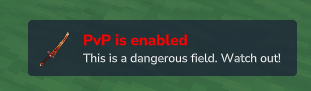
- Entering a PvP Area: When a player crosses into a region that meets the MinZone requirement, they receive a notification letting them know they are now in a combat zone.
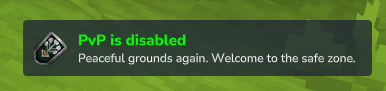
- Leaving a PvP Area: When moving back into a safe zone or a lower-tier region, they receive a notification that PvP has been disabled.
Installation
- Download the latest release.
- Place the plugin in your Hytale server's mods folder.
- Restart the server to generate the default ZonePVP.json config.
- Modify the config to your needs (optional).
Credits
- Thanks to Buuz135 and his SimpleClaims plugin. I've used the damage cancellation logic and the way he shows the titles using game ticks.
- HytaleModding website and the awesome documentation. Was really useful to understand how to create a plugin.