 Miscellaneous
 Gameplay
 Utility
 Quality of Life
Introduction
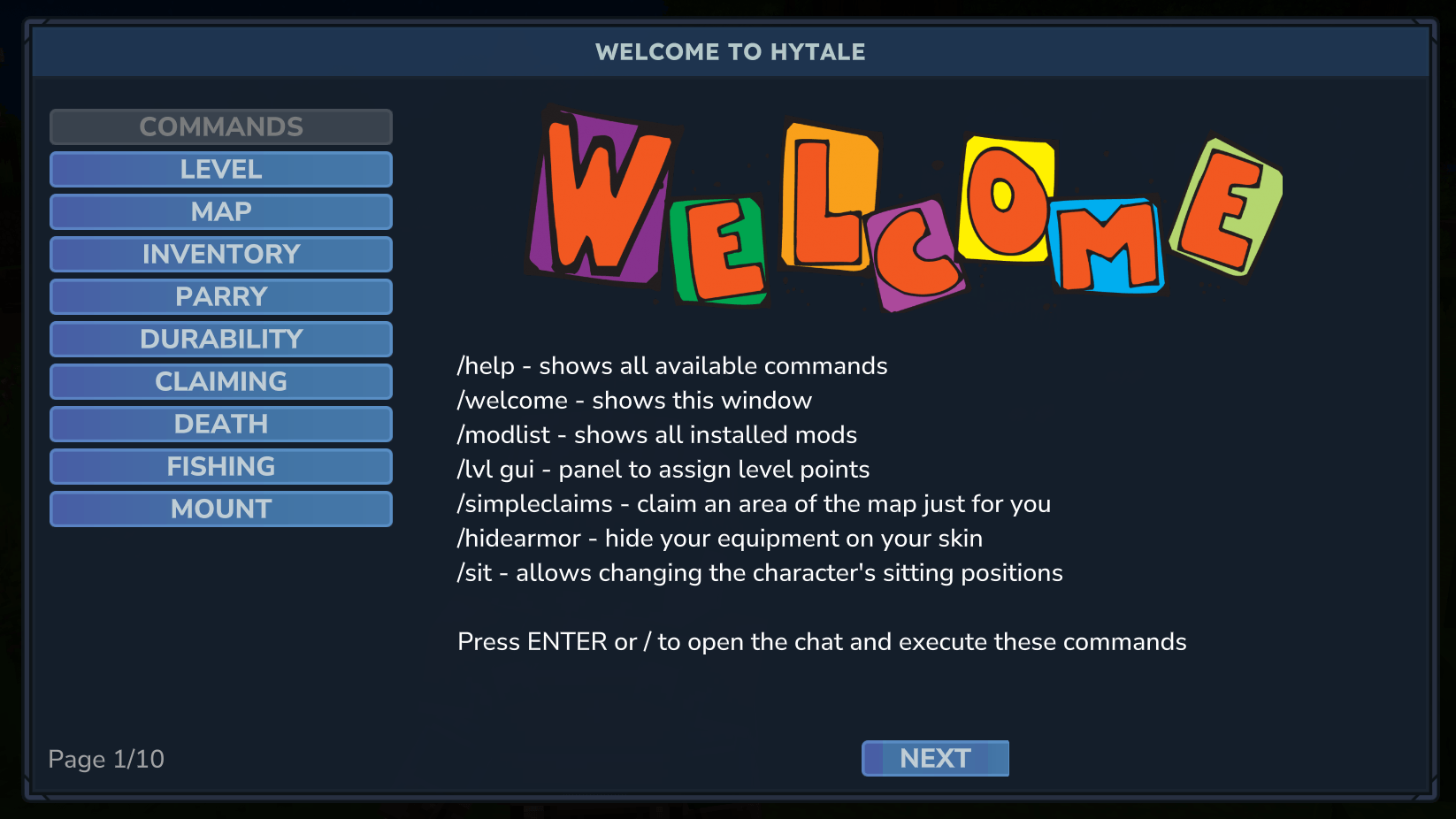
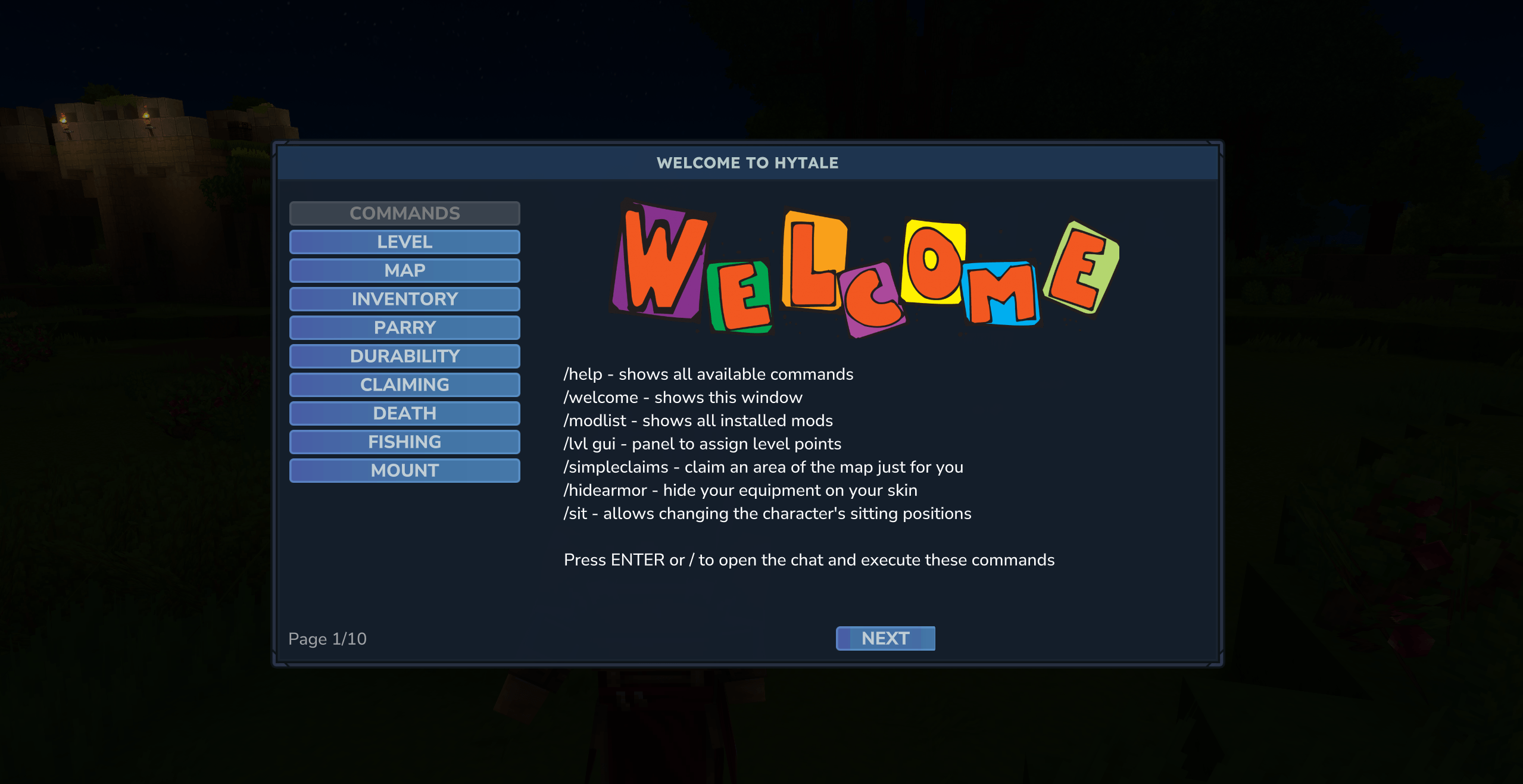
The purpose of this library is to provide a welcome window with information about the server.
Use it to explain which mods you added to your server and how to use them.
Usage
Server admin
- Download the
.jarfile - Put it into your
modsfolder - Run the server
- Login
- Log into the game
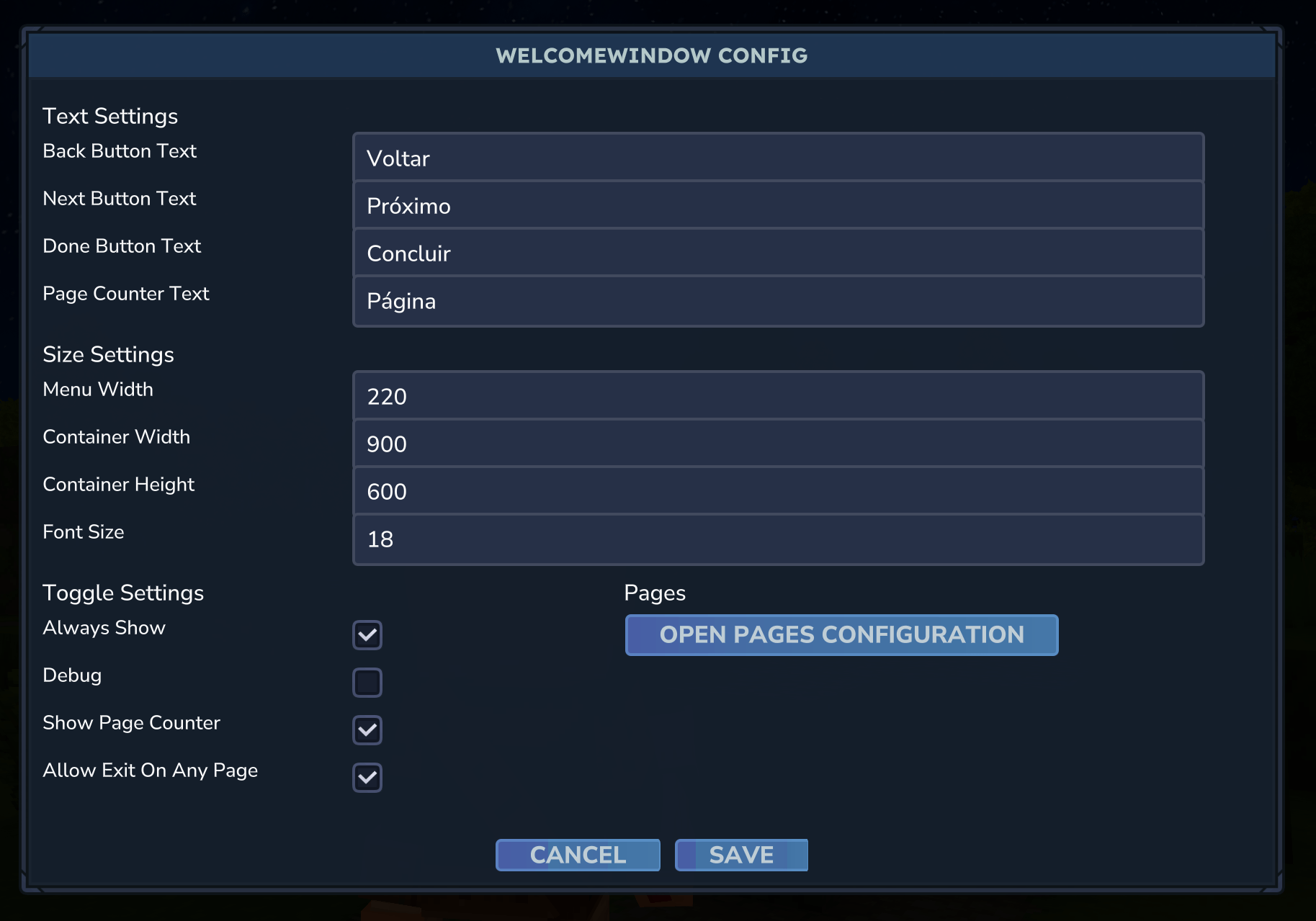
- Run
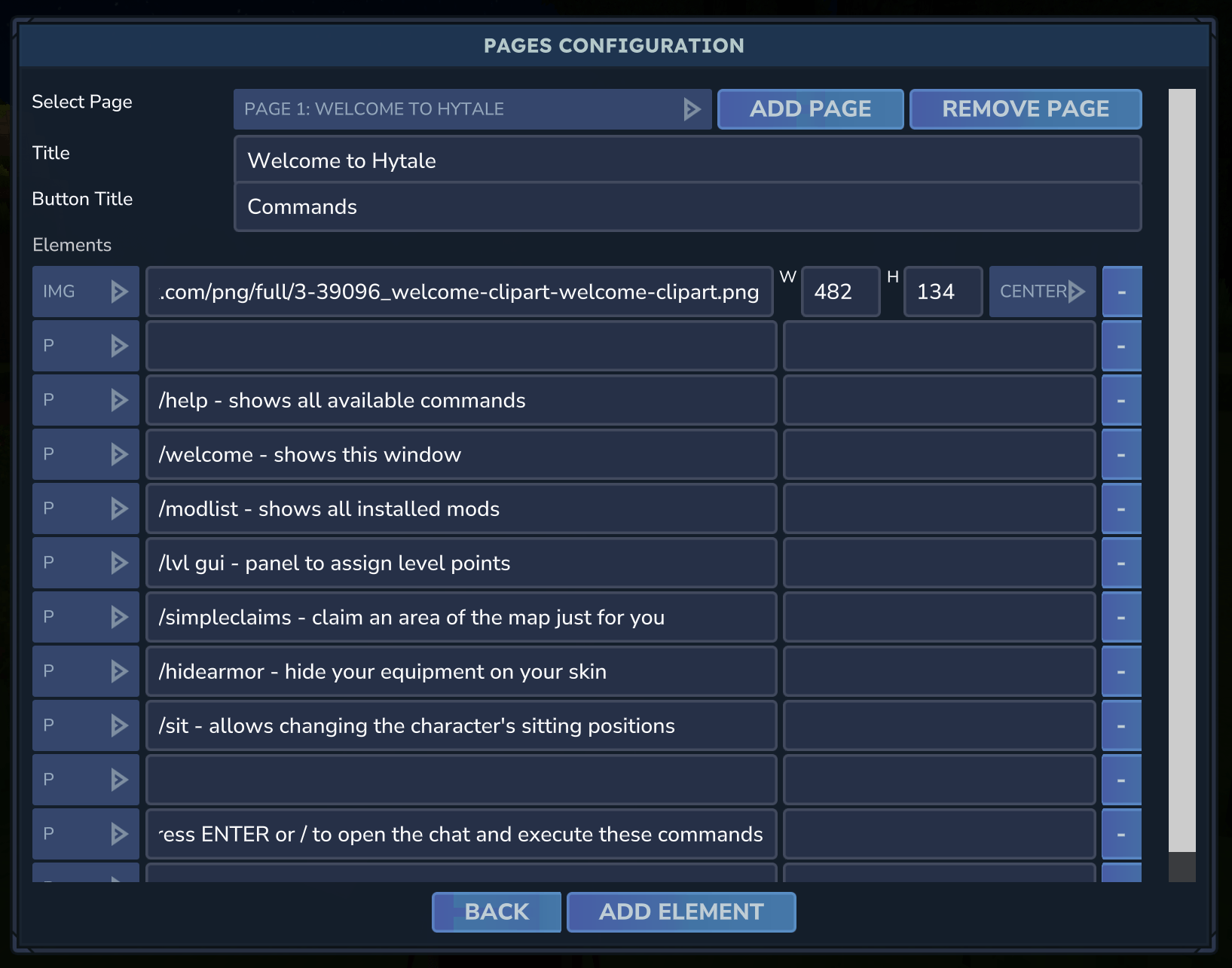
/welcomeconfig(or editgustavocontreiras_WelcomeWindow/config.json)
PS: Use empty strings ("") in the paragraphs to have more space between the texts.
Using images
You can use either URLs or local images.
URLs: Set the image content to a full URL (e.g. https://example.com/image.png - if the site doesn't let you get it, it will crash).
Local images:
- Open the
.jarfile with a zip manager (e.g. 7-Zip) - Put the image file inside
Common/UI/Custom/ - The file name must end with
@2x.png(e.g.[email protected]) - In the config, use the name without
@2x(e.g.welcome.png)
Player
- Run
/welcomeif you want to see the window again
Dependencies
HyUI >= 0.5.2
Complete example
config.json
{
  "BackButtonText": "Back",
  "NextButtonText": "Next",
  "DoneButtonText": "Done",
  "PageCounterText": "Page",
  "MenuWidth": 260,
  "ContainerWidth": 900,
  "ContainerHeight": 500,
  "FontSize": 16,
  "AlwaysShow": false,
  "Debug": false,
  "ShowPageCounter": true,
  "AllowExitOnAnyPage": false,
  "Pages": [
    {
      "Title": "Welcome to Hytale",
      "ButtonTitle": "Commands",
      "Elements": [
        {
          "Element": "img",
          "Content": "https://www.clipartmax.com/png/full/3-39096_welcome-clipart-welcome-clipart.png",
          "Style": "layout-mode: center;",
          "Id": "",
          "Width": 482,
          "Height": 134
        },
        {
          "Element": "p",
          "Content": "",
          "Style": "",
          "Id": "",
          "Width": 0,
          "Height": 0
        },
        {
          "Element": "p",
          "Content": "Check commands below to start",
          "Style": "font-size: 22; anchor-left: 114",
          "Id": "",
          "Width": 0,
          "Height": 0
        },
        {
          "Element": "p",
          "Content": "",
          "Style": "",
          "Id": "",
          "Width": 0,
          "Height": 0
        },
        {
          "Element": "p",
          "Content": "/help - shows all available commands",
          "Style": "",
          "Id": "",
          "Width": 0,
          "Height": 0
        },
        {
          "Element": "p",
          "Content": "/welcome - shows this window",
          "Style": "",
          "Id": "",
          "Width": 0,
          "Height": 0
        },
        {
          "Element": "p",
          "Content": "/modlist - shows all installed mods",
          "Style": "",
          "Id": "",
          "Width": 0,
          "Height": 0
        },
        {
          "Element": "p",
          "Content": "/lvl gui - panel to assign level points",
          "Style": "",
          "Id": "",
          "Width": 0,
          "Height": 0
        },
        {
          "Element": "p",
          "Content": "/simpleclaims - claim an area of the map just for you",
          "Style": "",
          "Id": "",
          "Width": 0,
          "Height": 0
        },
        {
          "Element": "p",
          "Content": "/hidearmor - hide your equipment on your skin",
          "Style": "",
          "Id": "",
          "Width": 0,
          "Height": 0
        },
        {
          "Element": "p",
          "Content": "/sit - allows changing the character's sitting positions",
          "Style": "",
          "Id": "",
          "Width": 0,
          "Height": 0
        },
        {
          "Element": "p",
          "Content": "",
          "Style": "",
          "Id": "",
          "Width": 0,
          "Height": 0
        },
        {
          "Element": "p",
          "Content": "Press ENTER or / to open the chat and execute these commands",
          "Style": "font-size: 12;",
          "Id": "",
          "Width": 0,
          "Height": 0
        }
      ]
    },
    {
      "Title": "Level",
      "ButtonTitle": "Level",
      "Elements": [
        {
          "Element": "p",
          "Content": "By killing creatures, you gain experience.",
          "Style": "",
          "Id": "",
          "Width": 0,
          "Height": 0
        },
        {
          "Element": "p",
          "Content": "",
          "Style": "",
          "Id": "",
          "Width": 0,
          "Height": 0
        },
        {
          "Element": "p",
          "Content": "When you level up, type /lvl gui to assign your level points.",
          "Style": "",
          "Id": "",
          "Width": 0,
          "Height": 0
        },
        {
          "Element": "p",
          "Content": "",
          "Style": "",
          "Id": "",
          "Width": 0,
          "Height": 0
        },
        {
          "Element": "p",
          "Content": "You can improve your health, mana, stamina, damage, defense,",
          "Style": "",
          "Id": "",
          "Width": 0,
          "Height": 0
        },
        {
          "Element": "p",
          "Content": "mining, woodcutting, oxygen, and ammo capacity.",
          "Style": "",
          "Id": "",
          "Width": 0,
          "Height": 0
        }
      ]
    },
    {
      "Title": "Map",
      "ButtonTitle": "Map",
      "Elements": [
        {
          "Element": "p",
          "Content": "Places you visit will be permanently saved on your map.",
          "Style": "",
          "Id": "",
          "Width": 0,
          "Height": 0
        },
        {
          "Element": "p",
          "Content": "",
          "Style": "",
          "Id": "",
          "Width": 0,
          "Height": 0
        },
        {
          "Element": "p",
          "Content": "Press M to view it.",
          "Style": "",
          "Id": "",
          "Width": 0,
          "Height": 0
        }
      ]
    },
    {
      "Title": "Inventory",
      "ButtonTitle": "Inventory",
      "Elements": [
        {
          "Element": "p",
          "Content": "Press TAB to:",
          "Style": "",
          "Id": "",
          "Width": 0,
          "Height": 0
        },
        {
          "Element": "p",
          "Content": "- Equip armor pieces and off-hand items",
          "Style": "",
          "Id": "",
          "Width": 0,
          "Height": 0
        },
        {
          "Element": "p",
          "Content": "- Craft tools and crafting tables",
          "Style": "",
          "Id": "",
          "Width": 0,
          "Height": 0
        },
        {
          "Element": "p",
          "Content": "- Organize your items",
          "Style": "",
          "Id": "",
          "Width": 0,
          "Height": 0
        },
        {
          "Element": "p",
          "Content": "",
          "Style": "",
          "Id": "",
          "Width": 0,
          "Height": 0
        },
        {
          "Element": "p",
          "Content": "Press Shift + Left Mouse Button to transfer quickly.",
          "Style": "",
          "Id": "",
          "Width": 0,
          "Height": 0
        },
        {
          "Element": "p",
          "Content": "Press Shift + Right Mouse Button to select half of the",
          "Style": "",
          "Id": "",
          "Width": 0,
          "Height": 0
        },
        {
          "Element": "p",
          "Content": "amount.",
          "Style": "",
          "Id": "",
          "Width": 0,
          "Height": 0
        },
        {
          "Element": "p",
          "Content": "Press Right Mouse Button to select a single unit.",
          "Style": "",
          "Id": "",
          "Width": 0,
          "Height": 0
        },
        {
          "Element": "p",
          "Content": "",
          "Style": "",
          "Id": "",
          "Width": 0,
          "Height": 0
        },
        {
          "Element": "p",
          "Content": "Items are automatically organized and stacked when placed",
          "Style": "",
          "Id": "",
          "Width": 0,
          "Height": 0
        },
        {
          "Element": "p",
          "Content": "in your inventory.",
          "Style": "",
          "Id": "",
          "Width": 0,
          "Height": 0
        },
        {
          "Element": "p",
          "Content": "",
          "Style": "",
          "Id": "",
          "Width": 0,
          "Height": 0
        },
        {
          "Element": "p",
          "Content": "You can hide your armor on your skin using the /hidearmor command",
          "Style": "",
          "Id": "",
          "Width": 0,
          "Height": 0
        }
      ]
    },
    {
      "Title": "Parry",
      "ButtonTitle": "Parry",
      "Elements": [
        {
          "Element": "p",
          "Content": "When you block at the exact moment you are being attacked,",
          "Style": "",
          "Id": "",
          "Width": 0,
          "Height": 0
        },
        {
          "Element": "p",
          "Content": "the enemy will be staggered and vulnerable to a counterattack.",
          "Style": "",
          "Id": "",
          "Width": 0,
          "Height": 0
        }
      ]
    },
    {
      "Title": "Durability",
      "ButtonTitle": "Durability",
      "Elements": [
        {
          "Element": "p",
          "Content": "Weapon, tool, and equipment durability has been disabled.",
          "Style": "",
          "Id": "",
          "Width": 0,
          "Height": 0
        }
      ]
    },
    {
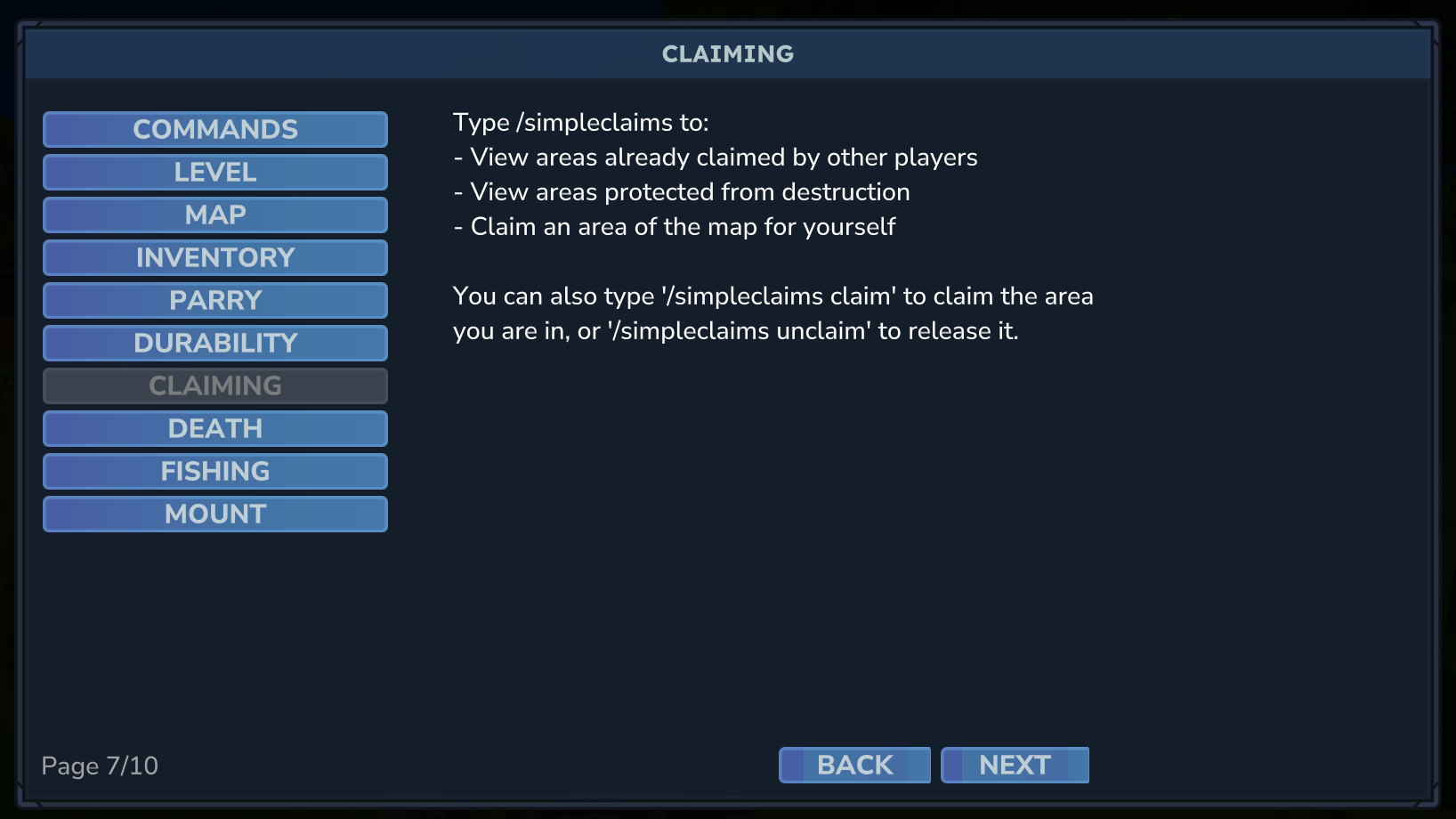
      "Title": "Claiming",
      "ButtonTitle": "Claiming",
      "Elements": [
        {
          "Element": "p",
          "Content": "Type /simpleclaims to:",
          "Style": "",
          "Id": "",
          "Width": 0,
          "Height": 0
        },
        {
          "Element": "p",
          "Content": "- View areas already claimed by other players",
          "Style": "",
          "Id": "",
          "Width": 0,
          "Height": 0
        },
        {
          "Element": "p",
          "Content": "- View areas protected from destruction",
          "Style": "",
          "Id": "",
          "Width": 0,
          "Height": 0
        },
        {
          "Element": "p",
          "Content": "- Claim an area of the map for yourself",
          "Style": "",
          "Id": "",
          "Width": 0,
          "Height": 0
        },
        {
          "Element": "p",
          "Content": "",
          "Style": "",
          "Id": "",
          "Width": 0,
          "Height": 0
        },
        {
          "Element": "p",
          "Content": "You can also type '/simpleclaims claim' to claim the area",
          "Style": "",
          "Id": "",
          "Width": 0,
          "Height": 0
        },
        {
          "Element": "p",
          "Content": "you are in, or '/simpleclaims unclaim' to release it.",
          "Style": "",
          "Id": "",
          "Width": 0,
          "Height": 0
        }
      ]
    },
    {
      "Title": "Death",
      "ButtonTitle": "Death",
      "Elements": [
        {
          "Element": "p",
          "Content": "When you die, some of your equipment, tools, and weapons may be",
          "Style": "",
          "Id": "",
          "Width": 0,
          "Height": 0
        },
        {
          "Element": "p",
          "Content": "lost.",
          "Style": "",
          "Id": "",
          "Width": 0,
          "Height": 0
        },
        {
          "Element": "p",
          "Content": "",
          "Style": "",
          "Id": "",
          "Width": 0,
          "Height": 0
        },
        {
          "Element": "p",
          "Content": "A coffin containing your items will remain where you died until",
          "Style": "",
          "Id": "",
          "Width": 0,
          "Height": 0
        },
        {
          "Element": "p",
          "Content": "someone retrieves them.",
          "Style": "",
          "Id": "",
          "Width": 0,
          "Height": 0
        }
      ]
    },
    {
      "Title": "Fishing",
      "ButtonTitle": "Fishing",
      "Elements": [
        {
          "Element": "p",
          "Content": "Craft a fishing rod through your inventory.",
          "Style": "",
          "Id": "",
          "Width": 0,
          "Height": 0
        },
        {
          "Element": "p",
          "Content": "",
          "Style": "",
          "Id": "",
          "Width": 0,
          "Height": 0
        },
        {
          "Element": "p",
          "Content": "Place the bait in the water by right-clicking and wait",
          "Style": "",
          "Id": "",
          "Width": 0,
          "Height": 0
        },
        {
          "Element": "p",
          "Content": "a few moments.",
          "Style": "",
          "Id": "",
          "Width": 0,
          "Height": 0
        },
        {
          "Element": "p",
          "Content": "",
          "Style": "",
          "Id": "",
          "Width": 0,
          "Height": 0
        },
        {
          "Element": "p",
          "Content": "When pulling the bait out of the water, you may have caught a fish.",
          "Style": "",
          "Id": "",
          "Width": 0,
          "Height": 0
        }
      ]
    },
    {
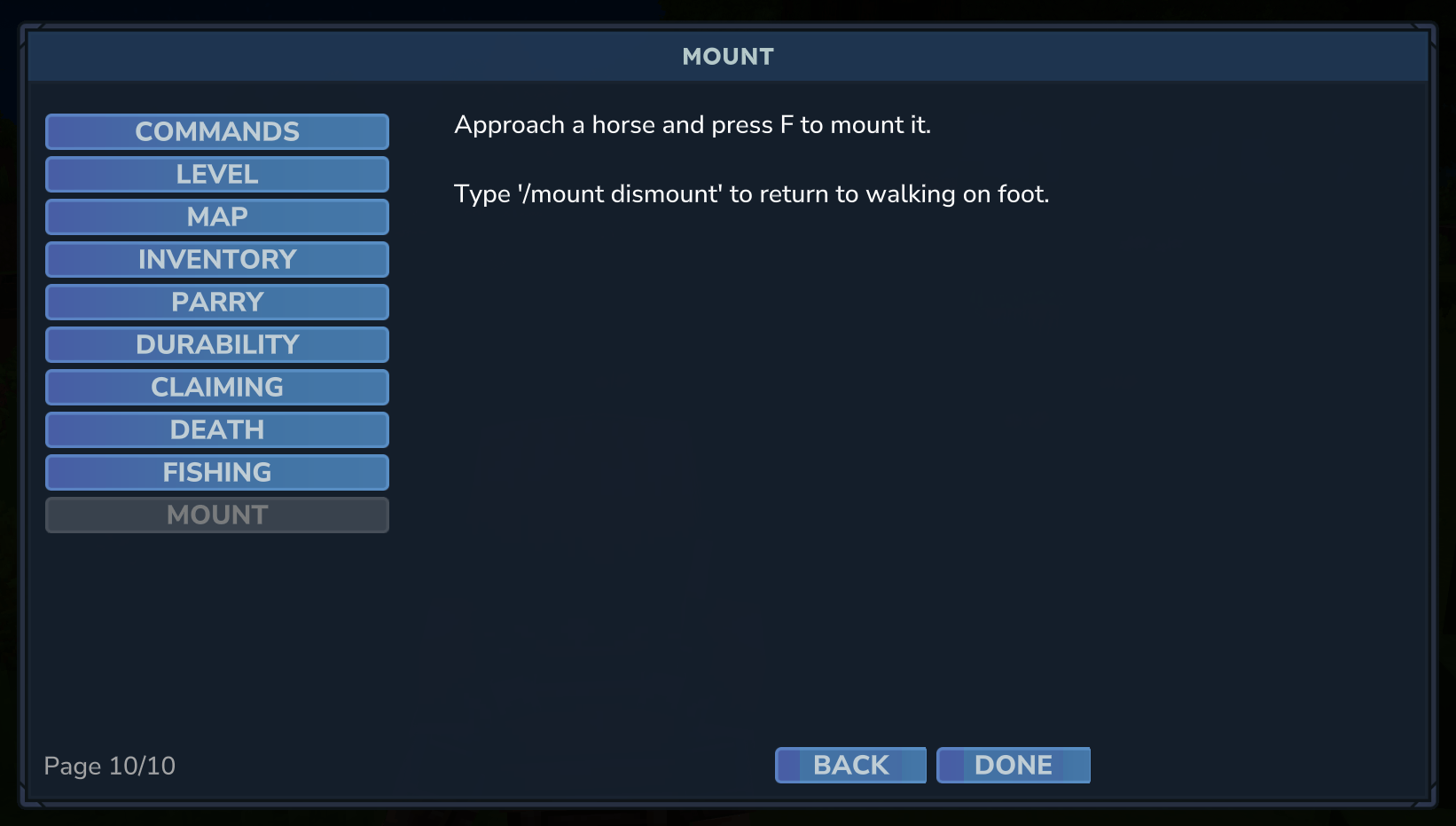
      "Title": "Mount",
      "ButtonTitle": "Mount",
      "Elements": [
        {
          "Element": "p",
          "Content": "Approach a horse and press F to mount it.",
          "Style": "",
          "Id": "",
          "Width": 0,
          "Height": 0
        },
        {
          "Element": "p",
          "Content": "",
          "Style": "",
          "Id": "",
          "Width": 0,
          "Height": 0
        },
        {
          "Element": "p",
          "Content": "Type '/mount dismount' to return to walking on foot.",
          "Style": "",
          "Id": "",
          "Width": 0,
          "Height": 0
        }
      ]
    }
  ]
}
Changelog
Check changelog.md to see latest changes implemented in the package.