
 Utility
 Miscellaneous
🗳️ HytaleVotifier
Reward your players for supporting your server! 🎁
A Votifier-style plugin for Hytale that receives vote notifications from voting websites via HTTP and fires events for other plugins to handle rewards.
✨ Features
| Feature | Description |
|---|---|
| 🔐 Dual Protocol Support | V1 (RSA encryption) and V2 (HMAC-SHA256 signatures) for maximum compatibility |
| 🔌 V2 Socket Server | Dedicated TCP socket server with challenge-response authentication |
| 🌐 HTTP Endpoints | REST API for receiving votes (auto-detects V1/V2) and checking server status |
| 📡 Event System | Fires VoteEvent via Hytale's event bus for other plugins to handle rewards |
| 🛡️ Secure Protocols | RSA/ECB/PKCS1Padding (V1) and HMAC-SHA256 with per-site tokens (V2) |
| 🎰 Reward Commands | Execute configurable server commands with random chance when votes are received |
| 📢 Vote Broadcasting | Announce votes to all online players with customizable messages |
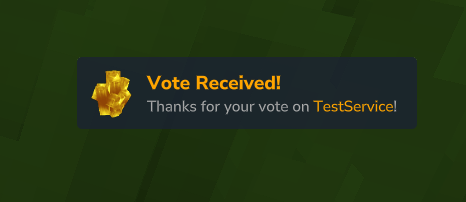
| 🔔 Toast Notifications | Display in-game toast popups to voters using TaleMessage formatting |
| 🔄 Update Checker | Automatic GitHub release checking with admin notifications |
| 🧪 Debug Tools | /testvote command for development and troubleshooting |
| 🗳️ Vote Command | /vote command displays clickable voting site links to players |
| ⏰ Vote Reminders | Remind players to vote when they join if they haven't voted recently |
| 💾 Vote Storage | Persistent SQLite storage tracks when players last voted |
📋 Requirements
- ☕ Java 25 or higher
- 🎮 Hytale Server with plugin support
- 🔌 Nitrado:WebServer plugin — Optional; if unavailable, a built-in fallback HTTP server is used
🚀 Installation
-
Build the plugin (if building from source):
mvn clean package -
Copy the JAR to your server's
mods/directory:mods/ └── HytaleVotifier-1.2.0.jar -
(Optional) Install Nitrado:WebServer — If available, HytaleVotifier uses it for HTTP handling. Otherwise, a built-in fallback HTTP server is automatically started on port 8080
-
Start the server — RSA keys will be automatically generated on first run 🔑
-
Verify installation by accessing the status endpoint:
GET http://your-server:port/Hyvote/HytaleVotifier/status
⚙️ Configuration
Configuration is stored in config.json in the plugin's data directory. The file is created automatically on first run with default values.
📁 Configuration File Location
mods/Hyvote_HytaleVotifier/
├── config.json       # Plugin configuration
├── votes.db          # Vote tracking database (SQLite)
└── keys/
    ├── public.key    # 📤 Share with voting sites
    └── private.key   # 🔒 Keep secure - never share!
📝 Full Configuration Example
{
  "debug": false,
  "keyPath": "keys",
  "voteMessage": {
    "enabled": false,
    "titleMessage": "<orange>Vote Received!</orange>",
    "descriptionMessage": "<gray>Thanks for your vote on <orange>{from}</orange>!</gray>",
    "iconItem": "Ore_Gold"
  },
  "broadcast": {
    "enabled": false,
    "message": "<orange>{username}</orange> <gray>voted on</gray> <orange>{from}</orange><gray>!</gray>"
  },
  "rewardCommands": [
    {
      "enabled": false,
      "command": "give {username} Ingredient_Stick",
      "chance": 1.0
    },
    {
      "enabled": false,
      "command": "give {username} Ingredient_Bar_Iron",
      "chance": 0.1
    }
  ],
  "voteSites": {
    "tokens": {
      "Hyvote": "your-secret-token-here",
      "MyVotingSite": "another-secret-token"
    }
  },
  "socketServer": {
    "enabled": true,
    "port": 8192
  },
  "internalHttpServer": {
    "enabled": true,
    "port": 8080
  },
  "protocols": {
    "v1Enabled": true,
    "v2Enabled": true
  },
  "voteCommand": {
    "enabled": false,
    "header": "<red>================<orange> Vote Now </orange>================</red>",
    "siteTemplate": "<orange><click:{link}>~{name}~</click></orange>",
    "footer": "<red>==============<orange> Earn Rewards </orange>==============</red>",
    "sites": [
      {
        "name": "Hyvote.org",
        "url": "https://hyvote.org"
      }
    ]
  },
  "voteReminder": {
    "enabled": true,
    "sendOnJoin": true,
    "voteExpiryInterval": 24,
    "delayInSeconds": 60,
    "storage": {
      "type": "sqlite",
      "filePath": "votes.db",
      "cleanupIntervalHours": 6
    },
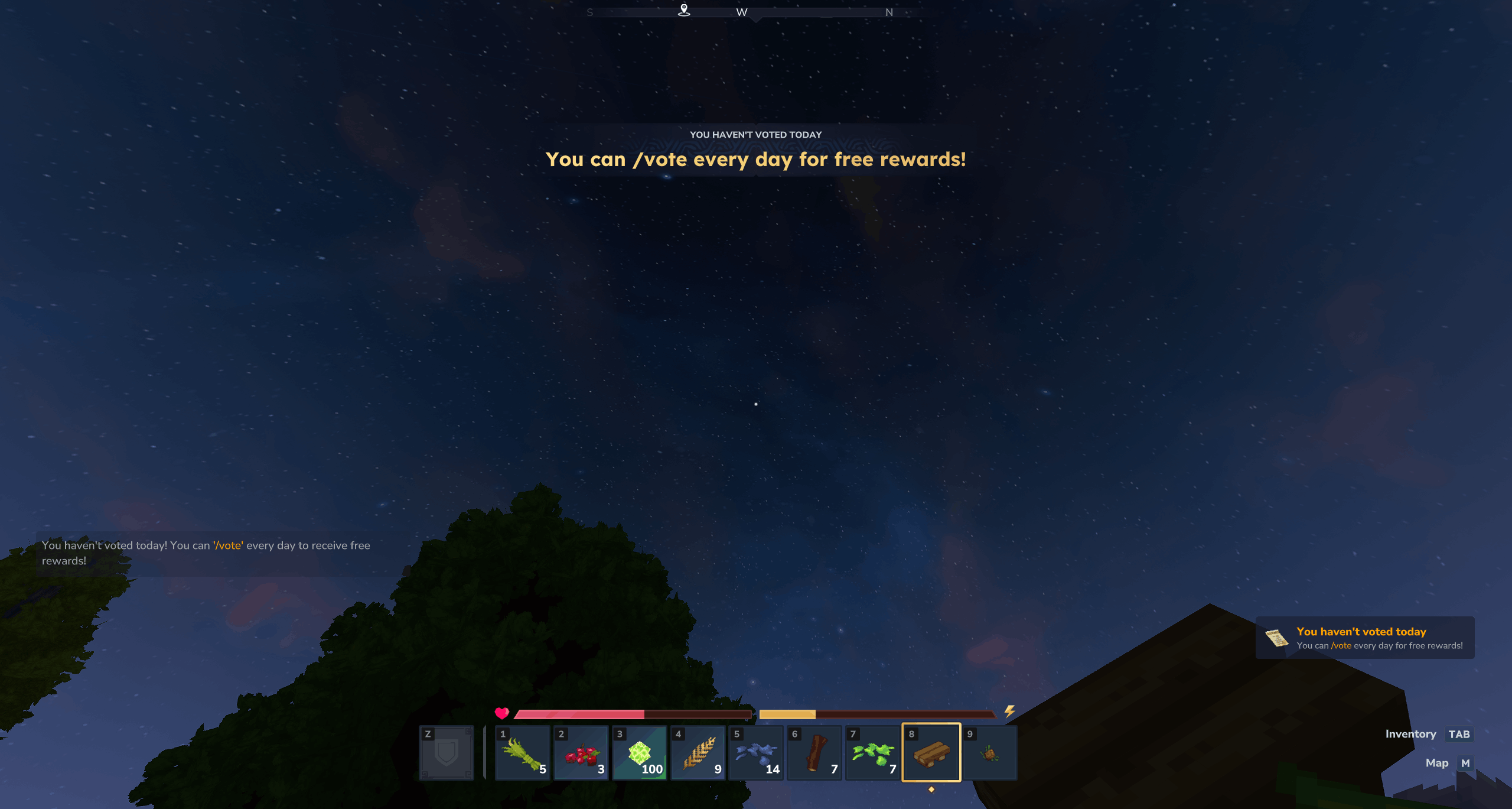
    "message": {
      "enabled": true,
      "text": "<gray>You haven't voted today! You can <orange>'/vote'</orange> every day to receive free rewards!</gray>"
    },
    "title": {
      "enabled": true,
      "title": "You can /vote every day for free rewards!",
      "subTitle": "You haven't voted today",
      "durationSeconds": 3.0,
      "fadeInSeconds": 0.5,
      "fadeOutSeconds": 0.5
    },
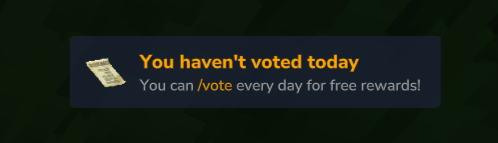
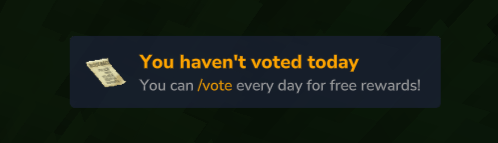
    "notification": {
      "enabled": true,
      "titleMessage": "<orange>You haven't voted today</orange>",
      "descriptionMessage": "<gray>You can <orange>/vote</orange> every day for free rewards!</gray>",
      "iconItem": "Upgrade_Backpack_2"
    },
    "sound": {
      "enabled": true,
      "sound": "SFX_Avatar_Powers_Enable",
      "soundCategory": "UI"
    }
  }
}
Configuration Options
| Option | Type | Default | Description |
|---|---|---|---|
debug |
boolean | false |
Enable verbose debug logging |
keyPath |
string | "keys" |
Subdirectory for RSA keys (relative to plugin data directory) |
voteMessage |
object | — | Toast notification settings (see below) |
broadcast |
object | — | Server-wide broadcast settings (see below) |
rewardCommands |
array | — | Commands to execute on vote (see below) |
voteSites |
object | — | V2 protocol service tokens (see V2 Configuration) |
socketServer |
object | — | V2 socket server settings (see V2 Configuration) |
internalHttpServer |
object | — | Fallback HTTP server settings (see below) |
protocols |
object | — | Protocol enable/disable settings (see below) |
voteCommand |
object | — | /vote command settings (see below) |
voteReminder |
object | — | Vote reminder settings (see below) |
🔔 Vote Message (Toast Notifications)
Display a toast popup to the player who voted.
| Option | Type | Default | Description |
|---|---|---|---|
enabled |
boolean | false |
Enable toast notifications |
titleMessage |
string | "<orange>Vote Received!</orange>" |
Toast title with TaleMessage formatting |
descriptionMessage |
string | "<gray>Thanks for your vote on <orange>{from}</orange>!</gray>" |
Toast description with placeholders |
iconItem |
string | "Ore_Gold" |
Item ID to display as the toast icon |
📢 Broadcast Settings
Announce votes to all online players.
| Option | Type | Default | Description |
|---|---|---|---|
enabled |
boolean | false |
Enable server-wide vote broadcasts |
message |
string | "<orange>{username}</orange> <gray>voted on</gray> <orange>{from}</orange><gray>!</gray>" |
Broadcast message with TaleMessage formatting and placeholders |
🎰 Reward Commands
Execute server commands when votes are received. Each command in the array can have its own probability — perfect for tiered rewards!
| Option | Type | Description |
|---|---|---|
enabled |
boolean | Whether this reward is active (allows disabling without removing) |
command |
string | Command to execute (without leading /). Supports placeholders. |
chance |
number | Probability of execution (0.0 to 1.0). Use 1.0 for guaranteed execution. |
Example reward configuration:
"rewardCommands": [
  {
    "enabled": true,
    "command": "give {username} Ingredient_Stick",
    "chance": 1.0
  },
  {
    "enabled": true,
    "command": "give {username} Ingredient_Bar_Gold",
    "chance": 0.25
  },
  {
    "enabled": true,
    "command": "give {username} Weapon_Longsword_Adamantite_Saurian",
    "chance": 0.05
  }
]
☝️ In this example, every voter receives a stick, has a 25% chance for a gold bar, and a 5% chance for a rare longsword! ⚔️
⚠️ Security Note: Usernames and service names are validated before command execution to prevent command injection. Only alphanumeric characters and underscores are allowed in usernames.
🌐 Fallback HTTP Server
When the Nitrado:WebServer plugin is not available, HytaleVotifier automatically starts its own HTTP server using Java's built-in HttpServer.
| Option | Type | Default | Description |
|---|---|---|---|
enabled |
boolean | true |
Enable the fallback HTTP server when Nitrado:WebServer is unavailable |
port |
number | 8080 |
The port to listen on for HTTP requests |
💡 Note: The fallback HTTP server provides the same
/Hyvote/HytaleVotifier/voteand/Hyvote/HytaleVotifier/statusendpoints as when using Nitrado:WebServer. If Nitrado:WebServer is installed, the fallback server is not started.
⚠️ Important: The HTTP server (both Nitrado:WebServer and fallback) is only started when V1 protocol is enabled. If you only use V2 protocol via the socket server, you can disable V1 to skip HTTP server initialization entirely.
🔧 Protocol Settings
Control which vote protocols are enabled. Both protocols are enabled by default.
| Option | Type | Default | Description |
|---|---|---|---|
v1Enabled |
boolean | true |
Enable V1 protocol (RSA-encrypted votes over HTTP) |
v2Enabled |
boolean | true |
Enable V2 protocol (HMAC-SHA256 signed votes over HTTP or socket) |
💡 Note: V1 protocol requires an HTTP server. If V1 is disabled, the HTTP server will not be started (even if available), and votes can only be received via the V2 socket server.
💡 Note: V2 protocol can work over both HTTP and socket. If you disable V1 but keep V2 enabled, configure the socket server to receive V2 votes.
🗳️ Vote Command Settings
Display clickable voting site links to players with /vote.
| Option | Type | Default | Description |
|---|---|---|---|
enabled |
boolean | false |
Enable the /vote command |
header |
string | "<red>================<orange> Vote Now </orange>================</red>" |
Header message displayed before sites |
siteTemplate |
string | "<orange><click:{link}>~{name}~</click></orange>" |
Template for each site with {name} and {link} placeholders |
footer |
string | "<red>==============<orange> Earn Rewards </orange>==============</red>" |
Footer message displayed after sites |
sites |
array | — | List of voting sites (displayed in order) |
Site object properties:
| Property | Type | Description |
|---|---|---|
name |
string | Display name of the voting site |
url |
string | URL where players can vote |
Example vote command configuration:
"voteCommand": {
  "enabled": true,
  "header": "<gold>★★★ Vote for our server! ★★★</gold>",
  "siteTemplate": "<yellow>➤</yellow> <click:{link}><aqua>{name}</aqua></click>",
  "footer": "<gray>Thank you for supporting us!</gray>",
  "sites": [
    {
      "name": "Hyvote.org",
      "url": "https://hyvote.org/servers/my-server"
    },
    {
      "name": "MyVotingSite",
      "url": "https://example.com/vote/my-server"
    }
  ]
}
⏰ Vote Reminder Settings
Remind players to vote when they join the server if they haven't voted recently. The reminder can include a chat message, title display, toast notification, and sound.
Main Settings
| Option | Type | Default | Description |
|---|---|---|---|
enabled |
boolean | false |
Enable the vote reminder system |
sendOnJoin |
boolean | true |
Send reminders when players join the server |
voteExpiryInterval |
number | 24 |
Hours before a vote "expires" and reminders resume |
delayInSeconds |
number | 15 |
Delay (in seconds) after joining before sending the reminder |
Storage Settings
Vote timestamps are stored to track when players last voted. The storage is also used for periodic cleanup of expired records.
| Option | Type | Default | Description |
|---|---|---|---|
storage.type |
string | "sqlite" |
Storage backend: "sqlite" (persistent) or "memory" (clears on restart) |
storage.filePath |
string | "votes.db" |
Database file path relative to plugin data directory |
storage.cleanupIntervalHours |
number | 6 |
How often to run cleanup of expired vote records |
💡 Note: The cleanup task removes vote records older than
voteExpiryIntervalto keep the database file size reasonable. Cleanup runs immediately on server startup and then at the configured interval.
Message Settings
Send a direct chat message to the player.
| Option | Type | Default | Description |
|---|---|---|---|
message.enabled |
boolean | true |
Enable the chat message reminder |
message.text |
string | (see below) | Message text with TaleMessage formatting |
Default message:
<gray>You haven't voted today! You can <orange>'/vote'</orange> every day to receive free rewards!</gray>
Title Settings
Display a title at the center of the screen.
| Option | Type | Default | Description |
|---|---|---|---|
title.enabled |
boolean | true |
Enable the title display |
title.title |
string | "You can /vote every day for free rewards!" |
Main title text |
title.subTitle |
string | "You haven't voted today" |
Subtitle text below the main title |
title.durationSeconds |
number | 3.0 |
How long the title is displayed |
title.fadeInSeconds |
number | 0.5 |
Fade-in animation duration |
title.fadeOutSeconds |
number | 0.5 |
Fade-out animation duration |
Notification Settings
Display a toast notification popup.
| Option | Type | Default | Description |
|---|---|---|---|
notification.enabled |
boolean | true |
Enable the toast notification |
notification.titleMessage |
string | "<orange>You haven't voted today</orange>" |
Toast title with TaleMessage formatting |
notification.descriptionMessage |
string | "<gray>You can <orange>/vote</orange> every day for free rewards!</gray>" |
Toast description |
notification.iconItem |
string | "Upgrade_Backpack_2" |
Item ID to display as the toast icon |
Sound Settings
Play a sound with the reminder.
| Option | Type | Default | Description |
|---|---|---|---|
sound.enabled |
boolean | true |
Enable the reminder sound |
sound.sound |
string | "SFX_Avatar_Powers_Enable" |
Sound ID to play |
sound.soundCategory |
string | "UI" |
Sound category for volume control ("UI", "MUSIC", "SFX") |
Example vote reminder configuration:
"voteReminder": {
  "enabled": true,
  "sendOnJoin": true,
  "voteExpiryInterval": 24,
  "delayInSeconds": 120,
  "storage": {
    "type": "sqlite",
    "filePath": "votes.db",
    "cleanupIntervalHours": 12
  },
  "message": {
    "enabled": true,
    "text": "<gold>Hey!</gold> <gray>Support us by voting with</gray> <green>/vote</green>"
  },
  "title": {
    "enabled": false
  },
  "notification": {
    "enabled": true,
    "titleMessage": "<gold>Vote for Rewards!</gold>",
    "descriptionMessage": "<gray>Type /vote to earn free items!</gray>",
    "iconItem": "Ore_Gold"
  },
  "sound": {
    "enabled": true,
    "sound": "SFX_UI_Quest_Complete",
    "soundCategory": "UI"
  }
}
🏷️ Available Placeholders
The following placeholders can be used in messages and commands:
| Placeholder | Description |
|---|---|
{username} |
The in-game username of the player who voted |
{from} |
The name of the voting site (service name) |
🎨 TaleMessage Formatting
Vote messages and broadcasts support TaleMessage formatting tags:
<red>Red text</red>
<orange>Orange text</orange>
<yellow>Yellow text</yellow>
<green>Green text</green>
<blue>Blue text</blue>
<gray>Gray text</gray>
<bold>Bold text</bold>
<italic>Italic text</italic>
<click:https://example.com>Clickable text</click>
🌐 HTTP API Reference
All endpoints are mounted at /Hyvote/HytaleVotifier/.
GET /status
Health check endpoint that returns server status information.
Response:
{
  "status": "ok",
  "version": "1.2.0",
  "serverType": "HytaleVotifier",
  "protocols": {
    "v1": true,
    "v2": true
  }
}
Status Codes:
- ✅
200 OK— Server is running and keys are initialized - ❌
503 Service Unavailable— RSA keys not initialized
POST /vote
Receives vote notifications from voting sites. The endpoint auto-detects the protocol (V1 or V2) based on the payload format.
V1 Request (RSA Encrypted)
Content-Type: text/plain or application/octet-stream
Request Body: Base64-encoded RSA-encrypted vote payload
V2 Request (HMAC Signed)
Content-Type: application/json
Request Body:
{
  "payload": "{\"serviceName\":\"Hyvote\",\"username\":\"PlayerName\",\"address\":\"192.168.1.1\",\"timestamp\":1704067200}",
  "signature": "BASE64_HMAC_SHA256_SIGNATURE"
}
Response (Success)
{
  "status": "ok",
  "message": "Vote processed for PlayerName"
}
Response (Error)
{
  "status": "error",
  "message": "Error description"
}
Status Codes:
- ✅
200 OK— Vote received and processed successfully - ⚠️
400 Bad Request— Empty payload, invalid format, decryption/signature failed, or invalid vote data - ❌
500 Internal Server Error— Unexpected server error
🔐 Vote Protocols
HytaleVotifier supports two protocols for receiving votes from voting sites:
| Protocol | Authentication | Transport | Use Case |
|---|---|---|---|
| V1 | RSA 2048-bit encryption | HTTP POST | Classic Votifier compatibility |
| V2 | HMAC-SHA256 signatures | HTTP POST or TCP socket | Modern NuVotifier compatibility |
🔑 V1 Protocol (RSA)
The original Votifier protocol using RSA public-key encryption.
Payload Format
The vote data is a newline-delimited string:
VOTE
serviceName
username
address
timestamp
Encryption Flow
1. 🌐 Voting site retrieves server's public key
2. 🔐 Voting site encrypts vote payload using RSA/ECB/PKCS1Padding
3. 📦 Voting site Base64-encodes the encrypted bytes
4. 📤 Voting site POSTs the Base64 string to /vote endpoint
5. 📥 Server decodes Base64 and decrypts with private key
6. ✅ Server parses and validates vote data
7. 📡 Server fires VoteEvent for listening plugins
🔒 V2 Protocol (HMAC-SHA256)
The NuVotifier V2 protocol uses HMAC-SHA256 signatures with per-service shared secret tokens instead of RSA encryption. This provides easier key management and works over both HTTP and dedicated socket connections.
Key Differences from V1
| Aspect | V1 | V2 |
|---|---|---|
| Authentication | Single RSA key pair for all sites | Unique token per voting site |
| Setup | Share public key with sites | Exchange shared secret tokens |
| Transport | HTTP only | HTTP or TCP socket |
| Replay Protection | None | Challenge-response (socket mode) |
V2 Payload Format
The V2 protocol uses JSON with a signed inner payload:
{
  "payload": "{\"serviceName\":\"Hyvote\",\"username\":\"PlayerName\",\"address\":\"192.168.1.1\",\"timestamp\":1704067200,\"challenge\":\"abc123...\"}",
  "signature": "BASE64_HMAC_SHA256_SIGNATURE"
}
| Field | Description |
|---|---|
payload |
Stringified JSON containing the vote data |
signature |
Base64-encoded HMAC-SHA256 of the payload string using the service's token |
Inner Payload Fields
| Field | Type | Required | Description |
|---|---|---|---|
serviceName |
string | ✅ | Identifier of the voting site (must match config) |
username |
string | ✅ | In-game username of the player who voted |
address |
string | ❌ | IP address of the voter |
timestamp |
number | ❌ | Unix timestamp (seconds or milliseconds) |
challenge |
string | Socket only | Challenge token from server greeting |
V2 HTTP Mode
Send V2 votes to the same HTTP endpoint as V1 votes. The server auto-detects the protocol based on payload format.
POST /Hyvote/HytaleVotifier/vote
Content-Type: application/json

{
  "payload": "{\"serviceName\":\"...\",\"username\":\"...\",\"timestamp\":...}",
  "signature": "..."
}
V2 Socket Mode
The socket server provides additional security through challenge-response authentication, preventing replay attacks.
Default Port: 8192
Protocol Flow:
1. 📡 Client connects to socket server
2. 📤 Server sends: "VOTIFIER 2 <challenge>\n"
3. 📥 Client sends binary packet:
   - Magic bytes: 0x733A (2 bytes, big-endian)
   - Length: payload length (2 bytes, big-endian)
   - Payload: JSON wrapper with challenge included
4. ✅ Server verifies signature AND challenge
5. 📤 Server responds with JSON result
Server Response:
// Success
{"status":"ok","cause":null,"errorMessage":null}

// Error
{"status":"error","cause":"error description","errorMessage":"error description"}
🔧 V2 Configuration
To use V2 protocol, configure tokens for each voting site in config.json:
{
  "voteSites": {
    "tokens": {
      "Hyvote": "your-secret-token-from-voting-site",
      "MyVotingSite": "another-secret-token"
    }
  },
  "socketServer": {
    "enabled": true,
    "port": 8192
  },
  "protocols": {
    "v1Enabled": true,
    "v2Enabled": true
  }
}
Vote Site Token Configuration
| Option | Type | Default | Description |
|---|---|---|---|
voteSites.tokens |
object | {} |
Map of service names to their shared secret tokens |
🔐 Important: Service name lookups are case-insensitive. The service name "Hyvote" will match "hyvote", "HYVOTE", etc.
Socket Server Configuration
| Option | Type | Default | Description |
|---|---|---|---|
socketServer.enabled |
boolean | true |
Enable the V2 TCP socket server |
socketServer.port |
number | 8192 |
Port for the socket server to listen on |
💡 Note: The socket server is only started when V2 protocol is enabled in the
protocolsconfig and at least one vote site token is configured.
Setting Up V2 with a Voting Site
- Get your token from the voting site's server configuration panel
- Add the token to your
config.jsonundervoteSites.tokenswith the exact service name - Configure the voting site with your server's socket address and port (for socket mode) or HTTP endpoint (for HTTP mode)
- Restart your server to apply the configuration
Vote Record Fields
| Field | Type | Description |
|---|---|---|
serviceName |
String | Identifier of the voting site (e.g., "Hyvote") |
username |
String | In-game username of the player who voted |
address |
String | IP address of the voter (as reported by voting site) |
timestamp |
long | Epoch milliseconds when the vote was cast |
🔌 Plugin Integration
Want to build your own reward system? Other plugins can listen for vote events to handle rewards.
Registering a Vote Listener
import org.hyvote.plugins.votifier.event.VoteEvent;
import org.hyvote.plugins.votifier.vote.Vote;

public class MyRewardPlugin extends JavaPlugin {

    @Override
    protected void setup() {
        // Register vote event listener
        getEventRegistry().register(VoteEvent.class, this::onVote);
    }

    private void onVote(VoteEvent event) {
        Vote vote = event.getVote();

        String username = vote.username();
        String service = vote.serviceName();
        String address = vote.address();
        long timestamp = vote.timestamp();

        // Handle vote reward
        getLogger().info("Player " + username + " voted on " + service);

        // Example: Give reward to player
        // Player player = getServer().getPlayer(username);
        // if (player != null) {
        //     giveReward(player);
        // } else {
        //     // Store for later - player is offline
        //     storeOfflineReward(username);
        // }
    }
}
Event Details
- 📦 Event Class:
org.hyvote.plugins.votifier.event.VoteEvent - ⚡ Fires: When a valid vote is received (encrypted or via test endpoint)
- 👤 Offline Players: Events fire regardless of player online status — your plugin should handle offline scenarios
VoteEvent Convenience Methods
event.getVote()        // Returns the Vote record
event.getServiceName() // Shortcut for vote.serviceName()
event.getUsername()    // Shortcut for vote.username()
event.getAddress()     // Shortcut for vote.address()
event.getTimestamp()   // Shortcut for vote.timestamp()
🔄 Update Checker
HytaleVotifier automatically checks for updates on GitHub when the server starts. Never miss a new feature! 🚀
How It Works
- 🚀 On server startup, the plugin queries the GitHub API for the latest release
- 📋 If a newer version is available, a message is logged to the console
- 👤 When players with admin permissions join, they receive a clickable notification with download links
Console Output
When an update is available, the console displays:
[Votifier] A new update is available: v1.2.0
[Votifier] Download from CurseForge: https://www.curseforge.com/hytale/mods/votifier
[Votifier] Download from GitHub: https://github.com/Hyvote/hytale-votifier/releases/latest
Player Notifications
Players with the appropriate permissions see a chat message with clickable links to download the update from CurseForge or GitHub.
🔑 Permissions
| Permission | Description |
|---|---|
votifier.command.vote |
Use the /vote command (granted by default to all game mode groups; can be negated per user/group) |
votifier.admin.testvote |
Use the /testvote command to fire test vote events |
votifier.admin |
Receive update notifications when joining the server |
votifier.admin.update_notifications |
Alternative permission for update notifications only |
🧪 Testing
/testvote Command
In-game command for testing vote events:
/testvote <username> [service]
| Argument | Required | Default | Description |
|---|---|---|---|
username |
Yes | — | The player username for the test vote |
service |
No | TestService |
The voting site name to simulate |
Permission Required: votifier.admin.testvote
This command fires a VoteEvent as if the specified player had voted, triggering all configured features (toast notifications, broadcasts, and reward commands). Perfect for testing your reward logic without external voting sites! 🎯
📄 License
MIT License
Copyright (c) 2026 Hyvote
Permission is hereby granted, free of charge, to any person obtaining a copy
of this software and associated documentation files (the "Software"), to deal
in the Software without restriction, including without limitation the rights
to use, copy, modify, merge, publish, distribute, sublicense, and/or sell
copies of the Software, and to permit persons to whom the Software is
furnished to do so, subject to the following conditions:
The above copyright notice and this permission notice shall be included in all
copies or substantial portions of the Software.
THE SOFTWARE IS PROVIDED "AS IS", WITHOUT WARRANTY OF ANY KIND, EXPRESS OR
IMPLIED, INCLUDING BUT NOT LIMITED TO THE WARRANTIES OF MERCHANTABILITY,
FITNESS FOR A PARTICULAR PURPOSE AND NONINFRINGEMENT. IN NO EVENT SHALL THE
AUTHORS OR COPYRIGHT HOLDERS BE LIABLE FOR ANY CLAIM, DAMAGES OR OTHER
LIABILITY, WHETHER IN AN ACTION OF CONTRACT, TORT OR OTHERWISE, ARISING FROM,
OUT OF OR IN CONNECTION WITH THE SOFTWARE OR THE USE OR OTHER DEALINGS IN THE
SOFTWARE.