
 Miscellaneous
 Utility
TaleShop
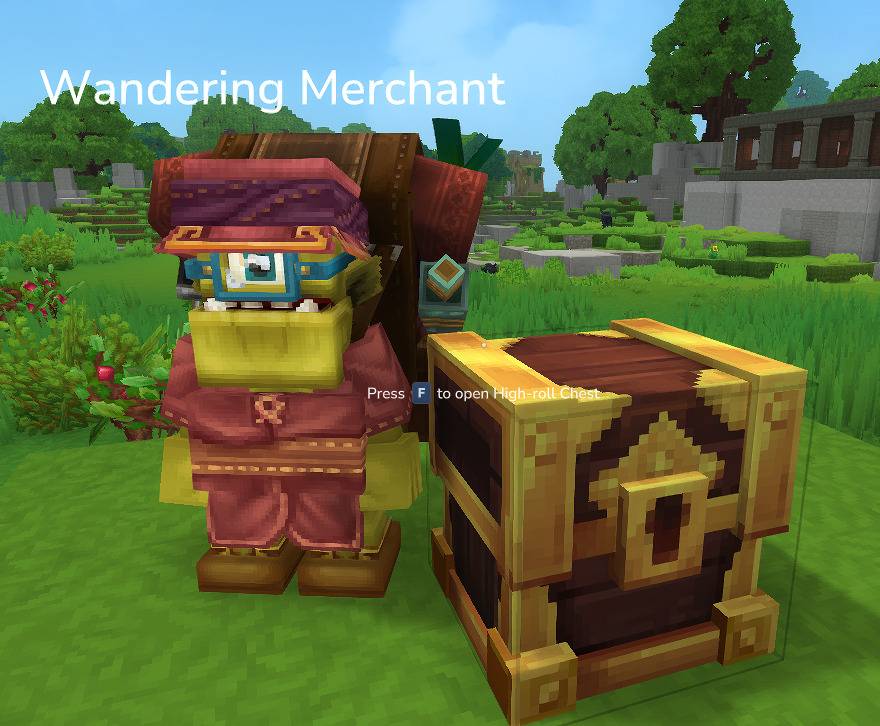
A Hytale server plugin that enables players to create and manage custom trading shops with NPC traders and automatic inventory management through nearby storage containers.
Features
- Player-Owned Shops: Create and manage multiple custom trading shops
- NPC Traders: Spawn interactive Klops Merchant NPCs to represent your shops
- Automatic Inventory Management: Shops automatically pull items from nearby chests/storage containers
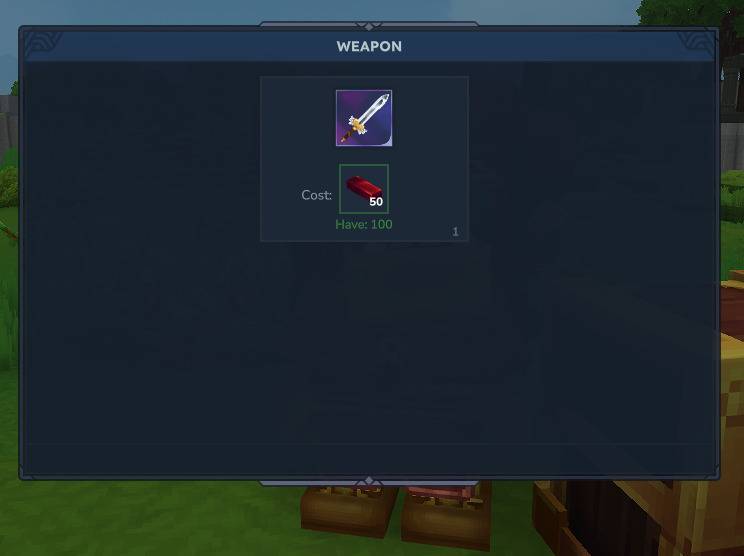
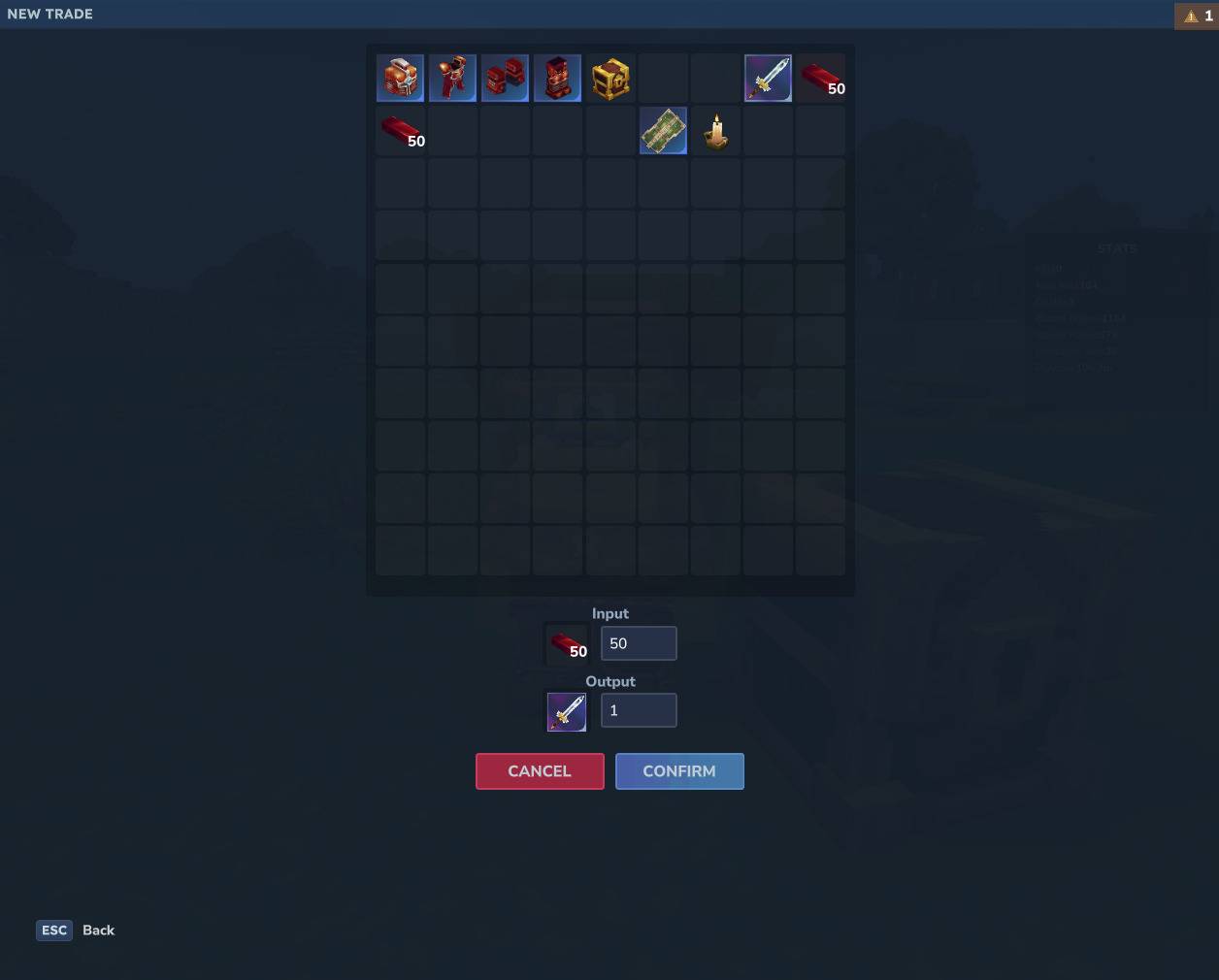
- Custom Trades: Define item exchanges with configurable input/output items and quantities
- Storage Distance Control: Configure search radius for storage containers
- Multi-Shop Support: Create multiple shops per player with no hardcoded limit
- Admin Shops: Create server-managed shops with infinite stock and no storage requirements
- Persistent Data: JSON by default, SQLite optional
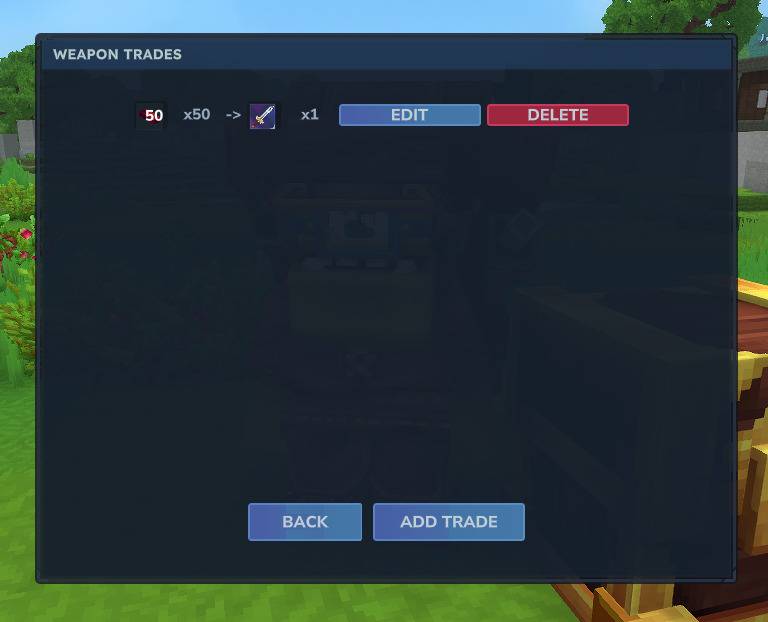
- Interactive UI: Full graphical interface for shop and trade management
Requirements
- Hytale Server
0.7.0(Update 7 / Chapter I) with NPC Plugin support - Java 25 or higher
- Permission:
taleshop.shop.manage(required for all shop management commands)
Installation
- Download the latest
TaleShop-2.1.0.jarfrom releases - Place the JAR file in your server's
mods/directory - Start or restart your server
- Configuration will be auto-generated at
run/mods/Leonardson_TaleShop/TaleShopConfig.json
Building from Source
./gradlew build
The compiled JAR is build/libs/TaleShop-2.1.0.jar, targeting Hytale server 0.7.0.
To compile against a specific local installation (requires a JDK, not only a JRE):
./gradlew build -PhytaleServerJar=/absolute/path/to/Server/HytaleServer.jar
Update 7 / Chapter I compatibility
TaleShop 2.1.0 targets the final Hytale 0.7.0 release. The server dependency
version and Maven repository can be overridden with hytale_version and
hytale_repository. The manifest's ServerVersion defaults to an exact match
for hytale_version, so compilation and declared compatibility stay aligned.
An explicit server_version property can override that constraint.
Local builds and CI compile and run tests against the same selected server
artifact. If you pass hytaleServerJar, both use that JAR; set hytale_version
to its version so the generated manifest also matches it.
CI=true ./gradlew clean build
Configuration and storage regression tests cover the configurable trade limit
in JSON and SQLite, including preservation of existing trades after reducing
the limit. An isolated classloader test checks that the distributed JAR can open
SQLite without Gradle's dependency classpath.
On October 13, 2026, all 14 tests passed against final server 0.7.0. The packaged
mod also loaded and shut down successfully in temporary standalone servers with
both JSON and SQLite, using the installed 0.7.0 server and assets. Player
interactions, trades between players and UI rendering still require in-game validation.
For in-game validation on a copy of a world:
- Check shop editing, NPC spawning, despawning, interaction and permissions with an owner and a buyer.
- Check chest stock discovery in
FIXEDandWORKBENCHmodes, including negative
heights in cubic worlds, and test successful trades, missing payment/stock,
full player inventories and full payment chests. - Check admin shops, item selection and persistence after restarting the server.
See the official Update 7 modder notes
for API changes. Use a world copy for upgrade tests: newer chunk section data
cannot be read by older servers.
Install only the main JAR, excluding -sources.jar, into the game's UserData/Mods folder.
Reload the world and enable TaleShop in its mod settings. For manual validation, open
/taleshop editor, create a shop and a trade using inventory items, spawn its NPC,
and stock a chest within two blocks. Test successful trades, insufficient payment,
missing stock, full inventories, and persistence after reloading. Use a second player
to test a player-owned shop's buyer UI; an owner's interaction opens management.
Configuration
Configuration File
Location: run/mods/Leonardson_TaleShop/TaleShopConfig.json
Default Configuration:
{
  "StorageBackend": "JSON",
  "StorageDistanceMode": "FIXED",
  "FixedStorageDistance": 2,
  "MaxTradesPerShop": 20
}
Configuration Options
| Option | Type | Default | Description |
|---|---|---|---|
StorageBackend |
String | "JSON" |
Storage backend: "JSON" or "SQLITE" |
StorageDistanceMode |
String | "FIXED" |
Storage search mode: "FIXED" or "WORKBENCH" |
FixedStorageDistance |
Integer | 2 |
Radius in blocks to search for storage (minimum: 1) |
MaxTradesPerShop |
Integer | 20 |
Maximum trades allowed in each shop (minimum: 1) |
Storage Distance Modes
-
FIXED: Uses the configured fixed distance (default: 2 blocks)
- Consistent behavior across all shops
- Better for performance tuning
-
WORKBENCH: Uses the game's crafting workbench distance settings
- Adapts to game configuration changes
- Matches crafting bench behavior
Configuration Examples
Increase storage distance to 5 blocks:
{
  "StorageDistanceMode": "FIXED",
  "FixedStorageDistance": 5
}
Use game's workbench distance:
{
  "StorageDistanceMode": "WORKBENCH",
  "FixedStorageDistance": 2
}
Set MaxTradesPerShop in TaleShopConfig.json to raise or lower the per-shop trade limit. The value takes effect after restarting the server.
For example, use "MaxTradesPerShop": 50 to allow 50 trades per shop. Values below
1 are clamped to 1. Lowering the limit preserves existing trades; adding new ones
is blocked until the shop's count is below the configured limit. Existing trades
can still be edited or deleted.
Permissions
| Permission | Description |
|---|---|
taleshop.shop.manage |
Required for all /taleshop commands (base permission on the command collection) |
taleshop.admin.manage |
Manage admin shops and edit admin-owned NPCs |
taleshop.shop.open |
Additional permission required for /taleshop open |
taleshop.npc.selectentity |
Allows selecting custom entity types when spawning NPCs (opens entity selection UI) |
Players without these permissions can still interact with shop NPCs to make trades.
Note: Players without taleshop.npc.selectentity will spawn NPCs with the default "Klops_Merchant" entity type.
Commands
All commands use the base /taleshop command with various subcommands. Aliases: /tshop, /barter
Shop Management
| Command | Description | Usage | Permission |
|---|---|---|---|
/taleshop create <name> |
Create a new shop | /taleshop create MyShop |
taleshop.shop.manage |
/taleshop rename <name> <newName> |
Rename an existing shop | /taleshop rename MyShop BetterShop |
taleshop.shop.manage |
/taleshop delete <name> |
Delete a shop and all its trades | /taleshop delete MyShop |
taleshop.shop.manage |
/taleshop list |
List all your shops with trade counts | /taleshop list |
taleshop.shop.manage |
/taleshop get <name> |
Get detailed information about a shop | /taleshop get MyShop |
taleshop.shop.manage |
/taleshop editor |
Open the graphical shop management UI | /taleshop editor |
taleshop.shop.manage |
/taleshop admin |
Open the admin shop management UI | /taleshop admin |
taleshop.admin.manage |
/taleshop open <owner> <shop> |
Open a shop remotely without NPC interaction | /taleshop open PlayerName MyShop |
taleshop.shop.manage, taleshop.shop.open |
NPC Management
| Command | Description | Usage | Permission |
|---|---|---|---|
/taleshop npc spawn <name> [entityRole] |
Spawn an NPC trader for your shop at your location | /taleshop npc spawn MyShop |
taleshop.shop.manage |
/taleshop npc despawn <name> |
Remove the NPC trader for your shop | /taleshop npc despawn MyShop |
taleshop.shop.manage |
Trade Management
| Command | Description | Usage | Permission |
|---|---|---|---|
/taleshop trade create <shopName> <inputItem> <inputQty> <outputItem> <outputQty> |
Create a new trade in the shop (up to the configured limit) | /taleshop trade create MyShop Ingredient_Gold 10 Tool_IronSword 1 |
taleshop.shop.manage |
/taleshop trade list <shopName> |
List all trades in a shop | /taleshop trade list MyShop |
taleshop.shop.manage |
/taleshop trade update <shopName> <tradeId> <inputItem> <inputQty> <outputItem> <outputQty> |
Update an existing trade | /taleshop trade update MyShop 1 Ingredient_Gold 5 Tool_IronSword 1 |
taleshop.shop.manage |
/taleshop trade delete <shopName> <tradeId> |
Delete a trade from a shop | /taleshop trade delete MyShop 1 |
taleshop.shop.manage |
Command Hierarchy
/taleshop (aliases: /tshop, /barter)
├── create <name>
├── rename <name> <newName>
├── delete <name>
├── list
├── get <name>
├── editor
├── open <owner> <shop>
├── npc
│   ├── spawn <name> [entityRole]
│   └── despawn <name>
└── trade
    ├── create <shopName> <inputItem> <inputQty> <outputItem> <outputQty>
    ├── list <shopName>
    ├── update <shopName> <tradeId> <inputItem> <inputQty> <outputItem> <outputQty>
    └── delete <shopName> <tradeId>
Usage Guide
Creating Your First Shop
-
Create a shop:
/taleshop create MyFirstShop -
Add a trade to your shop:
/taleshop trade create MyFirstShop Ingredient_Gold 10 Tool_IronSword 1This creates a trade where players give 10 gold and receive 1 iron sword.
-
Spawn the NPC trader:
/taleshop npc spawn MyFirstShop [entityRole]The NPC will spawn 1.5 blocks in front of you. If you have
taleshop.npc.selectentity, you can provide an entity role or pick one from the selection UI. -
Place storage containers nearby:
- Place chests or other storage containers within 2 blocks of the NPC (default distance)
- Stock them with the items you're selling (e.g., iron swords)
- The shop will automatically pull items from these containers when players make trades
-
Done! Players can now interact with the NPC to view and purchase from your shop.
Managing Multiple Shops
You can create and manage multiple shops:
/taleshop create Weapons
/taleshop create Potions
/taleshop create Materials
/taleshop list
Using the Shop Editor UI
For a more user-friendly experience, use the graphical shop editor:
/taleshop editor
This opens an interactive UI where you can:
- Browse all your shops
- Create, edit, and delete shops
- Manage trades visually
- Configure shop settings
Admin Shops
Admin shops are server-managed shops with infinite stock and no storage requirements. Only players with
taleshop.admin.manage can create or edit admin shops.
/taleshop admin
In admin shops:
- Stock is infinite (no nearby storage required)
- Input items are removed from the buyer
- Output items are always available
Opening Shops Remotely
With the taleshop.shop.manage and taleshop.shop.open permissions, you can open any shop remotely without needing to find and interact with the NPC:
/taleshop open <owner_name> <shop_name>
Examples:
# Open Alice's weapon shop
/taleshop open Alice WeaponShop

# Open Bob's potion store
/taleshop open Bob Potions
Behavior:
- If you're the shop owner: Opens the management UI (same as right-clicking your own NPC)
- If you're not the owner: Opens the shopping UI (same as right-clicking someone else's NPC)
- Shop names and owner names are case-insensitive
- Requires
taleshop.shop.manageandtaleshop.shop.openpermissions
Item ID Format
Items must use Hytale's internal item identifiers:
- Ingredients:
Ingredient_<Name>(e.g.,Ingredient_Gold,Ingredient_Diamond) - Tools:
Tool_<Name>(e.g.,Tool_IronSword,Tool_DiamondPickaxe) - Blocks:
Block_<Name>(e.g.,Block_Stone,Block_Wood)
Check your server's item registry for exact IDs.
How It Works
Trade Execution Flow
- Player interacts with an NPC trader
- The plugin displays all available trades from the shop
- The plugin scans nearby storage containers (within configured distance)
- Available stock is calculated based on items in storage
- When a player makes a purchase:
- Plugin validates the player has the required input items
- Plugin verifies the shop has the output items in storage
- Input items are removed from the player's inventory
- Output items are transferred from storage to the player
- The transaction is completed instantly
Data Storage
Storage backend is configurable in TaleShopConfig.json:
JSON(default):run/mods/Leonardson_TaleShop/shops.jsonSQLITE:run/mods/Leonardson_TaleShop/shops.db
Database Tables (when using SQLITE):
- shops - Stores shop information (owner, name, trader UUID)
- trades - Stores trade definitions with foreign key relationships
The plugin automatically migrates from legacy shops.properties format if found.
Limitations
- Maximum trades per shop is configurable with
MaxTradesPerShop(default: 20) - Shop names are case-insensitive
- Storage containers must be within the configured distance of the NPC
- Minimum storage distance is 1 block
- Maximum of 512 entities scanned when searching for containers
Examples
Example 1: Weapon Shop
# Create the shop
/taleshop create WeaponShop

# Add various weapon trades
/taleshop trade create WeaponShop Ingredient_Gold 20 Tool_IronSword 1
/taleshop trade create WeaponShop Ingredient_Gold 30 Tool_IronAxe 1
/taleshop trade create WeaponShop Ingredient_Diamond 10 Tool_DiamondSword 1

# Spawn the trader
/taleshop npc spawn WeaponShop

# Place chests nearby and stock with weapons
Example 2: Resource Exchange
# Create the shop
/taleshop create ResourceExchange

# Add resource conversion trades
/taleshop trade create ResourceExchange Block_Stone 64 Ingredient_Gold 5
/taleshop trade create ResourceExchange Block_Wood 32 Ingredient_Gold 3
/taleshop trade create ResourceExchange Ingredient_Coal 16 Ingredient_Diamond 1

# Spawn the trader
/taleshop npc spawn ResourceExchange

# Place chests nearby and stock with resources
Example 3: Managing Shops
# List all your shops
/taleshop list

# Get details about a specific shop
/taleshop get WeaponShop

# Rename a shop
/taleshop rename WeaponShop ArmorAndWeapons

# List all trades in a shop
/taleshop trade list ArmorAndWeapons

# Update a trade
/taleshop trade update ArmorAndWeapons 1 Ingredient_Gold 15 Tool_IronSword 1

# Delete a specific trade
/taleshop trade delete ArmorAndWeapons 2

# Remove the NPC
/taleshop npc despawn ArmorAndWeapons

# Delete the entire shop
/taleshop delete ArmorAndWeapons
Troubleshooting
NPCs not spawning
- Ensure you have the
taleshop.shop.managepermission - Check that the NPC plugin is loaded on your server
- Verify there's enough space in front of you (1.5 blocks)
- Make sure the shop exists first (
/taleshop list)
Trades not working
- Ensure storage containers are within the configured distance (default: 2 blocks)
- Check that the containers have the required output items
- Verify item IDs are correct (case-sensitive)
- Confirm the shop NPC is spawned
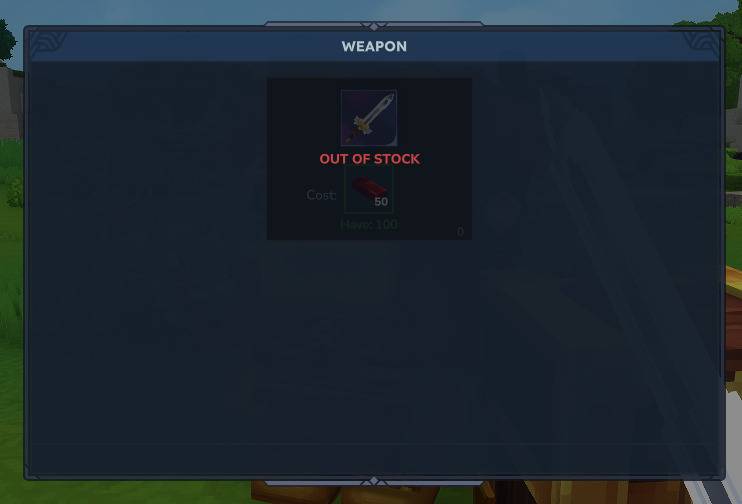
Shops showing "Out of Stock"
- Verify chests contain the correct items
- Check the item IDs match exactly (case-sensitive)
- Ensure chests are within configured distance of the NPC
- Increase
FixedStorageDistancein config if needed
Configuration not loading
- Check server logs for errors
- Verify JSON syntax (use a JSON validator)
- Ensure key names are capitalized correctly (
StorageDistanceMode) - Try deleting the config file and restarting to regenerate defaults
Database errors
- Check file permissions on
run/mods/Leonardson_TaleShop/directory - Look for errors in server logs
- Ensure database file is not locked by another process
- The plugin will auto-migrate from legacy
shops.propertiesif found
Performance Considerations
- Storage Distance: Smaller distances (1-3 blocks) provide better performance
- Number of Shops: More shops mean more potential concurrent scans
- Recommendations:
- Keep
FixedStorageDistanceat 2-3 blocks for optimal performance - Use well-organized storage containers rather than many scattered chests
- Keep
License
This project is licensed under the MIT license. See LICENSE.md for details.
Author
LeonardsonCC
Support
For issues, questions, or contributions, please visit the project repository.