
 Gameplay
 Utility
 Quality of Life
Server Hide Settings (Hytale Server Mod/Plugin)
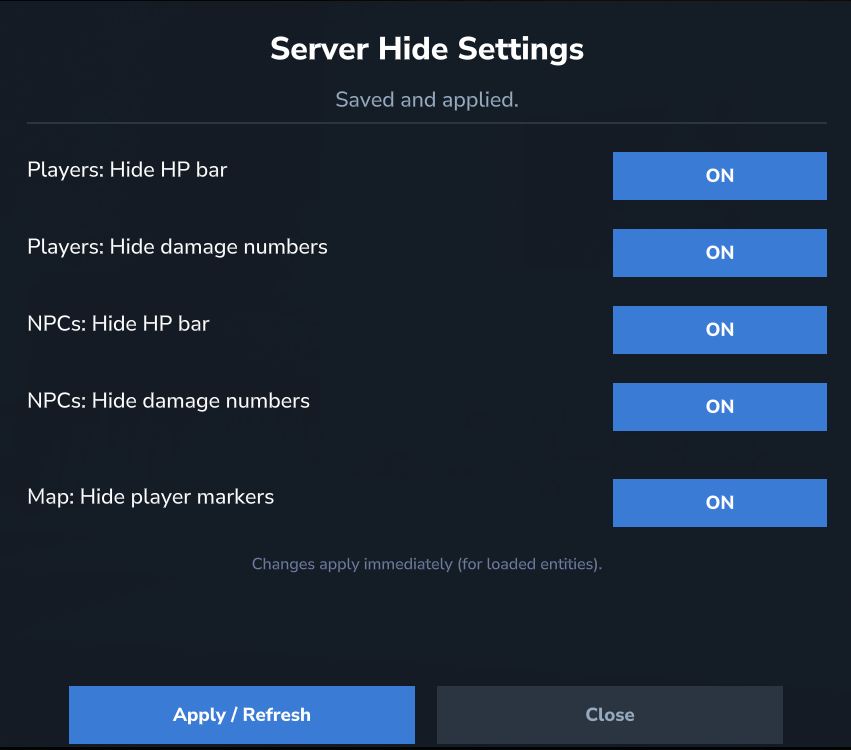
A server-side mod/plugin for Hytale that hides overhead combat UI (HP bars + combat text) and can also hide player map markers. It is controlled in-game via an admin Dashboard UI and supports a disk-based config.
Goal: reduce visual clutter and keep the server visuals cleaner — without requiring a client mod.
Features
- ✅ Hide overhead UI above entities (HP bars + combat text)
- ✅ Works for:
- Players (
players) - NPCs (
npcs)
- Players (
- ✅ Hide player markers on the world map
- ✅ In-game admin Dashboard UI (ON/OFF toggles)
- ✅ Saves settings to a file and applies them live (refresh)
- ✅ Server-side approach:
- modifies an entity’s
UIComponentList(client renders less overhead UI) - overrides the map icon provider (hides player markers)
- modifies an entity’s
Note: On some server/client builds, hiding HP may also hide combat text even if configured separately. The Dashboard UI reflects the effective behavior.
Requirements
- Hytale Server (compatibility depends on the Server API build)
- Java 25
Installation (Server)
- Build the
.jar(see Build below) or use a prebuilt release. - Place the mod into your server folder (commonly
mods/— depends on your setup). - Start the server.
- Join with an account that has the
serverhidesettings.adminpermission (or equivalent admin role). - Open the dashboard:
/hid ui
After the first start, the config file will be created:
mods/ServerHideSettings/config.json
Commands
Base command: hid
/hid help— show help/hid info— show mod info and current settings/hid ui— open the admin dashboard/hid reload— reload config from disk (admin)
Permissions
serverhidesettings.admin— access to the Dashboard UI and admin functions
Make sure your server permission system grants this permission to the correct role/player.
Configuration
File: mods/ServerHideSettings/config.json
Example:
{
  "enabled": true,
  "players": {
    "hideHealthBar": true,
    "hideDamageNumbers": true
  },
  "npcs": {
    "hideHealthBar": true,
    "hideDamageNumbers": true
  },
  "map": {
    "hidePlayerMarkers": true
  }
}
