
 Miscellaneous
 Utility
Message of the Day (MOTD) Plugin
A robust, lightweight Hytale server plugin designed to greet players with customizable titles and subtitles upon joining using HyTales integrated banner or a custom way to do your server announcements.
📣Announcements
MOTD supports server wide announcements with the event title that is fully customizable and is fully supported by the server console.
Usage:
Single-Line: "/motd announcement Server Restarting in 5 min" - This will only do the primary title with a default secondary title of Server Wide Announcement.
Two-Line: "/motd announcement Server Restarting in 5 min | Get to somewhere safe" - By using the "|" symbol the system will split the message in two to set the primary and seconday titles. (First is primary, Second is secondary)
⚙️Configuration:
   "announcement": {
     "isMajor": true, - Changes the way the event title looks
     "duration": 5.0, - Changes the TOTAL duration the message is shown in seconds
     "fadeInDuration": 1.5, - Changes how long the fade in will last in seconds (included in the duration time)
     "fadeOutDuration": 1.5, - Changes how long the fade out will last in seconds (included in the duration time)
     "permGroup": "%commandPermissions%", - By default this is the same permission as the command permissions but this can be configured to your server needs.
     "enabled": true - Enabled or disabled the announcement command
 }
👋Player Joins
By defualt, MOTD will display a welcome message to the user. This welcome message is fully customizable and has the ability to be randomized by enabling randomizeTitle.
Randomize Title:
Enable the randomizedTitle in the config.
Open and edit the randomEventTitles.json file to add in your messages you'd like to randomize.
User /motd reload or restart the server.
NOTE If you only want 1 title to be randomize. Only put one message in that section in the json.
⚙️Configuration:
    welcomeBanner": {
        "primaryTitle": "Welcome %player% to MOTD", - When randomizeTitle is false, this be what is shown as the primary title.
        "secondaryTitle": "Full Customizable", - When randomizeTitle is false, this be what is shown as the secondary title.
        "isMajor": true, - Changes the way the event title looks
        "duration": 5.0, - Changes the TOTAL duration the message is shown in seconds
        "fadeInDuration": 1.5, - Changes how long the fade in will last in seconds (included in the duration time)
        "fadeOutDuration": 1.5, - Changes how long the fade out will last in seconds (included in the duration time)
        "randomizeTitle": true, - Changes where the data for primary & secondary titles from default configs (listed above) or the randomEventTitle.json
        "permGroup": "%commandPermissions%", - By default this is the same permission as the command permissions but this can be configured to your server needs.
        "enabled": true - Enabled or disabled the announcement command
    }
🔄Update Available System
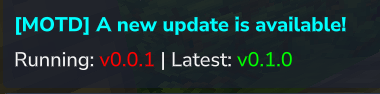
MOTD by default will notify people with "hytale:admin" permissions. This can be changed to add another role to be included.
Note: Admins will always receive the notifcations as they have all permissions.
⚙️Configuration:
  "updateAvailable": {
     "permGroup": "hytale.admin", - Sets the permission group that will see the update available message when that player joins. ("hytale:admins" will always see the notification unless disabled.
     "enabled": true - Enables/Disables the notification (Do not recommend turning off)
 }
🛠 Commands & Permissions
All commands require the hytale.admin permission node (standard for Operators/Admins) by defualt, howerver this can be changed in the configuration.
Command Description
/motd Displays the help and usage menu.
/motd reload Instantly reloads config.json changes.
/motd test Previews the MOTD title on your screen.
NOTE: The "/motd test" command must be run by a player in-game. It uses "world.execute()" to safely bridge the Hytale Command Thread to the World Thread for component access.
⚙️ Configuration
The plugin generates a "config.json" where you can change and configure the settings to your liking and server needs. From things like the duration the event title stays on the screen to how fast or slow it fades in and out. Full command support in game as well.
%player% can be inserted in a Title message to grab the users name.
%commandPermissions% - Can be used to refer the permissions to what the command permissions is set to. By default it's "hytale:admin".
EXAMPLES of Seasonal Welcome Messages:
"Happy Spooky Season, %player%!"
"Merry Christmas, %player%!"
When the mod first loads, it will create a directory in the mods folder and the config.json will be inside it. You can edit the config.json while the server is running and use "/motd reload" to reload the config settings and "/motd test" to spawn the welcome message.
NOTE: All changes to the config.json file will need a /motd reload or server restart to set the changes to the server.
Change Log
Version 0.1.1 Update: The "Control & Customization" Patch
This update brings a significant overhaul to how you manage and display messages. From real-time configuration to dynamic random titles, your server announcements just got a lot more flexible.
🛠️ Configuration & Core Changes
Structural Rework: The config system has been completely redesigned for future-proofing and expanded options.
⚠️ Action Required: Please delete your old config file before installing this update to allow the new structure to generate properly.
Live Editing: Added chat commands that allow you to modify config settings in real-time without leaving the game.
Permissions: Permissions were added to enhance the way you configure this mod.
Manual Reload System: Added a /motd reload command. Changes to the config files are not automatic to the game; use this command to push your updates to the server.
Update Notifications: You will now receive a notification when a new version of the plugin is available, ensuring you never miss a feature or fix.
#🎭 New Features
Randomized Titles: Introduce variety to your server's look!
New file: randomEventTitles.json.
Store your custom phrases here. When enabled in the config, the plugin will pull from both primary and secondary titles to keep things fresh.
Server-Wide Announcements: The biggest addition yet! Use the /motd announcement command for high-visibility broadcasts.
Console Support: Perfect for automated server restart warnings.
Dual-Line Formatting: Use a pipe symbol (|) to separate the primary and secondary text.
Smart Defaults: If no pipe is used, the secondary title defaults to "Server Wide Announcement".
📝 Announcement Examples
Single-Line: /motd announcement Server Restarting in 5 min
Two-Line: /motd announcement Server Restarting in 5 min | Get to somewhere safe