
 Quality of Life
 Miscellaneous
Lumenia: Ultimate Quality of Life Integration
Lumenia is a comprehensive utility and enhancement mod designed to streamline the player experience in Hytale. By combining dozens of essential Quality of Life (QoL) features into a single, lightweight package, Lumenia eliminates the need for multiple smaller mods while ensuring peak performance and compatibility.
Features
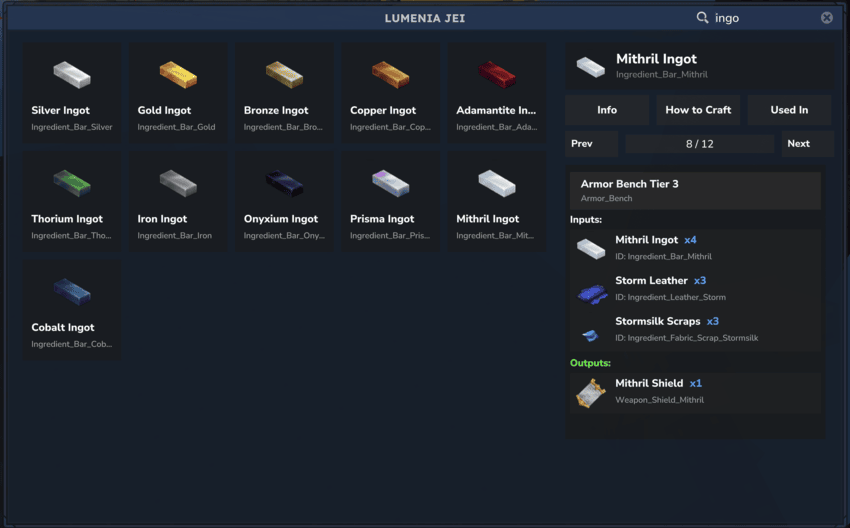
🔍 Advanced Search System
- Search by Name: Find items by their display name
- Search by ID: Locate items using their exact item ID
- Combined Search: Use both name and ID simultaneously for precise results
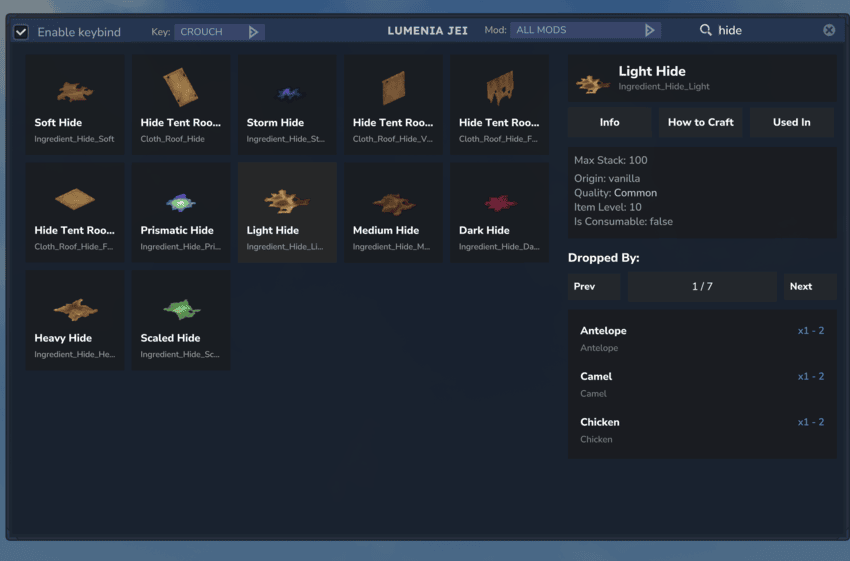
- Mod Filter: Filter items by mod/namespace using the dropdown in the header
- Real-time Filtering: Results update as you type
📦 Comprehensive Item Information
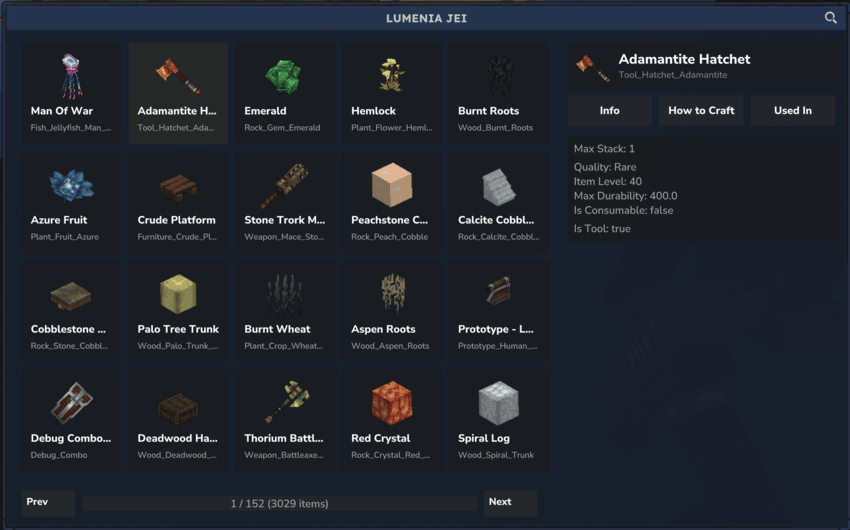
When you select an item, the panel displays detailed information including:
- Item Icon & Name: Visual identification with localized names
- Item ID: The unique identifier for the item (clickable - sends a message to chat with a link to copy the item ID)
- Origin: Whether the item is vanilla or modded (with mod name if applicable)
- Quality Tier: Displayed with appropriate color coding
- Item Level: The level requirement or tier of the item
- Max Stack Size: Maximum items that can be stacked
- Max Durability: Maximum durability for tools and equipment
- Item Properties:
- Is Consumable
- Has Block Type
- Fuel Quality
- Is Tool / Weapon / Armor
- Resource Types: List all resource types associated with an item
🔨 Recipe Information
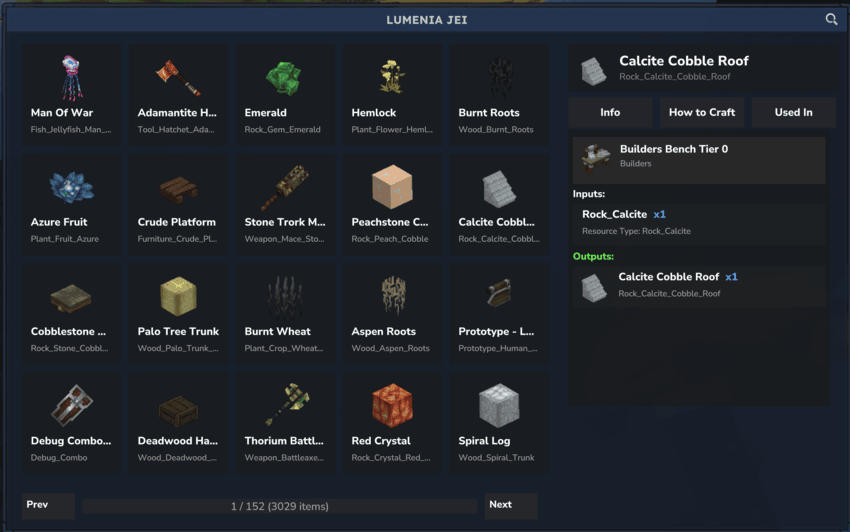
How to Craft:
- View all recipes that produce the selected item
- See required crafting bench and tier level
- Display input materials with quantities
- Paginated recipe list for easy navigation
Used In:
- Discover all recipes that use the selected item as an ingredient
- See what items can be crafted using the selected item
- Complete recipe details with all requirements
- Category-Based Recipes: Automatically includes recipes that share resource types or categories
🎮 Mob Drop Information
- Dropped By: See which mobs/creatures drop a specific item
- Drop Quantities: View min/max drop quantities for each mob
- Mob Details: Display mob name (translated), role ID, and model information
- Pagination: Navigate through drop lists with pagination support
- Automatic Discovery: Mob drop information is automatically discovered at world start
⚡ Quick Actions
- Give Item (Creative Mode Only): Instantly add the selected item to your inventory
- Copy Item ID: Click on any item ID to copy it to chat with a clickable link
⌨️ Configurable Keybind System
- Per-Player Settings: Each player can enable/disable the keybind individually via UI checkbox
- Keybind Selection: Choose between Walk or Crouch movement states
- Global Configuration: Server admins can enable/disable the feature globally
- Smart Defaults: Respects global settings while allowing player customization
- UI Integration: Configure keybind preferences directly in the JEI panel header
🎨 User Interface
- Clean, Modern Design: Intuitive interface that's easy to navigate
- Paginated Lists: Efficient browsing through large item catalogs
- Responsive Layout: Adapts to different screen sizes
- Color-Coded Quality: Visual indicators for item quality tiers
- Text Wrapping: Long item names and descriptions wrap properly
Installation
- Download
Lumenia-X.X.X.jarfrom the Modrinth page - Place the JAR file in your server's
pluginsdirectory - Restart your server
- Start using
/jeito open the panel or press the configured keybind (default: Walk key) - The plugin will automatically load and discover all items, recipes, and mob drops
Configuration
Server Configuration
Customize Lumenia's behavior through the Lumenia.json configuration file:
{
  "DefaultOpenJeiKeybind": true
}
DefaultOpenJeiKeybind: Enable/disable the keybind feature globally (default:true)- If set to
false, the keybind checkbox will not appear in the UI - If set to
true, players can individually enable/disable the keybind via the UI
- If set to
Player Configuration
Players can configure their keybind preferences directly in the JEI panel header:
- Enable/Disable Keybind: Toggle the keybind on/off per player using the checkbox
- Keybind Selection: Choose which movement state triggers the GUI (Walk or Crouch) using the dropdown
- Settings are saved per-player and persist across sessions
Usage
Opening the JEI Panel
You can open the JEI panel using any of the following methods:
Method 1: Commands
/jei- Opens the JEI panel/lumenia- Opens the JEI panel/recipe- Opens the JEI panel/recipes- Opens the JEI panel
Optional Command Parameters:
/jei --item=<text>- Opens the JEI panel with the search field pre-filled, allowing you to quickly find specific items
Method 2: Keybind (Default)
- Press the configured movement key while walking (default: Walk key)
- The GUI will automatically open
- This can be enabled/disabled using the UI checkbox in the panel header
- You can change from Walk to Crouch using the dropdown in the header
Method 3: Item Interaction
- Use the custom interaction
OpenLumeniaBookInteraction(if available)
Navigating the GUI
- Search Bar: Type to filter items by name or ID (supports combined search)
- Mod Filter: Select a mod from the dropdown in the header to filter items by namespace
- Keybind Settings:
- Checkbox to enable/disable the keybind (only visible if enabled globally)
- Dropdown to select keybind type (Walk or Crouch)
- Item Selection: Click on any item to view detailed information
- Section Tabs:
- Info: View item properties, resource types, and drop information
- How to Craft: See recipes that produce the item
- Used In: See recipes that use the item as ingredient
Viewing Item Information
When you select an item, you'll see:
- Item icon and name (localized)
- Item ID (clickable - sends message to chat with external link)
- Origin (vanilla or modded with mod name)
- Quality tier (color-coded)
- Item level/requirement
- Max stack size
- Max durability (for tools/equipment)
- Item properties (consumable, block type, fuel quality, tool/weapon/armor status)
- Resource types
- Dropped By: List of mobs that drop the item with quantities, mob names (translated), role IDs, and model information
Recipe Viewing
- Crafting Recipes: See all ways to craft an item
- Bench Requirements: View required crafting benches and tiers
- Material Lists: See all required ingredients with quantities
- Recipe Pagination: Navigate through multiple recipes
- Category-Based Matching: Automatically includes recipes sharing resource types or categories
Technical Details
Data Discovery
Lumenia automatically discovers:
- Items: All registered items from loaded asset packs
- Recipes: All crafting recipes and their relationships
- Mob Drops: NPC/creature drop tables discovered at world start
- Resource Types: Item resource type associations
Performance
Lumenia is designed with performance in mind:
- Lightweight and efficient: Minimal impact on server performance
- Optimized asset loading and caching: Fast startup and smooth operation
- Thread-safe operations: Safe concurrent access to data structures
- Efficient data structures: Fast lookups for items, recipes, and mob drops
- Lazy loading: Mob drop information is discovered at world start, not during gameplay
- Optimized UI updates: Pagination reduces UI update overhead
- Minimal memory footprint: Efficient memory usage patterns
Commands
/jei- Opens the JEI panel/lumenia- Opens the JEI panel (alias)/recipe- Opens the JEI panel (alias)/recipes- Opens the JEI panel (alias)
Optional Parameters:
/jei --item=<text>- Opens the JEI panel with the search field pre-filled, allowing you to quickly find specific items
Permissions
Currently, all players can use the /jei command and keybind feature. Future versions may include permission-based access control.
Compatibility
- Hytale Version: Compatible with vanilla Hytale items and recipes
- Modded Content: Supports modded items and custom recipes
- Other Plugins: Works seamlessly with other mods
- Early Access: Early Access compatible
- Asset Packs: Automatically detects items and recipes from all loaded asset packs
Building from Source
Prerequisites
- Java Development Kit (JDK) 17 or higher
- Gradle 7.0 or higher
Build Steps
- Clone the repository:
git clone <repository-url>
cd Lumenia
- Build the project:
./gradlew build
- Find the compiled JAR in
build/libs/Lumenia-X.X.X.jar
Development
Project Structure
Lumenia/
├── src/main/java/com/lumengrid/lumenia/
│   ├── Lumenia.java              # Main plugin class
│   ├── LumeniaConfig.java        # Configuration class
│   ├── LumeniaComponent.java    # Per-player component
│   ├── MobDropInfo.java         # Mob drop information class
│   ├── CheckKeybindSystem.java  # Keybind checking system
│   ├── gui/
│   │   └── JEIGui.java          # Main GUI implementation
│   ├── commands/
│   │   └── OpenJEICommand.java # Command handler
│   └── interactions/
│       └── OpenLumeniaBookInteraction.java
└── src/main/resources/
    ├── Common/UI/Custom/Pages/  # UI definitions
    ├── manifest.json             # Plugin manifest
    └── config.json               # Default configuration
Key Components
- LumeniaComponent: Stores per-player settings (keybind preferences)
- JEIGui: Main GUI class handling all UI interactions
- CheckKeybindSystem: System that monitors player movement and opens GUI
- MobDropInfo: Data class for mob drop information
Contributing
Contributions are welcome! Please feel free to submit issues or pull requests.
License
See LICENSE file for details.
Credits
- Developed by Lumengrid
- Inspired by JEI (Just Enough Items) for Minecraft
- Built for the Hytale game platform
Support
For issues, questions, or feature requests, please open an issue on the project repository.
Note: This plugin is designed for Hytale server environments. Make sure you're running a compatible Hytale server version.