
 Miscellaneous
 Gameplay
HyFlask
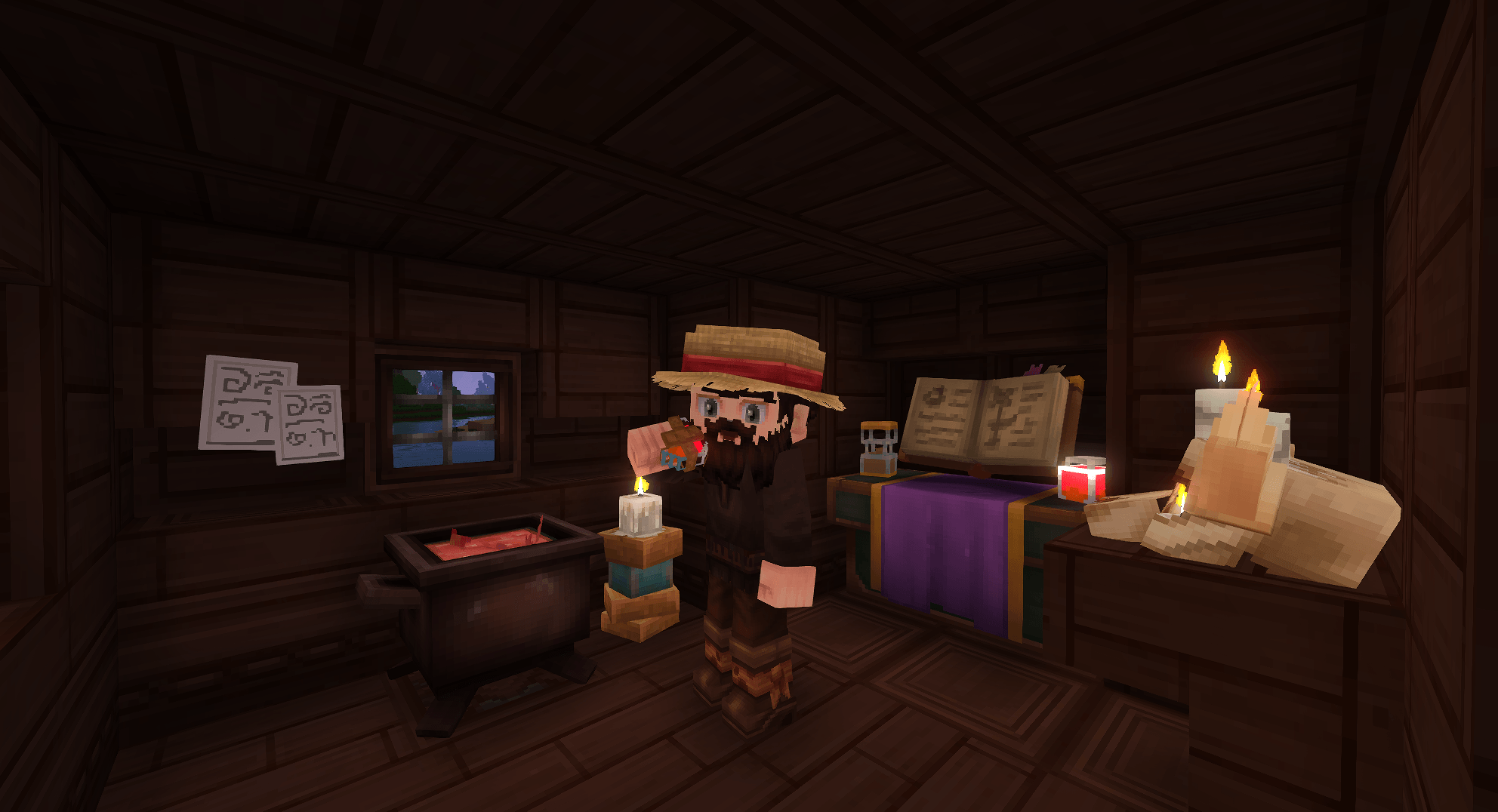
HyFlask adds a new potion Flask to the game that is not consumed upon use. Instead, it has multiple charges that can
be replenished by sleeping through the night. The effect of the flask can be changed by learning new effects at the
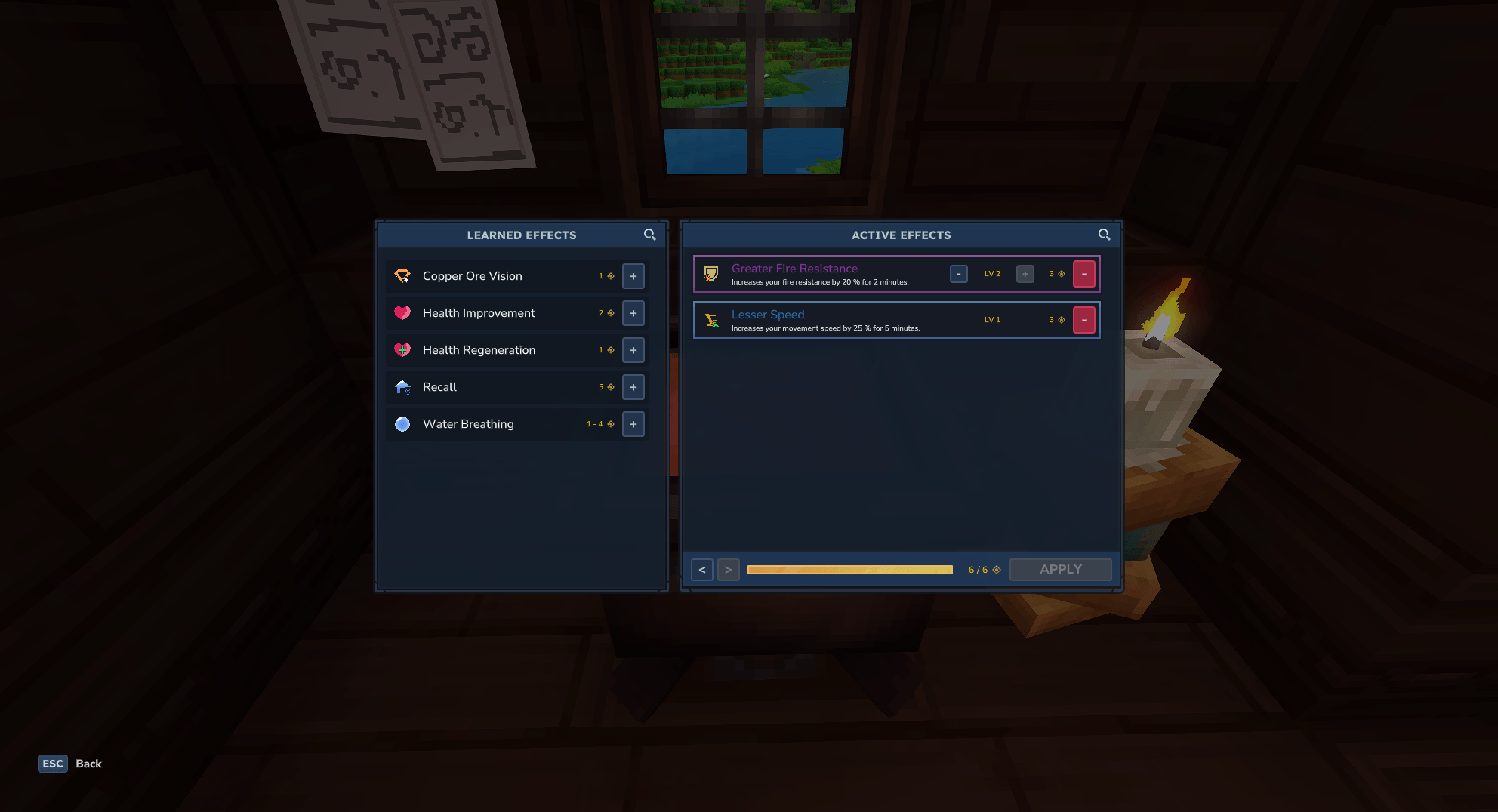
Research Table and then be equipped at the Effect Cauldron. You can have multiple effects active at the same time,
as long as your capacity is not exceeded.
Always open to critique or ideas!
Getting Your Flask
The flask can be crafted at the Alchemist Workbench.
Usage
You can use the flask like any other potion. However, instead of consuming the potion itself, you consume a use bound
to your player. This means you cannot have multiple flasks or use another player's flask to gain additional uses. To
replenish your charges, you must sleep through the night.
You get more charges the more often you use the flask. Whenever you sleep, it will check how many times you have
used the flask and then upgrades your maximum number of charges if a new threshold is reached.
Effects
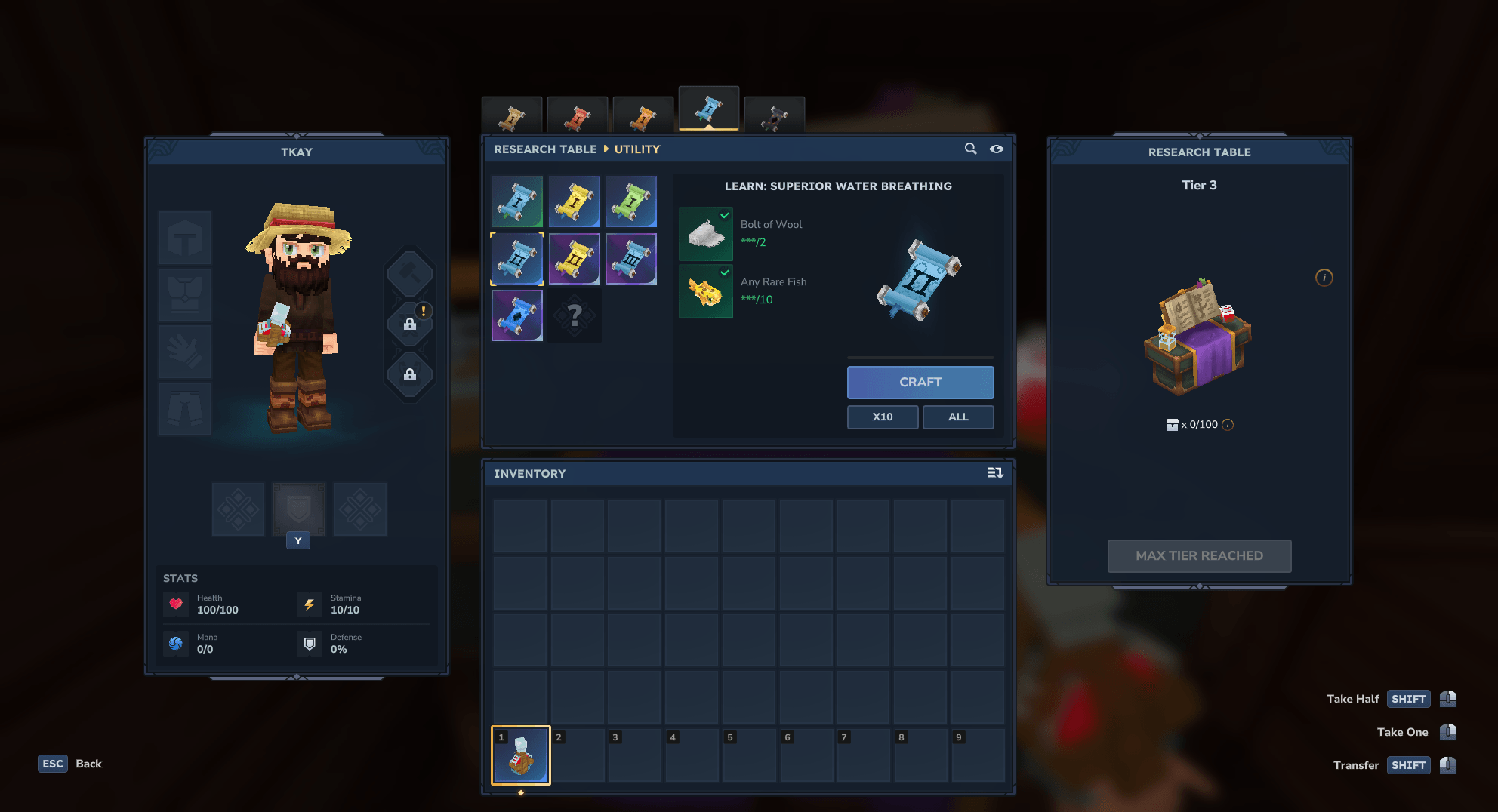
The flask starts with the health regeneration level 1 effect, but you can learn new effects by using effect scrolls
crafted at
the Research Table. Effects have different levels, and you always need the previous levels to learn a higher level
effect.
After learning a new effect, they can be equipped at the Effect Cauldron. You can equip as many effects as you want.
However, every effect has a cost and the flask has a maximum capacity that limits the number of effects you can have
active at the same time.
The capacity of the flask is increased by the CapacityScroll effects at the Research Table.
Commands
The root command is hyflask. Explanation of the available subcommands can be found in Hytale with the command ui or
using --help.
Configuration
Upon loading the plugin, it will create a config file in the mod folder that contains the following settings:
| Field | Description |
|---|---|
| StartingLearnedEffects | List of FlaskEffect asset IDs that new players start with as learned effects, available for equipping at the Effect Cauldron. |
| StartingActiveEffects | List of FlaskEffect asset IDs that are active by default for new players. |
| UsesUpgradeMap | Maps cumulative flask use counts to a maximum uses modifier. When the player's total uses reach a key's threshold, their maximum uses modifier is updated to the corresponding value. |
Credits
- Flask Model was done by my friend Haruka
Required Plugins
Modding
You can add your own effects to the game if you are familiar with modding the game through assets.
Config
After you’ve started your world while the plugin is active, it will create a config file in the mod folder. Whenever a
player uses a flask, Effect Cauldron or any of the flask commands for the first time, it will use the config
information to set the learned effects and currently active effects. By default, the player will only get the health
regeneration level 1 effect.
{
  "StartingLearnedEffects": [
    "FlaskEffect_HealthRegen_T1"
  ],
  "StartingActiveEffects": [
    "FlaskEffect_HealthRegen_T1"
  ]
}
Interactions
Here is a list of all the interactions added by HyFlask.
HyFlask_LearnEffect
Teaches the player a new flask effect, making it available for selection in the effect UI.
| Field | Description |
|---|---|
| EffectId | Asset ID of the FlaskEffect that should be learned. |
| Next | This will happen when the effect was successfully learned. |
| Failed | This will happen when the effect is already known or doesn't exist. |
Example
{
  "Type": "HyFlask_LearnEffect",
  "EffectId": "FlaskEffect_HealthRegen_T2"
}
HyFlask_ForgetEffect
Removes a previously learned flask effect from the player's known effects.
| Field | Description |
|---|---|
| EffectId | Asset ID of the FlaskEffect that should be forgotten. |
| Next | This will happen when the effect was successfully forgotten. |
| Failed | This will happen when the player doesn't know the effect or it doesn't exist. |
Example
{
  "Type": "HyFlask_ForgetEffect",
  "EffectId": "FlaskEffect_HealthRegen_T2"
}
HyFlask_RequireEffect
A condition that checks if the player already knows a specific effect before proceeding.
| Field | Description |
|---|---|
| EffectId | Asset ID of the FlaskEffect the player must know. |
| Next | This will happen when the player knows the effect. |
| Failed | This will happen when the player does not know the effect. |
Example
{
  "Type": "HyFlask_RequireEffect",
  "EffectId": "FlaskEffect_HealthRegen_T1"
}
HyFlask_ApplyEffect
Executes all currently active flask effects on the player. This is the interaction triggered when the player uses their
flask.
Example
{
  "Type": "HyFlask_ApplyEffect"
}
HyFlask_HasUses
A condition that checks if the player has enough uses remaining before proceeding.
| Field | Description |
|---|---|
| Costs | The minimum number of uses required for the condition to pass. Default 1. |
| Next | This will happen when the player has at least Costs uses left. |
| Failed | This will happen when the player doesn't have enough uses. |
Example
{
  "Type": "HyFlask_HasUses",
  "Costs": 1
}
HyFlask_ModifyUses
Adds or removes uses from the player's current use count.
| Field | Description |
|---|---|
| Amount | Amount by which uses are modified. Positive values add, negative values remove uses. |
| Next | This will happen as the next step. |
| Failed | There is no fail-state, so this won't happen. |
Example
{
  "Type": "HyFlask_ModifyUses",
  "Amount": -1
}
HyFlask_ModifyCapacity
Adds a named modifier to the player's maximum flask capacity. Positive values increase the cap, negative values decrease
it.
| Field | Description |
|---|---|
| Amount | Amount by which the capacity maximum is modified. Positive adds, negative removes. |
| Modifier | A unique name for this modifier. Use the same name to identify or overwrite the modifier later. |
| Next | This will happen when the modifier was successfully applied. |
| Failed | This will happen when the modifier could not be applied. |
Example
{
  "Type": "HyFlask_ModifyCapacity",
  "Amount": 2,
  "Modifier": "CapacityScroll_T1"
}
HyFlask_ModifyJumpHeight
Adds a jump height modifier to the player. The modifier is automatically removed when the specified effect ends.
| Field | Description |
|---|---|
| JumpHeight | The amount added to the player's current jump height (must be ≥ 0). |
| RemoveOnEffectId | When defined, the modifier is removed when this entity effect is removed from the player. |
| Next | This will happen as the next step. |
| Failed | There is no fail-state, so this won't happen. |
Example
{
  "Type": "HyFlask_ModifyJumpHeight",
  "JumpHeight": 0.5,
  "RemoveOnEffectId": "Effect_JumpHeight_T1"
}
HyFlask_ModifyVision
Applies visual modifications to specific blocks for the player (used by the Spelunker effect). Each entry in
BlockModifications overrides how a set of blocks appears while the effect is active.
| Field | Description |
|---|---|
| BlockModifications | Array of block modification entries (see below). |
| RemoveOnEffectId | When defined, all modifications are removed when this entity effect is removed from the player. |
| Next | This will happen as the next step. |
| Failed | There is no fail-state, so this won't happen. |
BlockModification fields:
| Field | Description |
|---|---|
| BlockIds | Array of block asset IDs whose appearance will be overridden. |
| Opacity | Optional. Overrides the opacity of the matched blocks. |
| Light | Optional. Overrides the light color of the matched blocks. |
| Particles | Optional. Array of particle system IDs to attach to the matched blocks. |
Example
{
  "Type": "HyFlask_ModifyVision",
  "RemoveOnEffectId": "Effect_Spelunker_Iron",
  "BlockModifications": [
    {
      "BlockIds": [
        "IronOre"
      ],
      "Opacity": "Transparent",
      "Light": {
        "R": 255,
        "G": 200,
        "B": 100
      }
    }
  ]
}
Asset Types
HyFlask introduces two custom asset types that you can define to add new effects to the game.
FlaskEffect
A FlaskEffect represents a single effect tier. It defines what the player sees in the selection UI (name,
description, icon, quality border) and what happens when the flask is used with that effect active. Assets are loaded
from Server/HyFlask/FlaskEffects/.
| Field | Description |
|---|---|
| TranslationProperties | Name and Description translation keys shown in the selection UI. |
| Quality | Hytale ItemQuality for coloring the effect in the effect selection. |
| Icon | Path to the icon image shown in the selection UI. |
| Cost | Capacity points required to have this effect active. |
| Interactions.Consumption | The interaction chain executed on every flask use while this effect is active. |
| GroupDetails | Adds the effect to a group and define which level it represents in that group. |
Example
{
  "TranslationProperties": {
    "Name": "server.hyflask.flaskEffects.FlaskEffect_HealthRegen_T1.name",
    "Description": "server.hyflask.flaskEffects.FlaskEffect_HealthRegen_T1.description"
  },
  "Quality": "Common",
  "Icon": "Icons/FlaskEffects/HealthRegen/T1.png",
  "Cost": 1,
  "Interactions": {
    "Consumption": {
      "Interactions": [
        {
          "Type": "ApplyEffect",
          "EffectId": "Effect_HealthRegen_T1"
        },
        {
          "Type": "ClearEntityEffect",
          "EntityEffectId": "Effect_HealthRegen_T2"
        },
        {
          "Type": "ClearEntityEffect",
          "EntityEffectId": "Effect_HealthRegen_T3"
        },
        {
          "Type": "ClearEntityEffect",
          "EntityEffectId": "Effect_HealthRegen_T4"
        }
      ]
    }
  },
  "GroupDetails": {
    "GroupId": "FlaskEffectGroup_HealthRegen",
    "Level": 1
  }
}
FlaskEffectGroup
A FlaskEffectGroup is a display container that groups multiple tiers of the same effect under a single header in
the selection UI. Only one level of a group can be active at the same time. Assets are loaded from
Server/HyFlask/FlaskEffectGroups/.
| Field | Description |
|---|---|
| TranslationProperties | Name translation key shown as the group header in the UI. |
| Icon | Path to the group icon shown next to the group header. |
Example
{
  "TranslationProperties": {
    "Name": "server.hyflask.flaskEffectGroups.FlaskEffectGroup_HealthRegen.name"
  },
  "Icon": "Icons/FlaskEffects/HealthRegen/Group.png"
}