 Gameplay
 Utility
 Miscellaneous
HideArmor v0.8.0-alpha
Advanced armor visibility control for Hytale servers with mutual opt-in system.

Overview
HideArmor gives players granular control over armor visibility through three independent systems:
- Hide your own armor from your view
- Hide other players' armor from your view (requires their permission)
- Control which armor pieces others can hide on you
All changes are client-side visual only and do not affect inventory, stats, or actual equipment.
Features
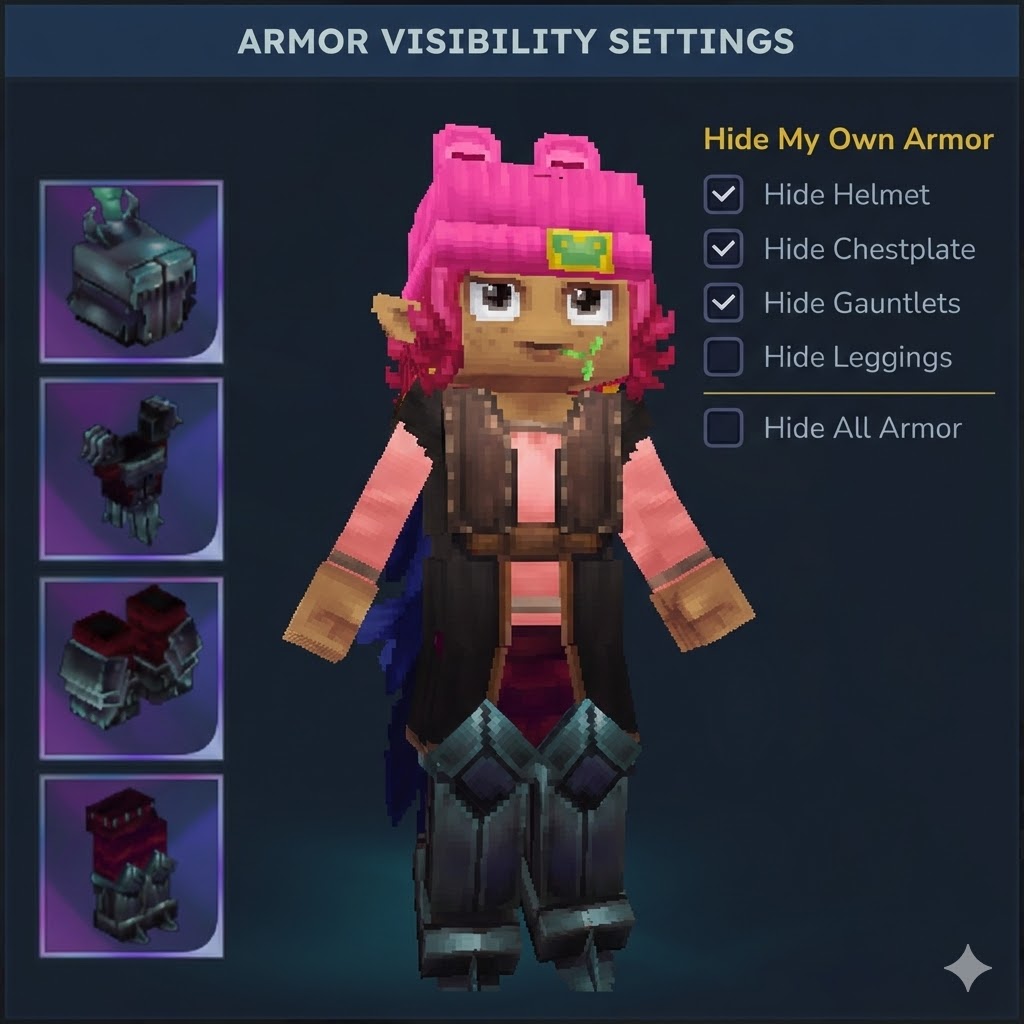
Self Armor Control
Hide your own armor pieces in your view without affecting gameplay or how others see you.
Hide Other Players' Armor
Choose which armor pieces to hide on other players. Requires mutual opt-in.
Privacy-First Permissions
Other players can only hide your armor if you explicitly allow it per armor slot.
Per-Slot Granularity
Control each armor piece independently:
- Head (helmet)
- Chest (chestplate)
- Hands (gauntlets)
- Legs (leggings)
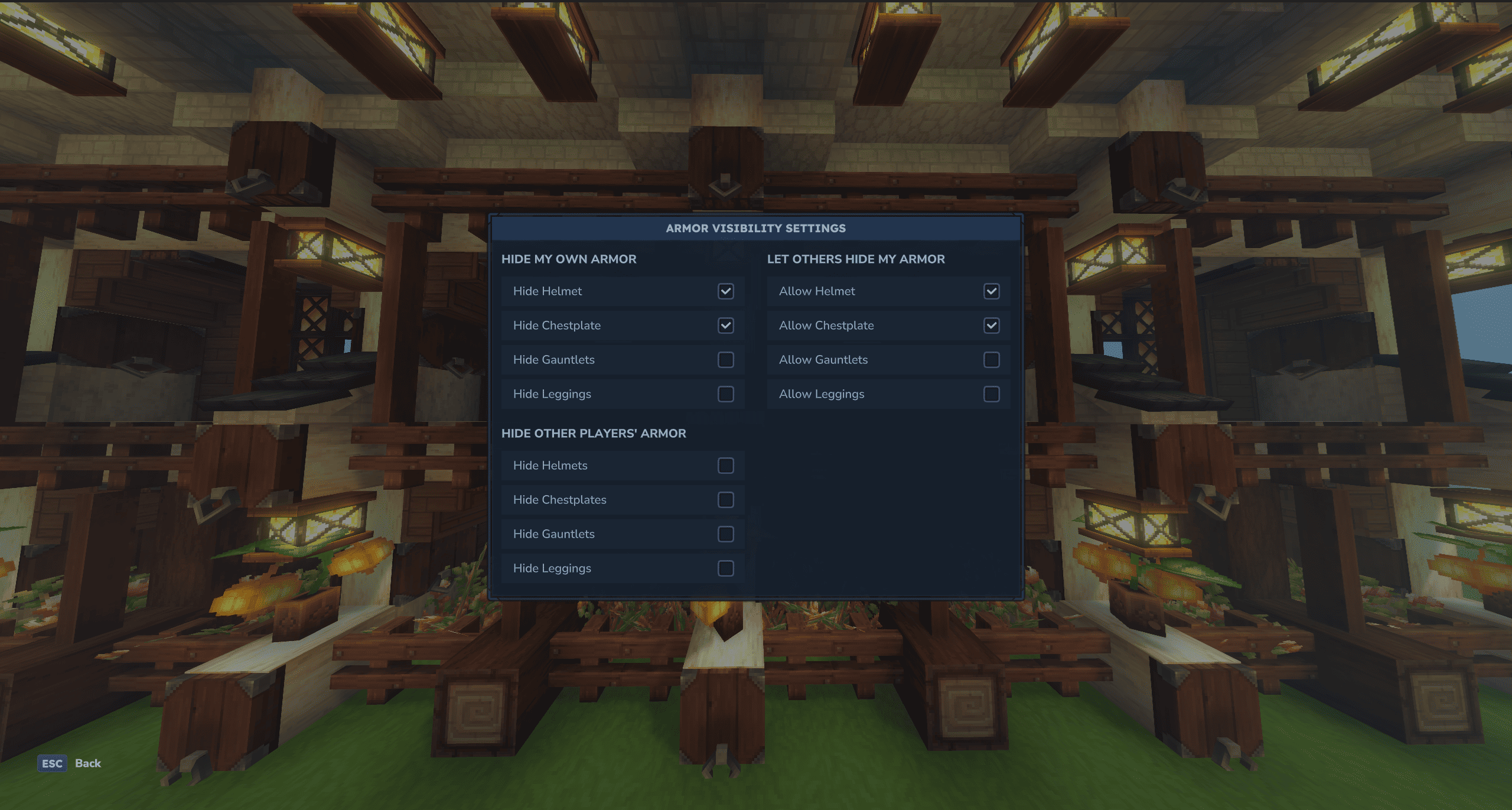
Interactive GUI
Modern Hytale Settings-style interface with three-column layout and checkboxes for easy configuration.
Multi-Language Support
Built-in translations for English, Spanish, Portuguese, French, German, and Russian. Change language directly from the UI or via /hidearmor language <code>.
Persistent Settings
All preferences automatically save to disk and restore on server restart.
How It Works
Mutual Opt-In System
For other players' armor to be hidden, both conditions must be met:
- Viewer has enabled "Hide Others' [piece]"
- Target player has enabled "Allow Others [piece]"
Example:
- Player A enables "Hide Others' Helmet"
- Player B has NOT enabled "Allow Helmet"
- Result: Player A still sees Player B's helmet (permission denied)
Once Player B enables "Allow Helmet", Player A will no longer see it.
Commands
Toggle Head slot only.
/hidehelmet
Output:
HideHelmet: ONHideHelmet: OFF
/hidearmor
| Usage | Description |
|---|---|
/hidearmor |
Show help + current status |
/hidearmor status |
Show hidden slots |
/hidearmor <slot> |
Toggle slot (head, chest, hands, legs) |
/hidearmorui |
Opens Gui menu for toggle |
/hidearmor on <slot> |
Force hide slot |
/hidearmor off <slot> |
Force show slot |
/hidearmor all |
Toggle all slots |
/hidearmor on all |
Hide all slots |
/hidearmor off all |
Show all slots |
Examples:
/hidearmor                  Open the interactive GUI
/hidearmorui                Alternative command to open GUI
Self Armor Control
/hidearmor <piece>          Toggle specific piece (head|chest|hands|legs)
/hidearmor all              Toggle all armor pieces
/hidearmor on <piece>       Force hide piece
/hidearmor off <piece>      Force show piece
/hidearmor on all           Hide all pieces
/hidearmor off all          Show all pieces
Hide Other Players' Armor
/hidearmor hideothers <piece>       Toggle hiding piece on others
/hidearmor hideothers all           Toggle hiding all on others
Permission Control
/hidearmor allowothers <piece>      Toggle allowing others to hide piece
/hidearmor allowothers all          Toggle allowing all pieces
Status & Info
/hidearmor status           Show all current settings
/hidehelmet                 Quick toggle for helmet only
GUI Layout
The interface is organized into three columns with a Hytale Settings-style design:
Left Column:
- Hide My Own Armor - Independent checkboxes for each armor slot
Middle Column:
- Hide Other Players' Armor - Choose which pieces to hide on others
Right Column:
- Let Others Hide My Armor - Grant permission for specific pieces
Language Selector:
- Bottom row with buttons for EN, ES, PT, FR, DE, RU
- Change display language instantly from within the UI
Each section has dark row backgrounds with right-aligned checkboxes and uppercase section headers.
Installation
- Download the latest
.jarfrom the releases page - Place it in your server's
pluginsfolder - Restart the server
- Configuration file
players.jsonwill be created automatically
Configuration
Settings are stored in plugins/HideArmor/players.json:
{
  "players": { ... },
  "config": {
    "defaultMask": 0,
    "forcedMask": 0,
    "refreshDelayMs": 50
  }
}
| Setting | Default | Range | Description |
|---|---|---|---|
defaultMask |
0 |
0-4095 | Default armor visibility for new players |
forcedMask |
0 |
0-4095 | Force hide settings (overrides player preferences) |
refreshDelayMs |
50 |
10-1000 | Delay (ms) before refreshing armor after inventory changes |
Tip: Increase
refreshDelayMsto reduce flickering during fast inventory operations. Default is 50ms (1 tick).
Permissions
Permission Nodes
| Permission | Command | Description |
|---|---|---|
dev.nxtime.hidearmor.command.hidearmor |
/hidearmor |
Main armor visibility command |
dev.nxtime.hidearmor.command.hidehelmet |
/hidehelmet |
Quick helmet toggle |
dev.nxtime.hidearmor.command.hidearmoradmin |
/hidearmoradmin |
Admin configuration (admin only) |
dev.nxtime.hidearmor.command.debug |
/hhdebug |
Debug command (admin only) |
Note: OP players with
*permission have access to all commands by default.
LuckPerms Integration
HideArmor automatically detects if LuckPerms is installed and uses it for permission management.
With LuckPerms Installed
When LuckPerms is present:
- The plugin skips modifying
permissions.json - All permission checks use LuckPerms API
- Manage permissions via
/lpcommands
Granting Permissions (LuckPerms)
Grant to a group:
# Player commands (for regular players)
/lp group default permission set dev.nxtime.hidearmor.command.hidearmor true
/lp group default permission set dev.nxtime.hidearmor.command.hidehelmet true
/lp group default permission set dev.nxtime.hidearmor.command.hidearmorui true

# Admin commands (for admin group only)
/lp group admin permission set dev.nxtime.hidearmor.command.hidearmoradmin true
/lp group admin permission set dev.nxtime.hidearmor.command.debug true
Grant to a specific player:
/lp user <username> permission set dev.nxtime.hidearmor.command.hidearmor true
Deny by Default (Recommended)
For security, explicitly deny permissions for the default group:
# Deny all HideArmor commands by default
/lp group default permission set dev.nxtime.hidearmor.command.hidearmor false
/lp group default permission set dev.nxtime.hidearmor.command.hidehelmet false
/lp group default permission set dev.nxtime.hidearmor.command.hidearmorui false
/lp group default permission set dev.nxtime.hidearmor.command.hidearmoradmin false
Then grant to specific groups that should have access:
/lp group member permission set dev.nxtime.hidearmor.command.hidearmor true
Checking Permissions
/lp user <username> permission info dev.nxtime.hidearmor.command.hidearmor
/lp group <groupname> permission info
Without LuckPerms (Native Permissions)
If LuckPerms is not installed, permissions are managed via the server's permissions.json file.
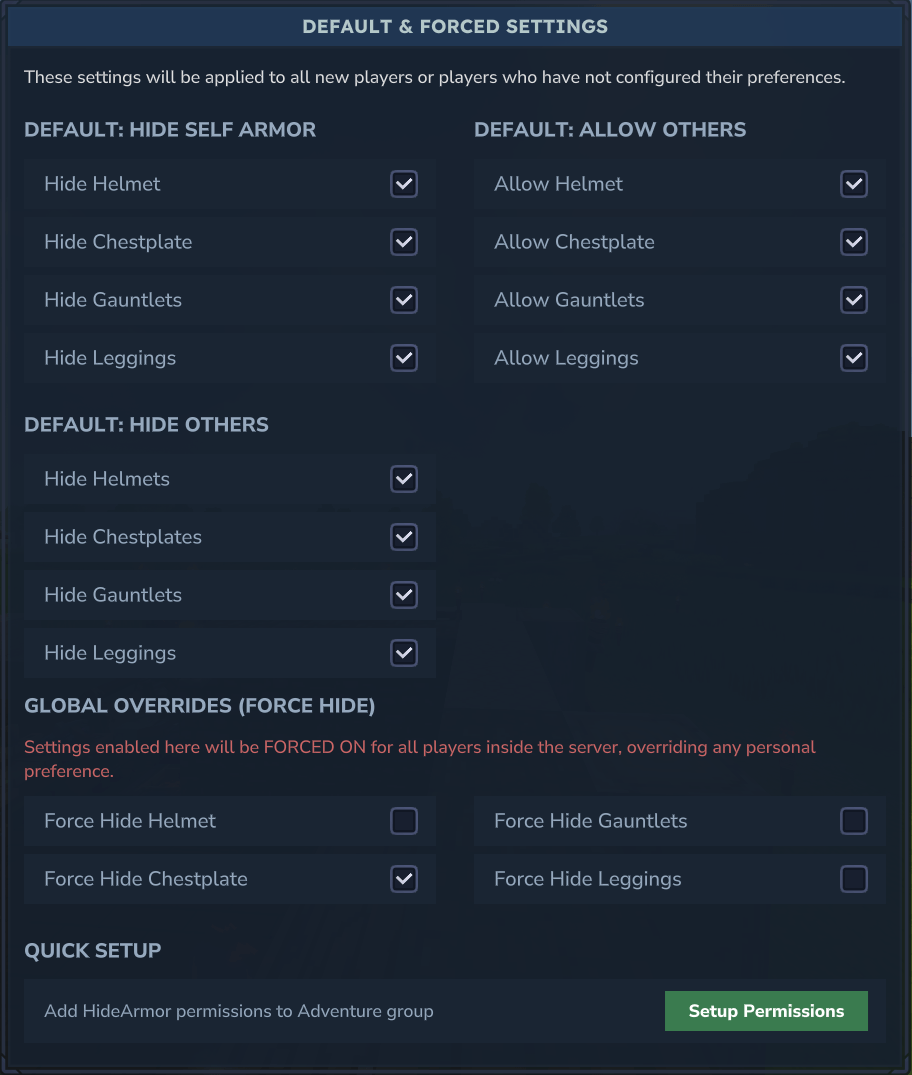
Quick Setup (Admin GUI)
- Run
/hidearmoradmin - Click "Setup Permissions" button
- This automatically adds HideArmor permissions to the Adventure group
Manual Setup
Edit your server's permissions.json:
{
  "groups": {
    "Adventure": [
      "dev.nxtime.hidearmor.command.hidearmor",
      "dev.nxtime.hidearmor.command.hidehelmet",
      "dev.nxtime.hidearmor.command.hidearmorui"
    ],
    "OP": [
      "*"
    ]
  }
}
Admin Configuration
Admins can access the global configuration menu via:
/hidearmoradmin
(Requires permission: dev.nxtime.hidearmor.command.hidearmoradmin)
Features:
- Default Settings: Configure the default visibility settings for new players or those who haven't set preferences.
- Example: Set "Hide Helmet" as default, so all new players join with hidden helmets.
- Force Overrides: Global settings that override ANY player preference.
- Example: "Force Hide Helmet" will ensure NO ONE can see their helmet, regardless of their personal setting.
- Hot Reload: Reload configuration from disk without restarting the server.
- Command:
/hidearmoradmin reload
- Command:
Persistence
Storage Location: plugins/HideArmor/players.json
Format:
{
  "players": {
    "uuid": mask_value
  }
}
Mask Format: 12-bit integer
- Bits 0-3: Self armor (head, chest, hands, legs)
- Bits 4-7: Hide others' armor
- Bits 8-11: Allow others permissions
Settings are automatically saved with a 1.5 second debounce to reduce disk I/O.
Technical Details
Packet Filtering
- Intercepts outgoing
EntityUpdatespackets - Modifies
Equipment.armorIdsbased on visibility rules - Uses UUID caching for performance optimization
- Thread-safe state management with
ConcurrentHashMap
What It Does NOT Do
- Does not modify actual equipped items
- Does not change inventory contents
- Does not affect armor durability or stats
- Does not affect server-side combat calculations
- Does not hide hand-held tools or weapons
Performance
- Zero server-side gameplay impact
- Minimal packet processing overhead
- Efficient caching system for entity resolution
- Debounced disk writes
Compatibility
Hytale Version: Early Access SDK
Server Type: Hytale dedicated servers
Conflicts: None known
Troubleshooting
Armor not hiding:
- Check that settings are enabled in the GUI
- For other players' armor, verify both conditions are met (hide + allow)
- Try
/hidearmor statusto verify current settings
Settings not saving:
- Check file permissions on
plugins/HideArmor/directory - Verify
players.jsonis not locked by another process - Check server logs for save errors
GUI not opening:
- Ensure you're using
/hidearmorwith no arguments - Check console for UI loading errors
- Verify the
.uifile is present in the jar
Version History
v0.8.0-alpha - Internationalization & UI Improvements
- Added multi-language support (EN, ES, PT, FR, DE, RU)
- New three-column layout for both user and admin UIs
- Language selector in both
/hidearmorand/hidearmoradminGUIs - Server-wide default language setting with persistence
- Updated command messages to include
[HideArmor]prefix - Removed Chinese language button (requires Font Fix mod for CJK support)
v0.7.0-alpha - Admin Configuration & Utilities
- Added admin configuration menu (
/hidearmoradmin) - Default settings for new players
- Force override system (global armor hiding)
- Hot reload command (
/hidearmoradmin reload) - Created utility classes (
CommandUtils,PluginLogger,GuiUtils) - Centralized logging and argument parsing
- Real-time force settings application
v0.6.0-alpha - Permission System
- Permission-based command access
AbstractPlayerCommandintegration- Server permission configuration support
v0.4.0-alpha - Mutual Opt-In System
- Added "Hide Other Players' Armor" feature
- Added "Allow Others" permission system
- Implemented mutual opt-in logic
- Expanded GUI with three sections
- Extended persistence to 12-bit masks
- Added new command subcommands
v0.3.0-alpha - Interactive GUI
- Added native Hytale UI integration
- Checkbox-based controls
- Real-time visual updates
v0.1.0-alpha - Initial Release
- Self-armor hiding functionality
- Command-line interface
- Basic persistence
Credits
Inspired by PabloBora/HideHelmet
Built for the Hytale modding community.
License
See LICENSE file for details.