
 Quality of Life
 Utility
EliteEssentials
A comprehensive server essentials plugin for Hytale that brings everything you need to run a professional multiplayer server. From advanced teleportation systems and home management to group-based chat formatting and customizable kits - EliteEssentials has it all.
Fully modular design - Enable only the features you want. LuckPerms & HyperPerms compatible - Seamless integration with advanced permission systems. Actively developed - Regular updates with new features and improvements.
Features
Full Localization Support
All 500+ player-facing messages are configurable in messages.json. Translate your server to any language!
- Placeholder support:
{player},{seconds},{name},{count},{max},{location} - Config auto-migrates - existing settings preserved when updating
Home System
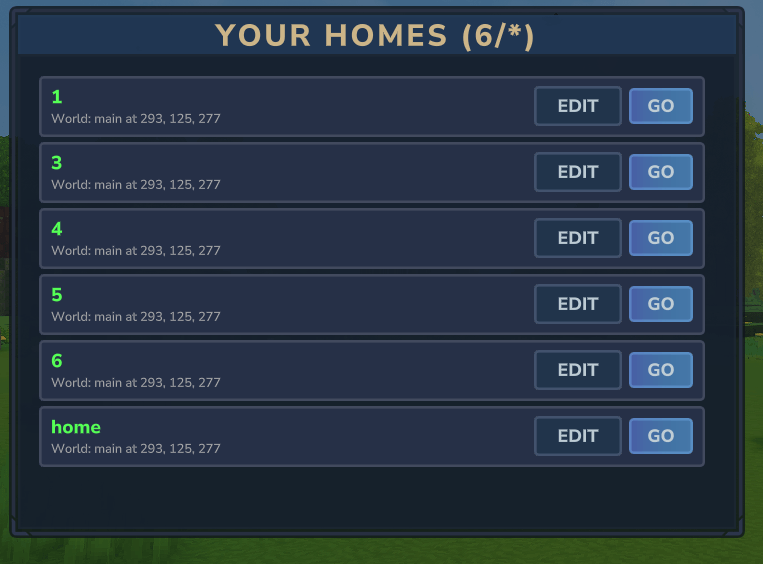
/sethome [name]- Save named home locations (default: "home")/home [name]- Teleport to your saved homes/delhome <name>- Delete a home/homes- List all your homes- Configurable max homes per player
Server Warps
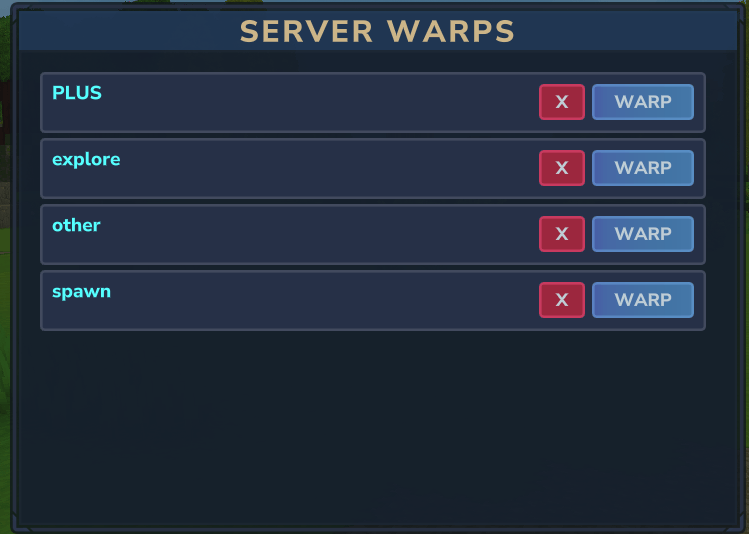
/warp- Open warp GUI or use/warp <name>to teleport to a warp/warp list- Text list of all warps/warpadmin- Admin panel: create, delete, or inspect warps/warpsetperm <warp> <all|op>- Set warp permission (Admin)/warpsetdesc <warp> <desc>- Set warp description shown in GUI (Admin)- Permission levels:
all(everyone) orop(admins only); per-warp permissions in advanced mode - Persisted to
warps.json
Player Warps
/pwarp gui- Open the player warps GUI with pagination and filter buttons/pwarp create <public|private> <name> [description]- Create a warp at your location/pwarp <name>- Teleport to a player warp/pwarp delete <name>- Delete your warp (admins can delete any)/pwarp toggle <name>- Switch between public and private visibility/pwarp list- List your warps with count and limit/pwarp info <name>- View warp details/pwarp setdesc <name> <desc>//pwarp setloc <name>- Update description or location- Public warps visible to everyone; private warps visible only to the owner
- Per-group warp limits, cooldowns, warmups, and costs via LuckPerms/HyperPerms
- Disabled by default; enable with
playerWarps.enabled: true
Back Command
/back- Return to your previous location- Remembers multiple locations (configurable history)
- Works on death - return to where you died (configurable)
Random Teleport
/rtp- Teleport to a random location in the world- Safe landing detection (avoids spawning underground)
- Configurable min/max range, cooldown, and warmup
- Per-group ranges (advanced permissions mode) - give different groups different min/max distances
rtp.permissionRanges- named ranges granted witheliteessentials.command.tp.rtp.range.<name>rtp.groupRanges- ranges keyed directly by LuckPerms or HyperPerms group name- Both are empty by default; see PERMISSIONS.md for examples
- Per-world ranges -
rtp.worldRangessets min/max per world - Force World Mode - Optionally restrict RTP to a specific world
rtp.forceWorldEnabled: false(default) - RTP within current worldrtp.forceWorldEnabled: true- Always RTP to specified worldrtp.forceWorld- Specify which world to force (e.g., "main", "explore")- Perfect for servers with multiple worlds where you want RTP only in one
Teleport Requests
/tpa <player>- Request to teleport to another player/tpahere <player>- Request a player to teleport to you/tpaccept- Accept a teleport request/tpdeny- Deny a teleport request/tphere <player>- Instantly teleport a player to you (Admin)- 30-second timeout (configurable)
Spawn
/spawn [name]- Teleport to spawn (nearest or named when per-world spawns are enabled)/setspawn [name]- Set spawn at your location (Admin); when per-world, use name for current world/delspawn <name>- Delete a named spawn point (Admin)/spawns- List spawn points in current world (Admin)/setfirstjoinspawn- Set where new players spawn (Admin)/delfirstjoinspawn- Remove first-join spawn (Admin)- Per-world or global spawn:
spawn.perWorld: false(default) = main world spawn;true= current world's spawn. Usespawn.mainWorldto set the main world. - Multi-spawn behavior: When per-world is enabled with multiple named spawns, choose nearest (
multiNearbySpawn) or random (multiRandomSpawn) spawn selection for/spawnand death respawn. - Spawn on login:
spawn.teleportOnEveryLoginrewrites player save on disconnect so they load directly at spawn (no teleport flash).
Kit System
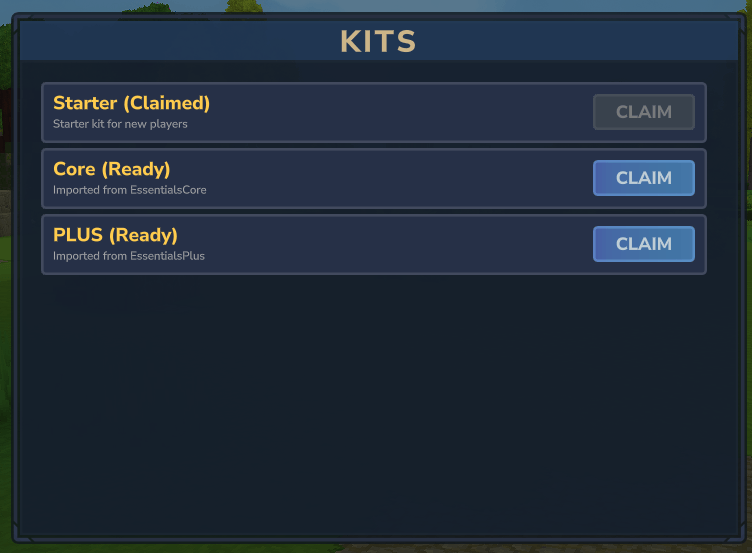
/kit- Open kit GUI;/kit <name>- Claim a specific kit (alias:/kitsfor GUI)/kit create <name> [cooldown] [onetime]- Create a kit from your inventory (Admin)/kit delete <name>- Delete a kit (Admin)- One-time kits - Kits that can only be claimed once per player
- Cooldown kits - Configurable cooldown between claims
- Per-rank kit cooldowns - Override kit cooldowns per group via LuckPerms/HyperPerms (
kit.cooldown.<kitname>.<seconds>) - Inventory space check - Kits are blocked when inventory is full (replace-inventory kits are exempt)
- Starter Kit - Automatically given to new players on first join
- Kit Commands - Kits can execute server commands on claim (e.g., grant permissions, give currency, run any plugin command)
- Fully configurable items, cooldowns, and permissions per kit
Utility Commands
/god- Toggle invincibility (Admin)/heal [player]- Fully restore health (self: Everyone when enabled; others: Admin)/fly- Toggle creative flight (Admin); optional cost-per-minute for limited paid flight/flyspeed <1-100|reset>- Set fly speed multiplier (Admin)/top- Teleport to the highest block at your current position (Admin)- Console support -
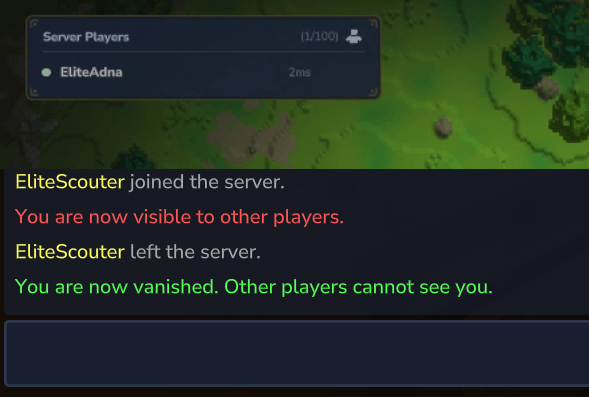
/repair,/heal,/god,/fly,/flyspeed, and/clearinvcan target specific players from console or NPCs /msg <player> <message>- Send a private message/reply- Reply to the last private message (aliases: /r)/clearinv [player]- Clear own or target's inventory (Admin, aliases: /clearinventory, /ci)/trash [size]- Open disposal window to trash items (optional 1–45 slots)/repair [all]- Repair held item or all items (Admin)/vanish- Toggle invisibility with fake join/leave messages (Admin)/invsee <player>- View (and optionally modify) another player's inventory (Admin)
Command Aliases
/alias create <name> <command> [permission]- Create custom shortcut commands (Admin)/alias delete <name>- Delete an alias/alias list- List all aliases/alias info <name>- Show alias details- Works with ANY command - Execute commands from any mod/plugin (e.g.,
/alias claims scruns/sc) - Silent mode - Add
"silent": truein aliases.json to suppress teleport messages - Command chains - Use
;to execute multiple commands (e.g.,warp spawn; heal; fly) - Security - Two-gate permission model: alias permission controls who can use the alias, target command permission is always enforced to prevent privilege escalation
- Optimized paths - EE commands (warp, spawn, home, etc.) support silent mode and /back saving
- Generic dispatch - All other commands (including other mods) run via
CommandManager.handleCommand() - Auto-generated permissions - Custom permissions auto-generate as
eliteessentials.command.alias.<name>- Example:
/alias create chatty /gc alias.chattycreates permissioneliteessentials.command.alias.chatty - Permissions
everyoneandopremain unchanged
- Example:
Communication & Server Management
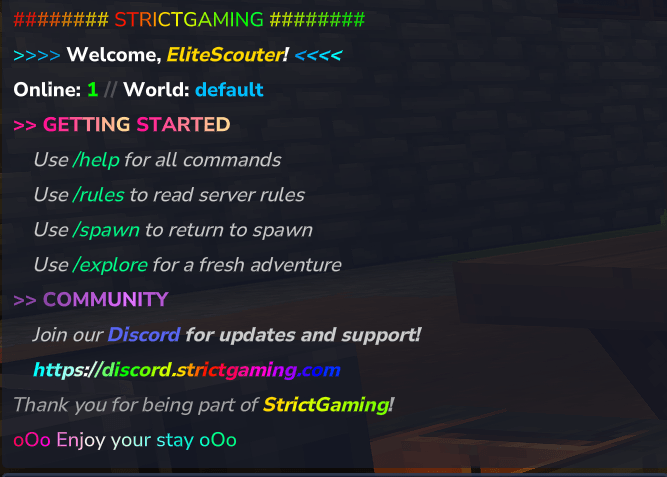
/motd- Display the Message of the Day- Rich formatting with color codes (
&a,&c,&l, etc.) - Clickable URLs automatically detected
- Placeholders:
{player},{server},{world},{playercount} - Stored in
motd.jsonfor easy editing - Auto-display on join (configurable)
- Rich formatting with color codes (
/rules- Display the server rules- Color-coded formatting for readability
- Stored in
rules.jsonfor easy editing - Fully customizable content
/broadcast <message>- Broadcast a message to all players (Admin, alias: /bc)- Supports color codes for formatted announcements
/clearchat- Clear chat for all players (Admin, alias: /cc)- Displays configurable message after clearing
/list- Show all online players (aliases: /online, /who)- Displays player count and sorted list of names
- Helpful for finding exact player names for commands
- Group-Based Chat Formatting - Customize chat appearance by player group
- Works with LuckPerms groups and simple permissions
- Priority-based group selection (highest priority wins)
- Color codes and placeholders:
{player},{displayname},{message},{prefix},{suffix},{group},{time},{date} - Timestamps in chat:
{time}and{date}with configurable patterns and time zone (chatFormat.timeFormat,dateFormat,timeZone) - Hex color support: Use
&#RRGGBBformat for precise colors (e.g.,&#FF5555) - LuckPerms prefix/suffix support: Use
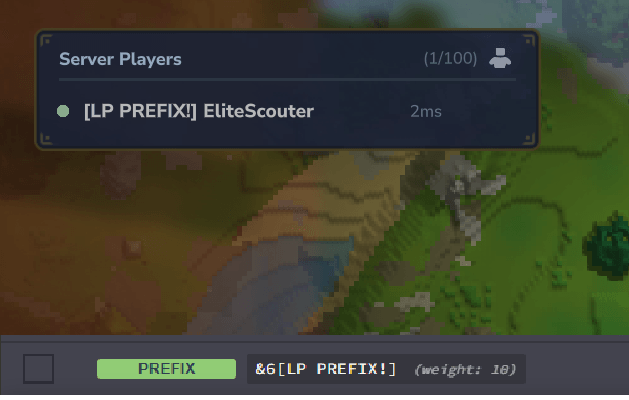
{prefix}and{suffix}to display LuckPerms meta - Create gradients with per-character hex colors
- Fully configurable per group in
config.json - Easy to add custom groups
- PlaceholderAPI Integration - Full support for cross-plugin placeholders
- Use placeholders from other plugins in chat format (e.g.,
%vault_eco_balance%) - EliteEssentials provides its own placeholders for other plugins to use
- Config option:
chatFormat.placeholderapito toggle PAPI processing
- Use placeholders from other plugins in chat format (e.g.,
- Range-Based Group Chat - Create proximity-based chat channels
- Configure
rangefield in group chats for local/proximity chat - Perfect for RP servers where only nearby players should hear you
- Configure
- Group Chat Formatting - Use the same prefix/color formatting from regular chat in group chat
- When enabled, player names in group chat use LuckPerms prefixes/suffixes and group priorities
- Configurable format template:
{channel_color}{channel_prefix} {chat_format} - Admin spy mode via
/spy gchat(legacy/gcspyalias still works) to monitor all channels
- Staff Spy - Unified
/spycommand for staff monitoring with three independently toggleable modes/spy gchat- See group chat messages from channels you don't belong to/spy dm- See all/msgand/replyprivate messages between players/spy command- See all commands executed by other players/spywith no arguments shows your current spy status- Each mode is independently configurable in
config.jsonunder thespysection - Permission:
eliteessentials.admin.spy
- Group Chat Channels - Create private chat channels for different groups
- Group-based chats tied to LuckPerms groups (e.g., admin, moderator)
- Permission-based chats tied to permission nodes (e.g., trade chat)
- Range-limited chats for proximity-based communication
/gcset [chat]- Set your default group chat for/gc- Configure channels in
groupchat.json
- Join Messages - Automatic messages when players join
- First join messages broadcast to everyone
- Fully customizable in config
- Option to suppress default Hytale join messages
- Greetings - Rule-based conditional messages on join, world enter, or respawn
- Send different messages to different players based on group, permissions, world, or first-join status
- Broadcast mode - Optionally announce to all players (e.g., VIP join announcements)
- Placeholders:
{player},{displayname},{world},{group},{playercount} - Configurable delay, show-once per session, and stop-after-match
- Vanish-safe: broadcast rules are skipped for vanished players
- Rules stored in
greetings.json, reloads with/ee reload
Auto Broadcast
- Scheduled announcements that cycle through a list of messages on a configurable interval.
- Configure in
autobroadcast.jsonwith multiple independent broadcast groups, each with its own interval and message list. - Per-broadcast options:
enabled,intervalSeconds,prefix,messages,requirePlayers. - Messages support color codes, hex colors, and the standard chat placeholders.
- Reloads live with
/ee reload. Master toggle viaautoBroadcast.enabledinconfig.json.
Nickname System
/nick <nickname>- Set your own display nickname (persists across restarts)/nick off- Clear your own nickname/nick <player> <nickname|off>- Set/clear another player's nickname (requiresmisc.nickname.others)/realname <name>- Look up the real username behind a nickname (requiresmisc.nickname.lookup)- Nicknames appear in chat, group chat, tab list,
/msg,/list, and join/quit messages - Color codes in nicknames gated behind
eliteessentials.command.misc.nick.colorpermission - Note: other mods will still show the player's real username
- Admin only in simple mode
Ignore System
/ignore <player>- Block a player's public and private messages/ignore list- View all players you are currently ignoring/unignore <player>- Stop ignoring a specific player/unignore all- Stop ignoring all players (reset)- Ignored players' chat messages are hidden only for you
- Private messages from ignored players are silently blocked
- Data stored per-player (persists across restarts)
Mute System (Admin)
/mute <player> [reason]- Mute a player server-wide with optional reason/tempmute <player> <time> [reason]- Mute a player for a set duration- Time format:
1d(1 day),2h(2 hours),30m(30 minutes),1d12h(1 day 12 hours) - Supports days (d), hours (h), minutes (m), seconds (s); a bare number means minutes
- Runnable from the console
- Time format:
/unmute <player>- Unmute a player (works on both permanent and temporary mutes)- Muted players cannot send public chat or private messages
- Muted players are notified when muted/unmuted, and temp mutes report the time remaining
- Mute data stored in
mutes.json(persists across restarts) - Temporary mutes expire on their own and are cleaned up on server start
Ban System (Admin)
/ban <player> [reason]- Permanently ban a player with optional reason/tempban <player> <time> [reason]- Temporarily ban a player- Time format:
1d(1 day),2h(2 hours),30m(30 minutes),1d12h(1 day 12 hours) - Supports days (d), hours (h), minutes (m), seconds (s)
- Time format:
/ipban <player> [reason]- Ban a player's IP address to prevent alt accounts/unban <player>- Remove a permanent or temporary ban/unipban <player>- Remove an IP ban- Banned players are immediately kicked from the server
- Ban data persists across restarts in
bans.json,tempbans.json, andipbans.json - Temporary bans automatically expire and are cleaned up on server start
- IP bans work with both TCP and QUIC connections
- Supports offline player unbanning by name
Freeze System (Admin)
/freeze <player>- Toggle freeze on a player (prevents all movement)- Frozen players cannot move, jump, or fly
- Frozen players are notified when frozen/unfrozen
- Perfect for moderating rule-breakers or conducting investigations
Warning System (Admin)
/warn <player> [reason]- Add a warning to a player/warnings [player]- List warnings for self or target/clearwarnings <player>- Clear all warnings for a player- Warnings stored in
warns.json; optional auto-punish (ban or tempban) at configurable threshold when warning count is reached
Player Info Commands
/seen <player>- Check when a player was last online/playerinfo [player]- Detailed player info (UUID, nickname, first join, last seen, wallet, playtime, coordinates)/joindate [player]- View when a player first joined the server- No argument shows your own join date
- Separate permission for viewing other players' join dates
/playtime [player]- View total play time on the server- No argument shows your own playtime
- Includes current session for accurate live totals
- Separate permission for viewing other players' playtime
- Player data - Per-player files (
mods/EliteEssentials/players/<uuid>.json) store homes, back locations, kit claims, mail, wallet, playtime, nickname, ignore list, and more
Help System
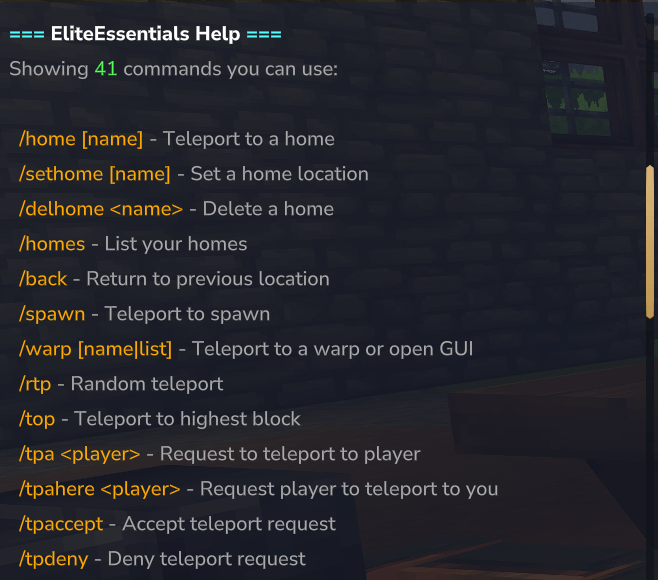
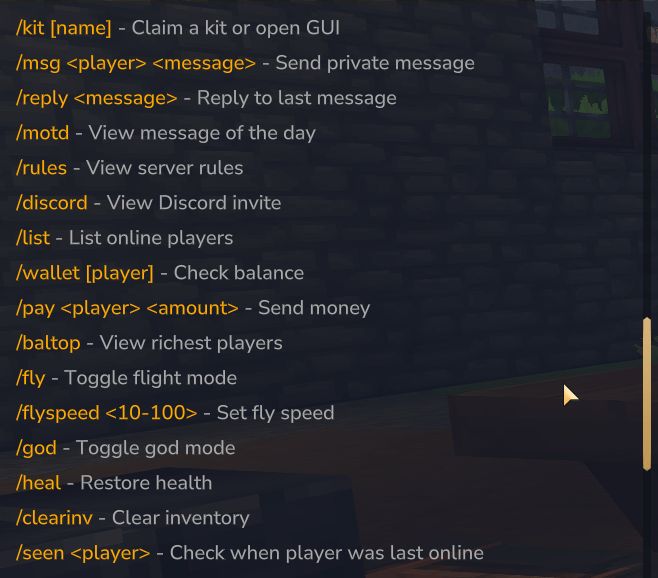
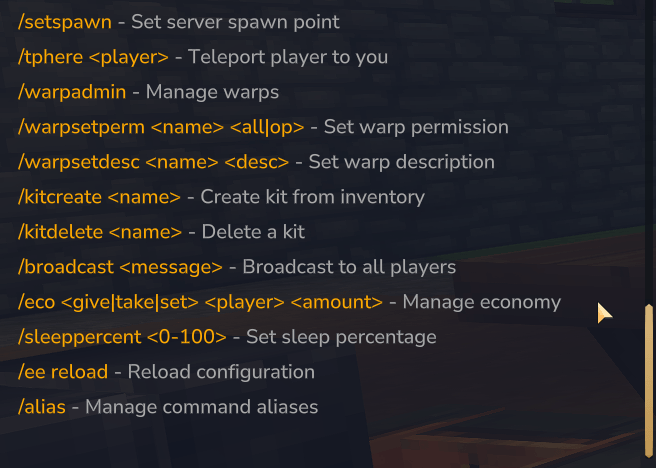
/eehelp- Shows all commands the player has permission to use (alias: /ehelp)- Custom help entries - Add help text for commands from other plugins via
custom_help.json- Each entry has
command,description,permission, andenabledfields - Permission supports
everyone,op, or custom permission nodes - Reloads with
/ee reload
- Each entry has
AFK System
/afk- Toggle AFK (Away From Keyboard) status- Automatic inactivity detection after configurable timeout (default: 5 minutes)
- Players automatically exit AFK when they move
- AFK players show
[AFK]prefix in tab list and/list - Optional chat broadcast when players go AFK or return
- PlayTime Rewards integration - admins can exclude AFK players from earning rewards
- AFK players excluded from sleep percentage count (configurable)
- Configurable: timeout, broadcast, tab list display, reward exclusion, sleep exclusion
Sleep Percentage (Admin)
/sleeppercent <0-100>- Set percentage of players needed to skip the night- Configurable sleep times - Control when players can sleep (
nightStartHour) and wake up (morningHour) - Progress messages shown to all players
- Automatically skips to morning when threshold reached
Economy System (Disabled by Default)
/wallet- View your balance/wallet <player>- View another player's balance (requires permission)/wallet set/add/remove <player> <amount>- Admin balance management/pay <player> <amount>- Send money to another player/baltop- View richest players leaderboard/eco- Console/admin economy management command- Configurable currency name, symbol, and starting balance
- Command costs - charge players for using teleport commands
- Full API for other mods to integrate (
com.eliteessentials.api.EconomyAPI)
Mail System
/mail send <player> <message>- Send mail to any player (online or offline)/mail read [number]- Read a specific mail or first unread/mail list- List all mail with timestamps and unread indicators/mail clear- Clear all mail/mail clear read- Clear only read mail/mail delete <number>- Delete specific mail- Login notification when you have unread mail
- Spam protection with per-recipient cooldown
- Configurable mailbox limit and message length
PlayTime Rewards
- Repeatable Rewards - Trigger every X minutes of playtime (e.g., hourly bonus)
- Milestone Rewards - One-time rewards at specific playtime thresholds (e.g., 100 hours = VIP)
- LuckPerms Integration - Execute LuckPerms commands directly via API:
lp user {player} group set/add/remove <group>- Manage player groupslp user {player} permission set/unset <permission>- Manage permissionslp user {player} promote/demote <track>- Promote/demote on tracks
- Economy Integration - Grant currency rewards with
eco add {player} <amount> - Custom Messages - Configurable messages per reward
- onlyCountNewPlaytime - Option to only count playtime after system was enabled
- Rewards defined in
playtime_rewards.json - Works without LuckPerms - LP commands are skipped with a warning if not installed
Migration (Admin)
/eemigration <source> [force]— Migrate data from other essentials plugins- Sources:
essentialscore,essentialsplus,hyssentials,homesplus - Options: Add
forceto overwrite existing data (use when re-migrating) - EssentialsPlus — Imports warps, kits, spawns, homes, and user profiles (balance, playtime, ipHistory, ignoredPlayers, kit cooldowns) from
mods/fof1092_EssentialsPlus/ - EssentialsCore — Imports warps, spawn, kits, homes, and kit cooldowns from
mods/com.nhulston_Essentials/
SQL Database Storage
- Three storage backends —
"json"(default),"sqlite"(embedded), or"mysql"(external) - SQLite embedded — zero-setup SQL database stored in the plugin data folder
- MySQL/MariaDB — external database for multi-server networks with shared player data
/eemigration sql— Migrate existing JSON data to the configured SQL database (Admin)- Automatic schema management — tables and indexes created on first startup
- Connection pooling — HikariCP with configurable pool size and timeouts
- Async writes — SQL writes run on a background thread, reads use in-memory cache
- Configurable table prefix — default
ee_, avoids conflicts in shared databases - Graceful shutdown — pending writes flushed before pool closes
Configuration
All settings are fully configurable via mods/EliteEssentials/config.json:
- Enable/disable any command - Disabled commands become OP-only
- Cooldowns - Prevent command spam
- Warmups - Require players to stand still before teleporting (with movement detection)
- World blacklists - Restrict commands from being used in specific worlds (supports
*wildcards) - RTP range - Set min/max teleport distance
- Home limits - Max homes per player
- Back history - How many locations to remember
- Death tracking - Enable/disable /back to death location
- Messages - 500+ configurable messages for full localization
Config file is automatically created on first server start with sensible defaults. Existing configs auto-migrate when updating to new versions.
Commands Summary
| Command | Description | Access |
|---|---|---|
/home [name] |
Teleport to home | Everyone |
/sethome [name] |
Set a home | Everyone |
/delhome [name] |
Delete a home | Everyone |
/homes |
List your homes (GUI) | Everyone |
/back |
Return to previous location | Everyone |
/spawn [name] |
Teleport to spawn | Everyone |
/setspawn [name] |
Set spawn | Admin |
/delspawn <name> |
Delete named spawn | Admin |
/spawns |
List spawn points | Admin |
/setfirstjoinspawn |
Set first-join spawn | Admin |
/delfirstjoinspawn |
Remove first-join spawn | Admin |
/rtp |
Random teleport | Everyone |
/rtp <player> [world] |
RTP a player (Admin/console) | Admin |
/tpa <player> |
Request teleport | Everyone |
/tpahere <player> |
Request player to you | Everyone |
/tpaccept |
Accept teleport request | Everyone |
/tpdeny |
Deny teleport request | Everyone |
/tphere <player> |
Teleport player to you | Admin |
/top |
Teleport to highest block | Admin |
/warp / /warp <name> |
Warp GUI or teleport to warp | Everyone |
/warp list |
List warps | Everyone |
/warpadmin |
Warp admin panel | Admin |
/warpsetperm / /warpsetdesc |
Set warp perm/description | Admin |
/pwarp gui |
Player warps GUI | Everyone |
/pwarp <name> |
Teleport to player warp | Everyone |
/pwarp create <vis> <name> [desc] |
Create player warp | Everyone |
/pwarp delete <name> |
Delete your player warp | Everyone |
/kit / /kit <name> |
Kit GUI or claim kit | Everyone |
/kit create <name> [cooldown] [onetime] |
Create kit | Admin |
/kit delete <name> |
Delete kit | Admin |
/list |
Show online players | Everyone |
/afk |
Toggle AFK status | Everyone |
/ignore <player> / /ignore list |
Ignore or list ignored | Everyone |
/unignore <player|all> |
Stop ignoring | Everyone |
/joindate [player] |
View first join date | Everyone |
/playtime [player] |
View total play time | Everyone |
/playerinfo [player] |
Detailed player info | Everyone / Admin* |
/seen <player> |
When player was last online | Everyone |
/god |
Toggle invincibility | Admin |
/heal [player] |
Restore health | Everyone / Admin* |
/fly |
Toggle creative flight | Admin |
/flyspeed <1-100|reset> |
Set fly speed | Admin |
/clearinv [player] |
Clear inventory | Admin |
/trash [size] |
Disposal window | Everyone |
/repair [all] |
Repair items | Admin |
/vanish |
Toggle invisibility | Admin |
/invsee <player> |
View/edit player inventory | Admin |
/msg <player> <msg> |
Private message | Everyone |
/reply |
Reply to last message | Everyone |
/motd |
Display MOTD | Everyone |
/rules |
Display server rules | Everyone |
/discord |
Display discord info | Everyone |
/broadcast <message> |
Broadcast to all players | Admin |
/clearchat |
Clear chat for all players | Admin |
/sendmessage |
Send formatted message (Admin) | Admin |
/gc [chat] <message> |
Group chat | Everyone |
/gcset [chat] |
Set default group chat | Everyone |
/chats |
List chat channels | Everyone |
/gcspy |
Spy on group chats (alias for /spy gchat) |
Admin |
/spy [gchat|dm|command] |
Toggle staff spy modes (group chat, DMs, commands) | Admin |
/mute <player> [reason] |
Mute a player | Admin |
/tempmute <player> <time> [reason] |
Temporarily mute a player | Admin |
/unmute <player> |
Unmute a player | Admin |
/warn <player> [reason] |
Add warning | Admin |
/warnings [player] |
List warnings | Everyone / Admin* |
/clearwarnings <player> |
Clear warnings | Admin |
/ban <player> [reason] |
Permanently ban | Admin |
/tempban <player> <time> [reason] |
Temporarily ban | Admin |
/ipban <player> [reason] |
IP ban | Admin |
/unban <player> |
Unban | Admin |
/unipban <player> |
Remove IP ban | Admin |
/freeze <player> |
Toggle freeze | Admin |
/sleeppercent [%] |
Set sleep percentage | Admin |
/wallet / /wallet <player> |
View balance | Everyone |
/wallet set/add/remove <player> <amount> |
Admin balance | Admin |
/pay <player> <amount> |
Send money | Everyone |
/baltop |
Richest players | Everyone |
/eco |
Economy admin | Admin |
/mail |
Send/receive mail | Everyone |
/nick <nickname> / /nick off |
Set/clear nickname | Admin |
/nick <player> <nickname|off> |
Set/clear other's nickname | Admin+ |
/realname <name> |
Look up real name | Admin |
/alias |
Manage aliases | Admin |
/eehelp |
Show available commands | Everyone |
/eliteessentials reload |
Reload config | Admin |
/eemigration sql [force] |
Migrate JSON data to SQL | Admin |
/eemigration cleanup |
Move old JSON files into backup/ after SQL migration |
Admin |
/eemigration <source> |
Migrate from other plugins | Admin |
/eeadmin |
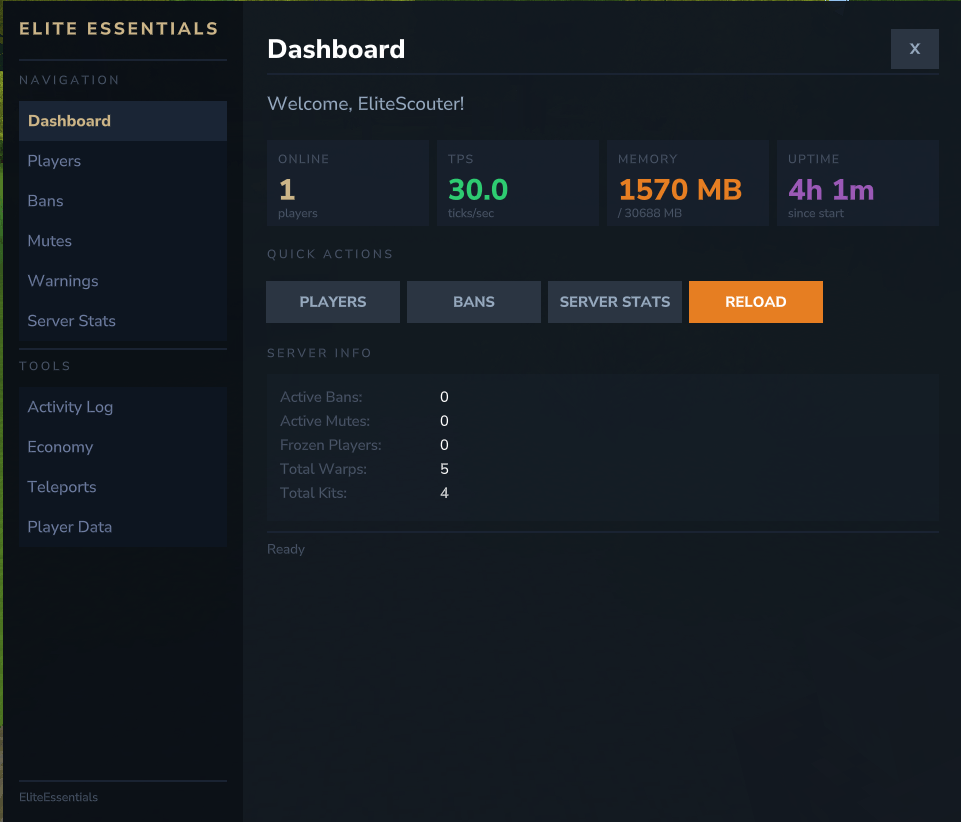
Open Admin UI panel | Admin |
/ee groupsync |
Sync groups between LP/HP and EE | Admin |
Self = Everyone when enabled; others = Admin. In simple mode (default), "Admin" requires OP.
Permissions
EliteEssentials supports two permission modes via advancedPermissions in config.json:
Simple Mode (Default)
- Everyone commands work for all players
- Admin commands require OP or
eliteessentials.admin.*
Advanced Mode (LuckPerms / HyperPerms Compatible)
Full granular permissions following eliteessentials.command.<category>.<action> structure:
| Category | Example Permissions |
|---|---|
| Home | command.home.home, command.home.sethome, command.home.limit.5, command.home.bypass.cooldown |
| Teleport | command.tp.tpa, command.tp.back, command.tp.back.ondeath, command.tp.bypass.warmup.rtp |
| Warp | command.warp.use, command.warp.list, command.warp.<warpname>, command.warp.bypass.cooldown |
| Player Warp | command.pwarp.use, command.pwarp.create, command.pwarp.delete, command.pwarp.limit.5, command.pwarp.bypass.cooldown |
| Player Warp | command.pwarp.use, command.pwarp.create, command.pwarp.delete, command.pwarp.limit.5, command.pwarp.bypass.cooldown |
| Spawn | command.spawn.use, command.spawn.set, command.spawn.delete, command.spawn.list, command.spawn.setfirstjoin, command.spawn.delfirstjoin, command.spawn.protection.bypass |
| Kit | command.kit.use, command.kit.gui, command.kit.<kitname>, command.kit.bypass.cooldown, command.kit.bypass.onetime |
| Misc | command.misc.msg, command.misc.heal, command.misc.heal.others, command.misc.repair, command.misc.repair.all, command.misc.ignore, command.misc.invsee, command.misc.groupchat, command.misc.groupchat.spy, command.misc.nick, command.misc.nick.color, command.misc.nickname.others, command.misc.nickname.lookup |
command.mail.use, command.mail.send |
|
| Chat | chat.color, chat.format, chat.<chatname> (permission-based group chats) |
| Admin | admin.reload, admin.alias, admin.mute, admin.tempmute, admin.unmute, admin.ban, admin.tempban, admin.ipban, admin.unban, admin.unipban, admin.freeze, admin.warn, admin.clearwarnings, admin.spy, admin.adminui |
| Bypass | command.home.bypass.cooldown, command.tp.bypass.warmup, bypass.cost |
See PERMISSIONS.md for the complete permission reference.
Roadmap
- Chat Filter - Configurable word filter with customizable actions (warn, mute, kick).