
 Miscellaneous
 Gameplay
 Utility
 Quality of Life
 Blocks
EasyClaims
Built for the European Hytale survival server at
play.hyfyve.net
Protect your builds on Hytale servers! Claim land, see it on your map, and share with friends.
Quick Start
- Install: Download the latest release and drop the JAR into your server's
mods/folder - Restart your server
- Claim land: Stand where you want to protect and type
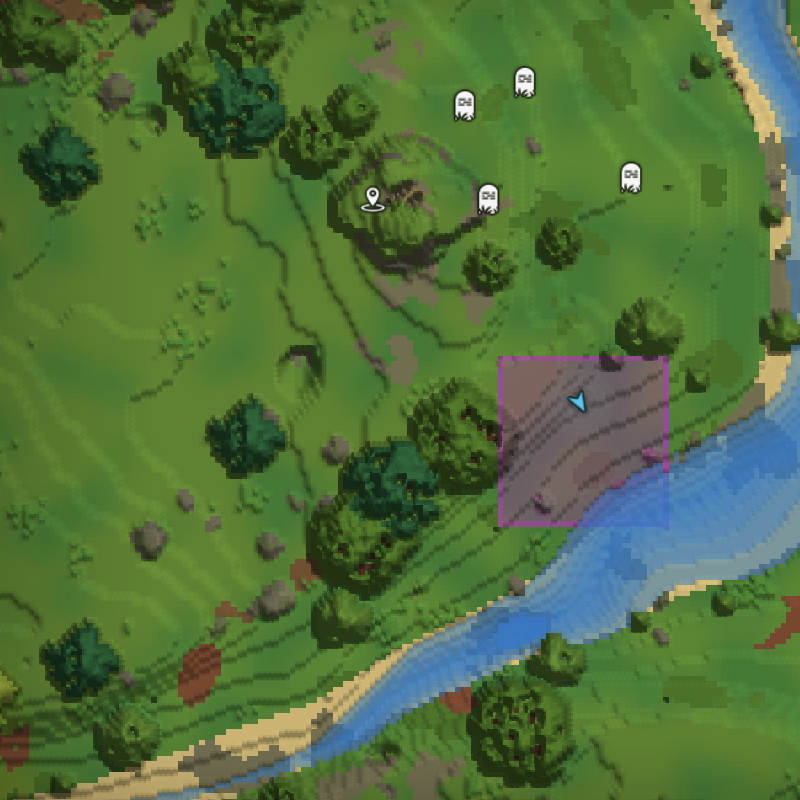
/easyclaims claim - See your claims: Open your map (M) - claimed chunks show in color!
That's it! Your builds are now protected.
Features
- Visual Map Integration - Claimed chunks appear colored on the world map
- In-Game GUI - Manage claims and trusted players through easy-to-use interfaces
- Playtime Rewards - Play longer, claim more land
- Share With Friends - Trust players with different permission levels
- Full Protection - Blocks breaking, placing, and interactions from strangers
- Anti-Griefing Buffer - 2-chunk buffer zone prevents others from claiming too close to you
- PvP Protection - Configure PvP rules per-server or per-claim (safe zones)
- Admin Claims - Server-owned protected areas for spawn, shops, etc.
Commands
All commands use /easyclaims.
GUI Commands
| Command | What it does |
|---|---|
/easyclaims gui |
Open the claim map GUI (see and manage claims visually) |
/easyclaims settings |
Open settings GUI to manage trusted players |
Essential Commands
| Command | What it does |
|---|---|
/easyclaims claim |
Claim the chunk you're standing in |
/easyclaims unclaim |
Remove your claim on current chunk |
/easyclaims list |
List all your claimed chunks |
/easyclaims help |
Show all available commands |
Sharing With Friends
| Command | What it does |
|---|---|
/easyclaims trust PlayerName |
Give full access to a player |
/easyclaims trust PlayerName use |
Let them use doors/buttons only |
/easyclaims trust PlayerName container |
Let them open chests too |
/easyclaims untrust PlayerName |
Remove a player's access |
/easyclaims trustlist |
See who you've trusted |
Tip: Use /easyclaims settings for an easier way to manage trusted players with a GUI!
Other Commands
| Command | What it does |
|---|---|
/easyclaims unclaimall |
Remove ALL your claims (careful!) |
/easyclaims playtime |
Check your playtime and claim slots |
Admin Commands
| Command | What it does |
|---|---|
/easyclaims admin gui |
Open claim manager GUI (admin mode) |
/easyclaims admin config |
Show current settings |
/easyclaims admin set <key> <value> |
Change a setting (saves immediately) |
/easyclaims admin reload |
Reload config from file |
/easyclaims admin unclaim |
Remove claim at your location (any owner) |
/easyclaims admin unclaim <player> |
Remove ALL claims from a player |
/easyclaims admin claim [name] |
Create an admin claim (e.g., "Spawn") |
/easyclaims admin pvp [on/off] |
Toggle PvP in the current claim |
/easyclaims admin grant claims <player> <amount> |
Grant bonus claim slots (additive) |
/easyclaims admin grant maxclaims <player> <amount> |
Increase player's max claims cap (additive) |
/easyclaims admin grant maxclaims <player> unlimited |
Remove claims cap entirely |
/easyclaims admin info <player> |
View a player's claim stats and bonuses |
Settings you can change:
/easyclaims admin set starting 6          # Starting claim slots for new players
/easyclaims admin set perhour 0.25        # Claims earned per hour (0.25 = 1 every 4 hours)
/easyclaims admin set max 100             # Maximum claims any player can have
/easyclaims admin set buffer 2            # Buffer zone in chunks (0 = disabled)
/easyclaims admin set pvpinclaims false   # PvP in player claims (true=PvP, false=PvE)
Player Claim Management:
Grant commands are additive - running them multiple times adds more each time:
# Grant 10 bonus claim slots (added on top of playtime-based limit)
/easyclaims admin grant claims Steve 10

# Grant 10 more (Steve now has 20 bonus slots total)
/easyclaims admin grant claims Steve 10

# Increase max claims cap by 50 (server default + 50)
/easyclaims admin grant maxclaims Alex 50

# Remove the claims cap entirely (unlimited claims)
/easyclaims admin grant maxclaims Alex unlimited

# View a player's claim stats and bonuses
/easyclaims admin info Steve
Note: <player> can be a username (if online or has previously claimed) or UUID. These commands work even when the target player is offline.
Admin Bypass: Admins with easyclaims.admin permission bypass all protection checks and claim limits.
Trust Levels Explained
When you trust someone, you can choose how much access they get:
| Level | Command Example | What They Can Do |
|---|---|---|
| use | /easyclaims trust Steve use |
Open doors, press buttons, flip levers |
| container | /easyclaims trust Steve container |
Above + open chests, barrels |
| workstation | /easyclaims trust Steve workstation |
Above + use furnaces, crafting tables |
| build | /easyclaims trust Steve build |
Full access - can break and place blocks |
Note: If you don't specify a level, players get full build access.
Tip: Use /easyclaims trust PlayerName use for visitors who just need to get through doors!
How Claims Work
- Each claim protects a 32x32 block area (one chunk)
- Claims extend from bedrock to sky - full vertical protection
- You start with 4 claim slots and earn more by playing
- Open your world map (M) to see claims highlighted in color
- Your claims show in your unique color, others show in theirs
- Buffer zone: Other players can't claim within 2 chunks of your claims (prevents griefing)
- Admin claims (light blue) are server-protected areas like spawn
Earning More Claims
The longer you play, the more land you can claim:
| Playtime | Total Claim Slots |
|---|---|
| New player | 4 chunks |
| 1 hour | 6 chunks |
| 5 hours | 14 chunks |
| 10 hours | 24 chunks |
Use /easyclaims playtime to check your progress!
PvP Protection
Server owners can configure PvP behavior:
- PvP Servers (
pvpinclaims true) - Fighting is allowed everywhere including player claims - PvE Servers (
pvpinclaims false) - Player claims become safe zones where PvP is disabled
On the map, safe zones show with a green tint and [Safe] label.
Admin Claims
Admin claims are special server-owned protected areas for spawn, shops, arenas, etc.
- Created with
/easyclaims admin claim [name](e.g.,/easyclaims admin claim Spawn) - PvP disabled by default (toggle with
/easyclaims admin pvp on/off) - Shown in light blue on the map
- Not counted against any player's claim limit
- Bypass buffer zone restrictions
Use admin claims to create protected community areas!
Installation
For Server Owners
- Download the latest JAR from Releases
- Place it in your server's
mods/folder - Restart the server
Setting Up Permissions
Grant these permissions to let players use the plugin:
perm group add Adventure easyclaims.use
perm group add admin easyclaims.admin
The easyclaims.use permission grants access to all player commands (claim, unclaim, trust, etc.).
The easyclaims.admin permission grants access to /easyclaims admin commands (config, set, reload).
Troubleshooting
"You don't have permission"
Ask your server admin to grant you the easyclaims.use permission.
Claims not showing on map?
Try closing and reopening your map, or reconnect to the server.
Can't claim?
- Check if you have available slots:
/easyclaims playtime - Make sure the chunk isn't already claimed by someone else
- You might be too close to another player's claim (2-chunk buffer zone)
License
MIT - Use it however you like!
