 Quality of Life
 Utility
DiscordWebhook




A Hytale plugin that links in-game events to a Discord channel using a webhook. This plugin automatically sends player join, leave, deaths, chat messages, and server lifecycle events to your Discord server.
Current Features
- Event Configuration System: Individual configuration files for each event type
- Placeholder System: Dynamic placeholders like
{player},{message},{deathCause},{time}, etc. - Timezone Support: Time placeholders with timezone control (e.g.,
{time-america/los_angeles}) - Multiple Webhook Channels: Route different events to different Discord channels
- Message Customization: Full control over message format (embeds, plain text, or both)
- Event Toggling: Enable or disable individual events
- Update Check: Check Github releases for updates and notifies you if there is one
- Hot Reload: Reload configuration without restarting the server using
/dw-reload - Default Event Templates: Default event configurations are automatically copied from resources on first launch
Current Events
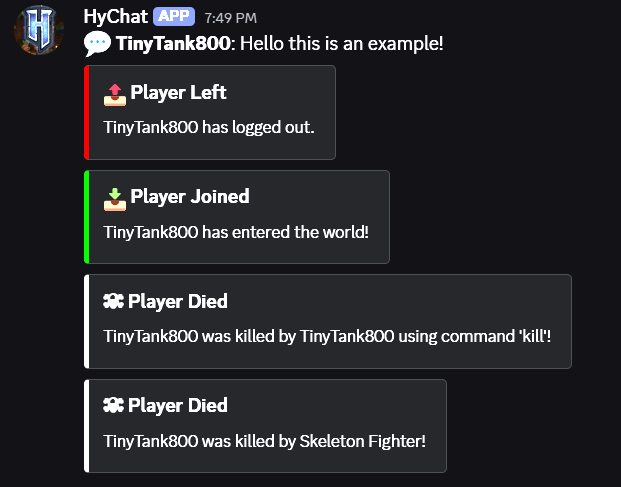
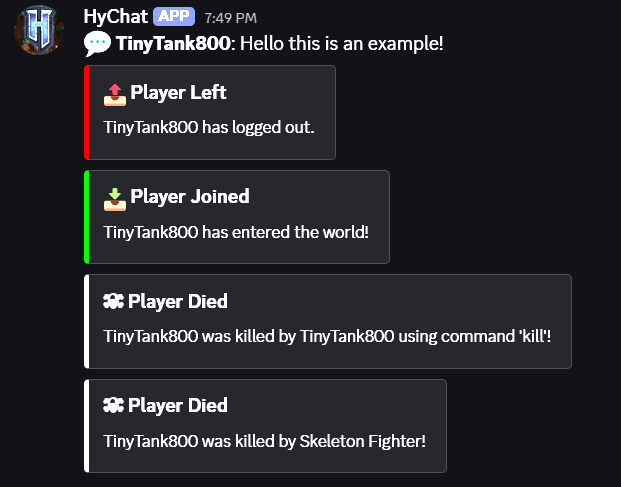
- Player Join Events: Sends customizable notifications when a player joins the server
- Player Leave Events: Sends customizable notifications when a player leaves the server
- Player Death Events: Sends customizable notifications when a player dies on the server
- Player Chat: Forwards all player chat messages to Discord with full customization
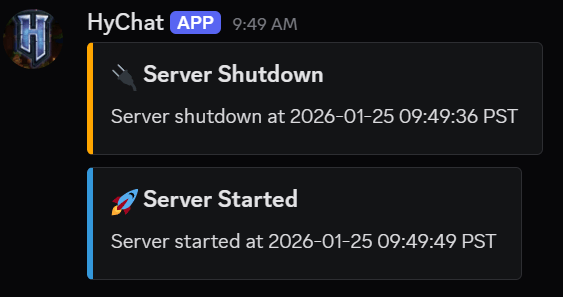
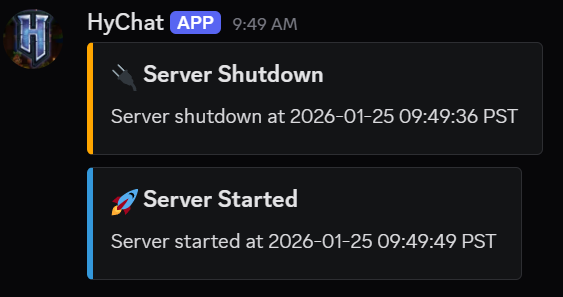
- Server Boot: Sends a notification when the server starts up
- Server Shutdown: Sends a notification when the server shuts down
Installation
- Download the latest release from the releases page
- Place the
DiscordWebhook-x.x.x.jarfile into your Hytale server'smodsfolder - Start your server to generate the configuration files
- Edit the
Jemsire_DiscordWebhook/WebhookConfig.jsonfile and add your Discord webhook URL(s) - (Optional) Customize individual event configs in
Jemsire_DiscordWebhook/events/folder - In-game type
/dw-reloadto hot reload the config to start the plugin
Note: Default event configurations are automatically created on first launch. You can customize them or leave them as-is.
Configuration
After first launch, configuration files will be created in your mods folder. The plugin uses a two-tier configuration system:
- WebhookConfig.json: Main configuration with webhook URLs and channels
- events/: Individual event configuration files
Getting a Discord Webhook URL
- Open your Discord server settings
- Go to Integrations → Webhooks
- Click New Webhook or select an existing webhook
- Copy the webhook URL
- Paste it into your
WebhookConfig.jsonfile
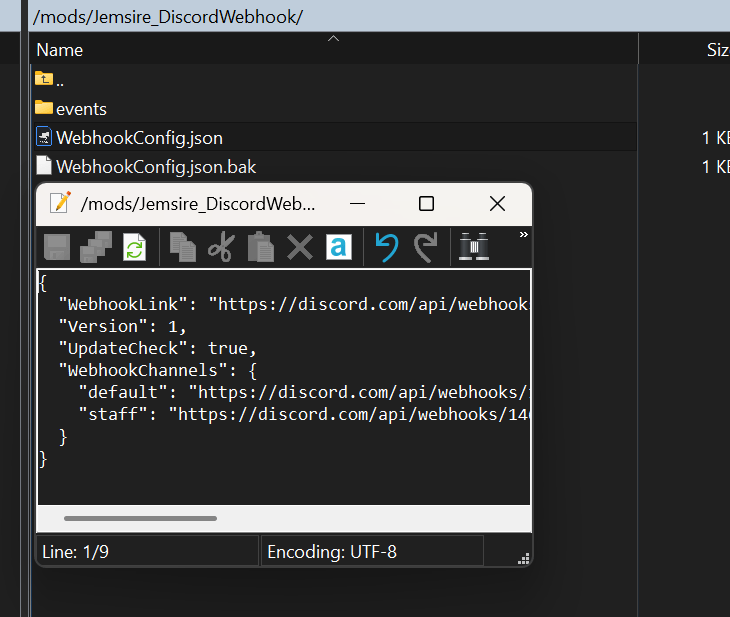
Main Configuration File (WebhookConfig.json)
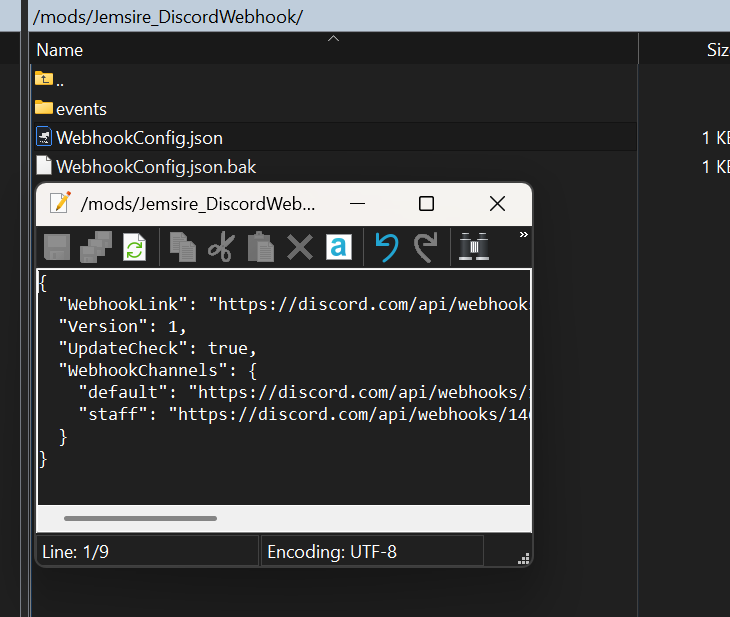
The main configuration file is located at Jemsire_DiscordWebhook/WebhookConfig.json:
{
  "WebhookLink": "https://discord.com/api/webhooks/YOUR_WEBHOOK_URL_HERE",
  "Version": 2,
  "UpdateCheck": true,
  "WebhookChannels": {
    "default": "https://discord.com/api/webhooks/YOUR_DEFAULT_WEBHOOK_URL",
    "staff": "https://discord.com/api/webhooks/YOUR_STAFF_WEBHOOK_URL"
  }
}
Configuration Options:
WebhookLink: Default webhook URL (used as fallback)Version: Configuration version (currently 2)UpdateCheck: Enable/disable automatic update checkingWebhookChannels: Map of channel names to webhook URLs (e.g., "default", "staff", "admin")
Event Configuration Files
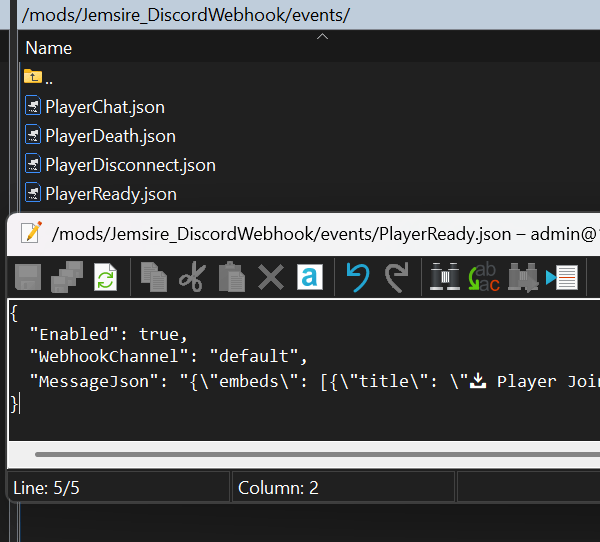
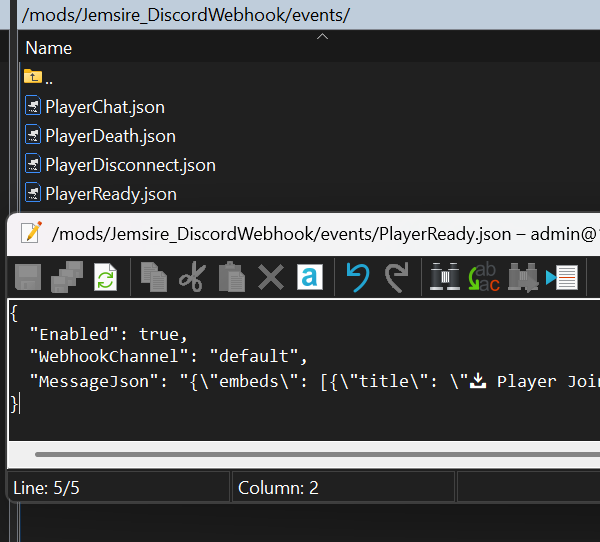
Each event has its own configuration file in Jemsire_DiscordWebhook/events/. Default configs are automatically created on first launch:
PlayerChat.json- Player chat messagesPlayerConnect.json- Player connect eventsPlayerDisconnect.json- Player leave eventsPlayerDeath.json- Player death eventsBoot.json- Server startup eventsShutdown.json- Server shutdown events
Event Configuration Structure
{
  "Enabled": true,
  "WebhookChannel": "default",
  "MessageJson": "{\"content\": \"💬 **{player}**: {message}\"}"
}
Configuration Options:
Enabled: Enable or disable this event (true/false)WebhookChannel: Which webhook channel to use (must match a key inWebhookChannelsfrom main config)MessageJson: Raw Discord webhook JSON with placeholders (see below)
Message Format Examples
Plain Text Message:
{
  "Enabled": true,
  "WebhookChannel": "default",
  "MessageJson": "{\"content\": \"💬 **{player}**: {message}\"}"
}
Embed Message:
{
  "Enabled": true,
  "WebhookChannel": "default",
  "MessageJson": "{\"embeds\": [{\"title\": \"📥 Player Joined\", \"description\": \"{player} has entered the world!\", \"color\": 65280}]}"
}
Combined (Text + Embed):
{
  "Enabled": true,
  "WebhookChannel": "default",
  "MessageJson": "{\"content\": \"New player!\", \"embeds\": [{\"title\": \"Player Joined\", \"description\": \"{player} joined the server\", \"color\": 65280}]}"
}
Server Event with Timezone:
{
  "Enabled": true,
  "WebhookChannel": "default",
  "MessageJson": "{\"embeds\": [{\"title\": \"🚀 Server Started\", \"description\": \"Server started at {time-america/los_angeles}\", \"color\": 3447003}]}"
}
Available Placeholders
Placeholders are replaced at runtime with actual values. Use {placeholderName} in your JSON strings.
Player Placeholders:
{player}- Player's username or display name (context-dependent){playerUsername}- Player's username (alias){playerDisplayName}- Player's display name (alias){playerUuid}- Player's UUID (if available)
Chat Placeholders:
{message}- Chat message content{content}- Chat message content (alias)
Death Placeholders:
{deathCause}- Formatted death message{deathMessage}- Formatted death message (alias){deathMessageRaw}- Raw death message (if available)
Time Placeholders:
{time}- Current time in server's default timezone (format:yyyy-MM-dd HH:mm:ss z){time-<timezone>}- Current time in a specific timezone (e.g.,{time-america/los_angeles})
Timezone Examples:
{time-america/los_angeles}- Pacific Time (PST/PDT){time-america/new_york}- Eastern Time (EST/EDT){time-america/chicago}- Central Time (CST/CDT){time-america/denver}- Mountain Time (MST/MDT){time-europe/london}- UK Time (GMT/BST){time-europe/paris}- Central European Time (CET/CEST){time-asia/tokyo}- Japan Standard Time (JST){time-australia/sydney}- Australian Eastern Time (AEST/AEDT){time-utc}- Coordinated Universal Time (UTC)
Timezone Notes:
- Timezone names are case-insensitive (e.g.,
AMERICA/LOS_ANGELESworks the same asamerica/los_angeles) - Any valid Java timezone ID can be used (see IANA Time Zone Database)
- If an invalid timezone is specified, the system will default to UTC and log a warning to the console
- Time format includes the timezone abbreviation (e.g., "2026-01-25 10:30:45 PST")
Note: Some placeholders won't work in some events. Placeholders are automatically escaped for JSON, so special characters won't break your webhook payload.
Screenshots
Main Configuration File
Event Configuration Files
Discord Messages
Commands
/dw-reload- Reloads the plugin configuration without restarting the server- Permission:
discordwebhook.reload - Usage: Only reloads if the configuration has changed
- Permission:
How It Works
Architecture
The plugin follows a modular architecture:
- Main Plugin Class (
DiscordWebhook.java): Handles plugin initialization, event registration, configuration management, default file copying, and thread pool for async operations - Event Handlers: Listen for Hytale server events and collect placeholder data
- Event Configuration System (
EventConfigManager.java): Manages individual event configs with enable/disable, webhook channels, and custom messages - Placeholder Replacer (
PlaceholderReplacer.java): Replaces placeholders in JSON templates with actual values, including dynamic timezone resolution for time placeholders - Webhook Sender (
DiscordWebhookSender.java): Handles asynchronous HTTP requests to Discord's webhook API via thread pool - Configuration System: Manages webhook URL storage, channels, and reloading
Event Flow
- Event Occurs: A Hytale server event is triggered (e.g., player joins, chats, dies)
- Event Handler: The corresponding event handler collects relevant data (player name, message, etc.)
- Placeholder Map: Event data is converted into a placeholder map (e.g.,
{"player": "Steve", "message": "Hello!"}) - Config Lookup: The system looks up the event's configuration file (e.g.,
PlayerChat.json) - Placeholder Replacement: Placeholders in the
MessageJsonare replaced with actual values - Webhook Channel Resolution: The configured webhook channel is resolved to a webhook URL
- Async Send: The final JSON is sent to Discord asynchronously via a background thread (non-blocking)
Event Handlers
- Player Join (
OnPlayerConnectEvent.java):- Listens for
PlayerConnectEvent - Provides placeholders:
{player},{playerDisplayName},{playerUsername},{playerUuid}
- Listens for
- Player Leave (
OnPlayerDisconnectEvent.java):- Listens for
PlayerDisconnectEvent - Provides placeholders:
{player},{playerUsername},{playerUuid}
- Listens for
- Player Death (
OnPlayerDeathEvent.java):- Listens for
DeathSystems.OnDeathSystemevents - Provides placeholders:
{player},{playerDisplayName},{playerUsername},{playerUuid},{deathCause},{deathMessage},{deathMessageRaw}
- Listens for
- Player Chat (
OnPlayerChatEvent.java):- Listens for
PlayerChatEvent - Provides placeholders:
{player},{playerUsername},{message},{content},{playerUuid}
- Listens for
- Server Boot (
OnBootEvent.java):- Listens for
BootEvent - Provides placeholders:
{time},{time-<timezone>}(any valid timezone) - Example:
{time-america/los_angeles}for Pacific Time
- Listens for
- Server Shutdown (
OnShutdownEvent.java):- Listens for
ShutdownEvent - Provides placeholders:
{time},{time-<timezone>}(any valid timezone) - Example:
{time-america/los_angeles}for Pacific Time
- Listens for
Message Formatting
- Customizable Format: Each event can use plain text, embeds, or both
- Placeholder System: Dynamic values are injected at runtime
- JSON Escaping: All placeholder values are properly escaped to prevent JSON injection
- Multiple Channels: Different events can route to different Discord channels via webhook channels
Building from Source
Prerequisites
- Java Development Kit (JDK) 25 or higher
- Gradle 8.0 or higher
Build Steps
-
Clone the repository:
git clone https://github.com/jemsire/DiscordWebhook.git cd DiscordWebhook -
Ensure
HytaleServer.jaris in thelibs/directory -
Build the project:
./gradlew build -
The compiled JAR will be in
build/libs/DiscordWebhook-x.x.x.jar
Project Structure
DiscordWebhook/
├── src/main/java/com/jemsire/
│   ├── commands/
│   │   └── ReloadCommand.java           # Command handler for /dw-reload
│   ├── config/
│   │   ├── WebhookConfig.java           # Main configuration data class
│   │   ├── EventConfig.java             # Individual event configuration data class
│   │   └── EventConfigManager.java      # Manager for event configs (loading, saving, caching)
│   ├── events/
│   │   ├── OnPlayerChatEvent.java       # Handles player chat messages
│   │   ├── OnPlayerDisconnectEvent.java # Handles player disconnections
│   │   ├── OnPlayerDeathEvent.java      # Handles player deaths
│   │   ├── OnPlayerConnectEvent.java    # Handles player connections
│   │   ├── OnBootEvent.java             # Handles server startup
│   │   └── OnShutdownEvent.java         # Handles server shutdown
│   ├── plugin/
│   │   └── DiscordWebhook.java          # Main plugin class
│   └── utils/
│       ├── DiscordWebhookSender.java     # Webhook HTTP client
│       ├── PlaceholderReplacer.java     # Placeholder replacement utility (includes timezone support)
│       ├── UpdateChecker.java           # Checks for updates
│       └── Logger.java                  # Logging utility
├── src/main/resources/
│   ├── events/                          # Default event configuration templates
│   │   ├── PlayerChat.json
│   │   ├── PlayerConnect.json
│   │   ├── PlayerDisconnect.json
│   │   ├── PlayerDeath.json
│   │   ├── Boot.json
│   │   └── Shutdown.json
│   └── manifest.json                    # Plugin metadata
├── build.gradle.kts                     # Gradle build configuration
└── settings.gradle.kts                  # Gradle project settings
Technical Details
Dependencies
- HytaleServer.jar: Provided at compile time, required at runtime
- Java Standard Library: Uses
java.netfor HTTP connections andjavax.net.sslfor HTTPS
Security
- Webhook URLs are stored in configuration files (not in code)
- JSON content is properly escaped to prevent injection attacks
- Permission-based command access (
discordwebhook.reload)
Performance
- Asynchronous Webhook Sending: All webhook operations run in background threads to prevent blocking the game server
- Thread Pool: Uses a fixed thread pool (2 threads) for concurrent webhook operations
- Non-Blocking: Network requests never block the main game thread, ensuring smooth gameplay
- Update Checking: Update checks run asynchronously during startup to avoid delays
Error Handling
- Validates webhook URL is set before sending messages
- Logs errors to server console if webhook requests fail
- Gracefully handles network errors without crashing the server
- 5-second timeout on all HTTP connections to prevent hanging
Troubleshooting
Messages Not Appearing in Discord
- Check Webhook URLs: Ensure webhook URLs in
WebhookConfig.jsonand event configs are correct - Verify Webhook Status: Check if the webhooks are still active in Discord
- Check Event Enabled Status: Verify that
"Enabled": truein the event's JSON file - Check Webhook Channel: Ensure the
WebhookChannelin event config matches a channel inWebhookChannels - Check Server Logs: Look for error messages in the server console
- Reload Config: Use
/dw-reloadafter updating the configuration - Validate JSON: Ensure your
MessageJsonis valid JSON (use a JSON validator)
Permission Errors
- Ensure you have the
discordwebhook.reloadpermission to use the reload command - Check your server's permission system configuration
Placeholders Not Replacing
- Check that placeholder names match exactly (case-sensitive for non-timezone placeholders)
- Ensure placeholders use the format
{placeholderName}(with curly braces) - Verify that the event handler provides the placeholder you're trying to use
- Check server logs for warnings about missing placeholders
- For timezone placeholders: Ensure the timezone ID is valid (check server logs for warnings about invalid timezones)
- Timezone placeholders are case-insensitive, but must use the format
{time-<timezone>}(e.g.,{time-america/los_angeles})
Event Not Triggering
- Verify the event config file exists in
Jemsire_DiscordWebhook/events/ - Check that
"Enabled": truein the event config - Ensure the
MessageJsonfield is not empty - Check server logs for event-related errors
Contributing
Contributions are welcome! Please feel free to submit a Pull Request.
License
This project is licensed under the MIT License - see the LICENSE file for details.
Author
TinyTank800
- Website: https://jemsire.com/DiscordWebhook
Support
For issues, feature requests, or questions, please open an Issue.