DiscordRelay
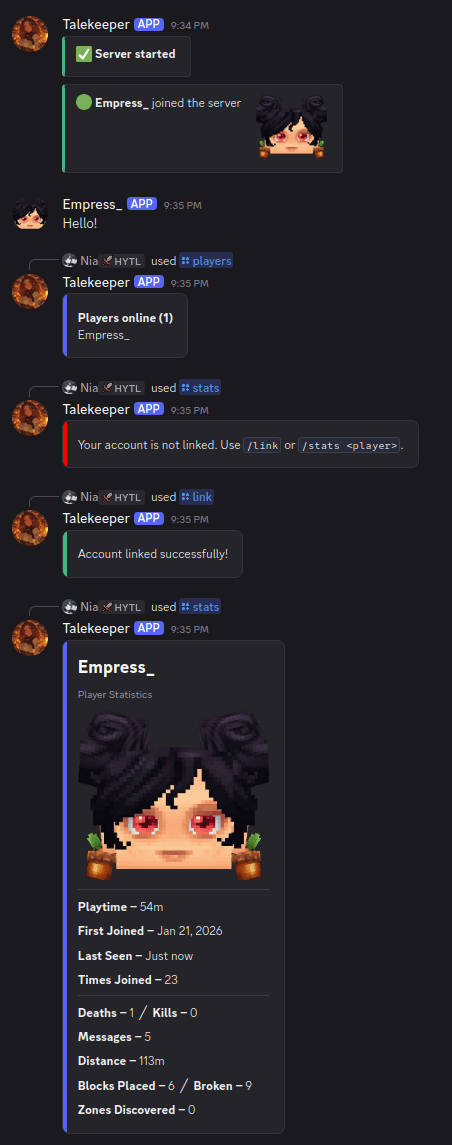
A two way bridge between a Hytale server and Discord. Relay chat both ways, announce player events, run console commands from Discord, link accounts, sync bans, track stats, and more.
Built for Hytale dedicated server 0.5.x. Licensed under the MIT License.
Features
- Two way chat relay with player names and avatars (via a webhook it can create automatically).
- Player events: join, leave, death (using the game's own kill feed), and server start/stop, as plain text or rich embeds, with per event toggles and a pool of randomized death messages.
/playersin game and as a Discord slash command.- Discord console relay: run server commands from a Discord channel, role gated and limited to a command allowlist.
- Account linking (
/link,/unlinkfrom either side) with optional linked role and Discord nickname sync. - Linking gates: optionally require a linked account to chat from Discord and/or to play on the server.
- Discord name in game: show a linked player's Discord name on the world map, above their head, and in chat.
- Player stats:
/statsand a paginated/playtimeleaderboard with all time / today / 7 day / 30 day ranges. - AFK announcements, a single live status embed, and a startup update check.
- Two way ban sync (a game ban bans the linked Discord user and vice versa) and ban / unban broadcasts.
- Zone discovery broadcasts.
- Self documenting
config.ymlthat migrates automatically from older versions.
Installation
- Download the latest
discord-relay-<version>.jarfrom Releases or CurseForge. - Drop it into your server's
mods/folder. - Start the server once to generate
mods/Discord_Relay/config.yml. - Set at least
DiscordTokenandChatChannelIdin that file (see Discord setup below), then restart.
Every option in config.yml has a comment explaining what it does, so the file itself is the reference.
Discord setup
- Create an application and bot at the Discord Developer Portal and copy the bot token into
DiscordToken. - Under the bot's settings, enable the Message Content intent (required for the chat relay).
- Invite the bot to your server with permission to View Channel and Send Messages, plus Manage Webhooks (avatars), Manage Roles and Manage Nicknames (linking), and Ban Members (ban sync) as needed.
- Put the channel IDs you want into
ChatChannelIdand the optionalConsoleChannelId/JoinLeaveChannelId.
Commands
In game: /link, /unlink, /players (aliases list, online).
Discord slash commands: /players, /link, /unlink, /stats [player], /playtime [range] [page].
Building from source
Requires a Java 25 JDK. The plugin compiles against the Hytale server API from Maven, so no game install is needed to build.
./gradlew shadowJar
The plugin jar is produced in build/libs/. Drop it into your server's mods/ folder to run it.
Upgrading from 1.5.1
On first start, the plugin converts an existing 1.5.1 config.yml to the current format and keeps your settings; the original is preserved as config.yml.old. A handful of options that changed or were removed in 2.0 reset to their defaults.
Privacy
Player avatars are rendered by Crafthead from player UUIDs. If you prefer not to use it, set AvatarEnabled to false in the config and the plugin sends messages without avatars.
Contributing
Contributions are welcome. See CONTRIBUTING.md for how to build, the code style, and the pull request process.
Support
Issues and suggestions: open an issue. Chat: Discord.
License
MIT. See LICENSE.