
 Early Plugins





Installation • Features • Usage • Community • Contributing
📝 Why Choose Catalyst?
It is the ultimate drop-in, gain performance mod for both Client and Server to get more performance without affecting gameplay.
-
Catalyst only optimizes performance. It doesn't modify:
- Any game mechanics
- Visuals
- Or behavior
-
The optimizations apply everywhere, automatically.
-
Every optimization can be toggled and tuned at runtime via an in-game GUI. No restarts required.
-
Designed to work alongside other mods, early plugins, and the Hyxin Mixin framework.
🔧 How It Works
Catalyst uses ASM bytecode manipulation to inject optimizations directly into Hytale's classes as they're loaded by the JVM.
┌─────────────────┐     ┌─────────────────┐     ┌─────────────────┐
│  Hytale Server  │ ──▶│    Catalyst     │ ──▶│ Optimized Code  │
│                 │     │                 │     │   (Bytecode)    │
└─────────────────┘     └─────────────────┘     └─────────────────┘
This approach provides:
-
Zero runtime overhead — Optimizations are baked into the bytecode at load time
-
No JAR patching — Works without modifying game files
-
Fully reversible — Just remove the plugin to restore vanilla behavior
-
Thread-safe toggling — All config fields are
volatilefor safe runtime changes: no vulnerabilities
📥 Installation
For Server Operators
-
Download the latest JAR from the Releases Page
-
Place it in your
early-plugins/folder:
| Platform | Path |
|---|---|
| Windows | C:\Users\YourUsername\AppData\Roaming\Hytale\UserData\early-plugins\ |
| Linux (Flatpak) | ~/.var/app/com.hypixel.HytaleLauncher/data/Hytale/UserData/early-plugins/ |
| macOS | ~/Library/Application Support/Hytale/UserData/early-plugins/ |
- Start your server or singleplayer world
⚠️ Important: Catalyst goes in both
early-plugins/, andmods/. Early plugin is needed to load before the server starts to intercept class loading and mod is needed for commands to function and UI to appear.
📊 Performance Results
Benchmark data coming soon
Click to view benchmark results
Chunk Generation Performance
Benchmark data coming soon
┌────────────────────────────────────────────────────────────┐
│  Vanilla:   ████████████████████████████████████  100%     │
│  Catalyst:  ██████████████████████████            ~70%     │
└────────────────────────────────────────────────────────────┘
Entity Tick Performance
Benchmark data coming soon
Light Propagation Performance
Benchmark data coming soon
Test Environment:
- CPU: Your CPU here
- RAM: Your RAM here
- Hytale Version: 2026.01.17
- Java: OpenJDK 25
✨ Features
Catalyst provides a comprehensive set of server-side optimizations, all configurable at runtime:
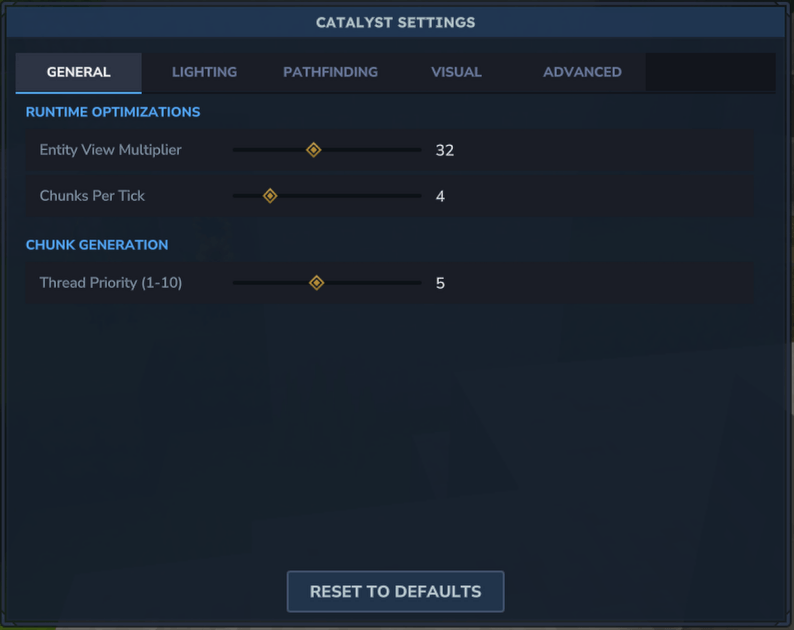
Runtime Optimizations
| Setting | Description | Default |
|---|---|---|
| Entity View Distance | Configurable multiplier for entity sync distance | 32 blocks/chunk |
| Chunk Loading Rate | Control chunks sent per tick to balance loading speed vs TPS | 4 chunks/tick |
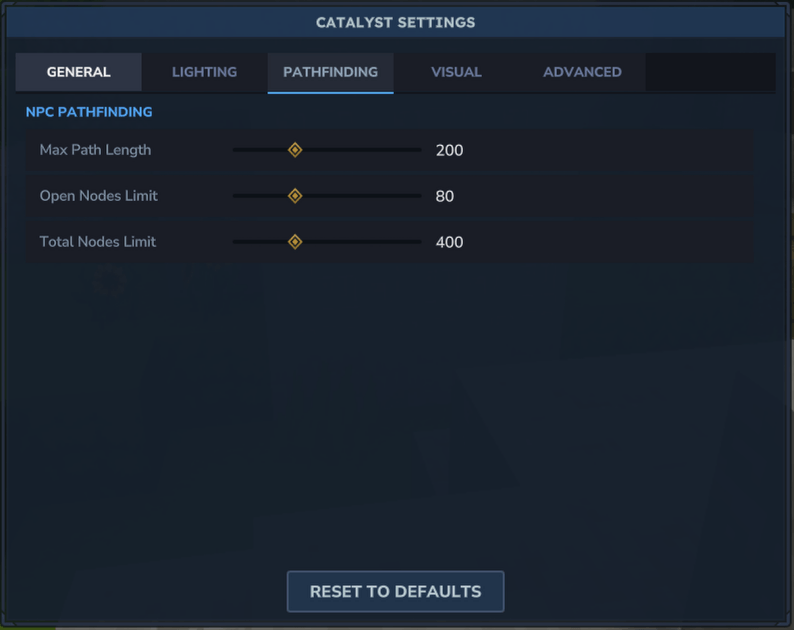
Pathfinding
| Setting | Description | Default |
|---|---|---|
| Max Path Length | Maximum nodes in a path | 200 |
| Open Nodes Limit | A* open set size limit | 80 |
| Total Nodes Limit | Maximum visited nodes per pathfind | 400 |
Chunk Generation
| Setting | Description | Default |
|---|---|---|
| Thread Pool Size | Worker threads for chunk generation | CPU cores |
| Cache Sizes | Generator, cave, and prefab cache sizes | 50k/5k/50 |
| Thread Priority | Worker thread priority | 5 (Normal) |
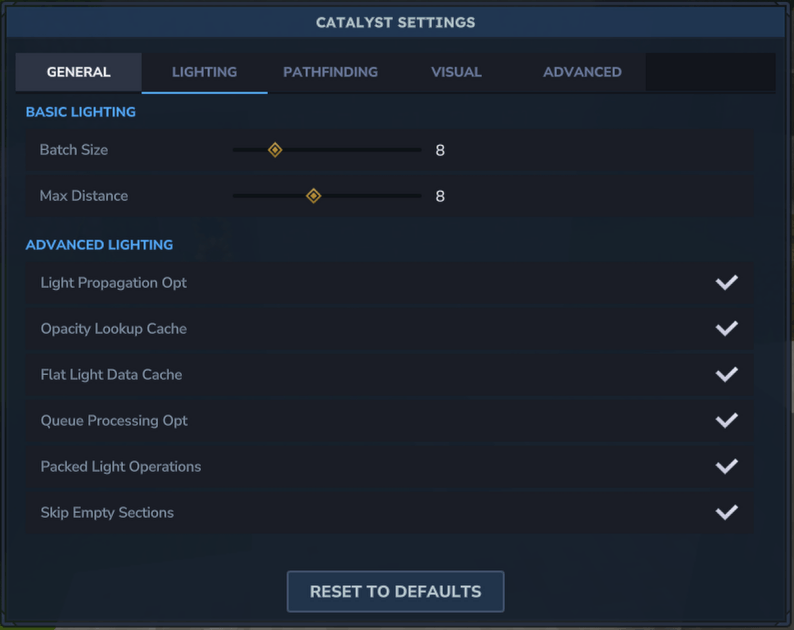
Lighting
| Setting | Description | Default |
|---|---|---|
| Skip Empty Sections | Skip light propagation for solid-air sections with no light data | Off |
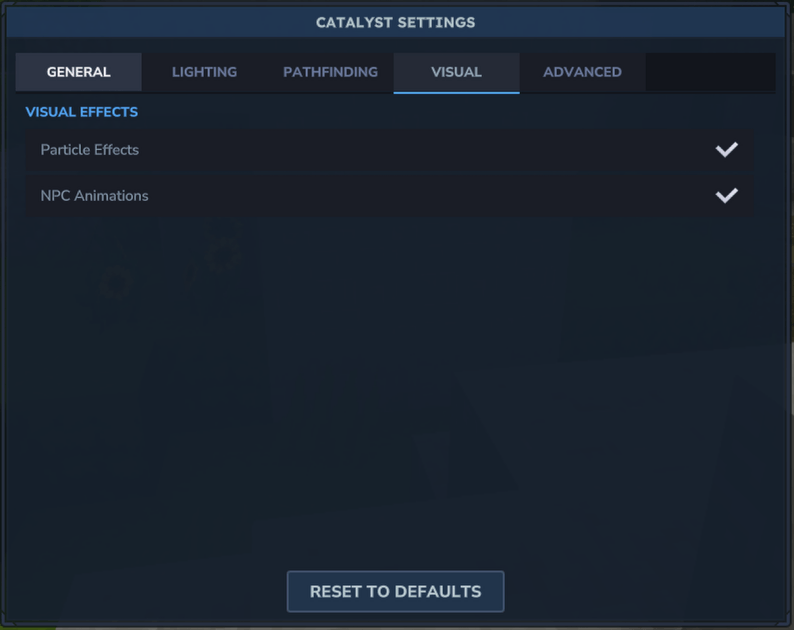
Visual Effects
| Setting | Description | Default |
|---|---|---|
| Particles | Toggle server-side particle effects | On |
| Animations | Toggle server-side NPC animations | On |
Caching
| Setting | Description | Default |
|---|---|---|
| Block Section Cache | Cache last accessed BlockSection for Y-iteration patterns | Off |
| Block Type Cache | Cache BlockType lookups by block ID | Off |
| Local Chunk Cache | 2-slot LRU cache for chunk access during lighting | Off |
Advanced Optimizations
| Setting | Description | Default |
|---|---|---|
| Block Entity Sleep | Skip ticking idle block entities that haven't changed | Off |
| Stat Recalc Throttle | Reduce entity stat recalculation frequency | Off |
| Block Update Batching | Track and batch block update notifications | Off |
| Flood Fill Limit | Prevent lag spikes in complex terrain spawning | Off |
| Pathfinding Pool | Reduce GC pressure with node object pooling | Off |
🖥️ Usage
In-Game Settings
Open the settings menu with:
/catalyst menu
Screenshots
Settings GUI - General Tab
Screenshot coming soon
Settings GUI - Advanced Tab
Screenshot coming soon
Settings GUI - Search Feature
Screenshot coming soon
The GUI features:
- Tabbed interface — General, Lighting, Pathfinding, Visual, and Advanced tabs
- Real-time sliders — Adjust values and see changes instantly
- Search functionality — Quickly find any setting
- One-click reset — Restore all defaults with a single button
Settings are saved automatically to mods/com.criticalrange_Catalyst/catalyst.json.
Commands
| Command | Description |
|---|---|
/catalyst |
Open the settings GUI |
/catalyst status |
Show current optimization status |
/catalyst reload |
Reload configuration from file |
⚙️ Configuration
Catalyst stores its configuration in JSON format:
mods/com.criticalrange_Catalyst/catalyst.json
You can edit this file directly, then use /catalyst reload to apply changes without restarting.
Example configuration
{
  "entityDistanceEnabled": false,
  "entityViewMultiplier": 32,
  "chunkRateEnabled": false,
  "chunksPerTick": 4,
  "pathfindingEnabled": false,
  "maxPathLength": 200,
  "openNodesLimit": 80,
  "totalNodesLimit": 400,
  "chunkPoolSizeEnabled": false,
  "chunkPoolSize": 8,
  "chunkCacheSizeEnabled": false,
  "generatorCacheSize": 50000,
  "caveCacheSize": 5000,
  "prefabCacheSize": 50,
  "chunkThreadPriorityEnabled": false,
  "chunkThreadPriority": 5,
  "lightSkipEmptyEnabled": false,
  "particlesEnabled": true,
  "animationsEnabled": true,
  "blockSectionCacheEnabled": false,
  "blockTypeCacheEnabled": false,
  "blockTypeCacheSize": 256,
  "localChunkCacheEnabled": false,
  "blockEntitySleepEnabled": false,
  "blockEntitySleepInterval": 20,
  "statRecalcThrottleEnabled": false,
  "statRecalcInterval": 5,
  "blockUpdateBatchingEnabled": false,
  "blockUpdateBatchSize": 64,
  "floodFillLimitEnabled": false,
  "floodFillMaxIterations": 5000,
  "pathfindingPoolEnabled": false,
  "pathfindingPoolSize": 512
}
✅ Compatibility
| Requirement | Version |
|---|---|
| Hytale | 2026.01.17+ |
| Java | 25+ |
| Hyxin | Compatible ✓ |
| Other Early Plugins | Compatible ✓ |
Known Limitations
- Catalyst must be placed in
early-plugins/, notmods/ - Some optimizations are disabled by default for stability
- Experimental features should be tested before production use
💬 Community
| Platform | Link |
|---|---|
| Discord | Coming soon |
| Issues | Report a bug |
| Discussions | Feature requests & ideas |
🙇 Getting Help
For technical support (including installation problems and crashes), please:
- Check the FAQ below
- Search existing issues
- Join our Discord server for real-time help
📬 Reporting Issues
Found a bug? Please open an issue with:
- Hytale version
- Catalyst version
- Steps to reproduce
- Error logs (if applicable)
❓ FAQ
Does Catalyst affect gameplay?
No. Catalyst only optimizes performance—it doesn't change any game mechanics, visuals, or behavior. Your gameplay experience remains identical to vanilla Hytale.
Is it safe to use on production servers?
Catalyst is an experimental bootstrap. While we strive for stability, we recommend:
- Testing on a non-production world first
- Keeping regular backups
- Starting with default settings before enabling advanced optimizations
Can I use this with other mods?
Yes! Catalyst is designed to be compatible with:
- Other early plugins
- Hyxin (Mixin framework for Hytale)
- Regular Hytale mods in the
mods/folder
Why does Catalyst go in both early-plugins and mods?
Catalyst uses bytecode transformation, which must happen before classes are loaded. The early-plugins/ folder is loaded by Hytale's bootstrap process, allowing Catalyst to intercept and modify classes as they're loaded into the JVM. The mods/ folder is loaded by the game, allowing Catalyst to be used as a mod. This is a workaround as Hytale doesn't have a way to load commands and UI without using a mod.
How do I know if Catalyst is working?
Run /catalyst status in-game to see the current state of all optimizations. You should also see [Catalyst] messages in your server console during startup.
Can I disable specific optimizations?
Yes! Every optimization can be toggled individually via:
- The in-game GUI (
/catalyst) - The config file (
catalyst.json) - Commands (
/catalyst reloadafter editing config)
🛠️ For Developers
Building from Source
# Clone the repository
git clone https://github.com/CriticalRange/Catalyst.git
cd Catalyst

# Build the JAR
./gradlew build

# Launch server with mod loaded
./gradlew runServer

# Launch client via official launcher
./gradlew runClient
Build artifacts can be found in build/libs/.
Creating Custom Transformers
Extend BaseTransformer and register via META-INF/services:
public class MyTransformer extends BaseTransformer {
    @Override
    protected boolean shouldTransform(String className) {
        return className.equals("com.hypixel.hytale.some.TargetClass");
    }

    @Override
    protected ClassVisitor createClassVisitor(ClassWriter cw, String className) {
        return new MyClassVisitor(cw);
    }

    @Override
    public String getName() {
        return "MyTransformer";
    }
}
All config fields are volatile for thread-safe runtime toggling.
Project Structure
Catalyst/
├── src/main/java/com/criticalrange/
│   ├── Catalyst.java              # Main plugin class
│   ├── CatalystConfig.java        # Configuration fields
│   ├── CatalystConfigFile.java    # JSON persistence
│   ├── transformer/               # Bytecode transformers
│   │   ├── BaseTransformer.java
│   │   ├── EntityDistanceTransformer.java
│   │   ├── ChunkRateTransformer.java
│   │   └── ...
│   └── util/
│       └── CatalystSettingsGui.java
└── src/main/resources/
    ├── META-INF/services/         # Transformer registration
    └── Common/UI/Custom/Pages/    # GUI definitions
Directory Structure (Runtime)
~/.var/app/com.hypixel.HytaleLauncher/data/Hytale/
└── install/
    ├── early-plugins/              # Catalyst JAR goes here
    ├── mods/
    │   └── com.criticalrange_Catalyst/
    │       └── catalyst.json       # Configuration file
    └── release/package/game/latest/
        ├── Server/HytaleServer.jar
        └── Assets.zip
🌟 Contributing and Supporting Development
Contributions are welcome! Here's how you can help:
-
Report bugs — Found an issue? Open a bug report
-
Suggest features — Have an idea? Start a discussion
-
Submit PRs — Code contributions are appreciated!
-
Improve docs — Help make the documentation better
-
Star the repo — Show your support!
Before submitting a PR, please:
-
Fork the repository
-
Create a feature branch (
git checkout -b feature/amazing-feature) -
Commit your changes (
git commit -m 'Add amazing feature') -
Push to the branch (
git push origin feature/amazing-feature) -
Open a Pull Request
🙏 Credits
- CriticalRange — Lead developer
- ASM Team — Bytecode manipulation library
- Hypixel Studios — For creating an amazing game
- All Contributors — Everyone who helps improve Catalyst
📜 License
Catalyst is licensed under the MIT License — do whatever you want with this code, just keep the copyright notice.
See LICENSE for the full license text.
Made with ❤️ for the Hytale community